cancel
Showing results for 
Search instead for 
Did you mean: 

View all the Fabric Data Days sessions on demand. View schedule

Reply
StevenHiatt
Frequent Visitor

Calculate Totals of Items based on Metric Variable

We have items in inventory with expiration dates that we can use to find the remamining percent shelf life. I have a slicer that can adjust a threshold to identify items below a given shelf life %. I have a metric that calculates if an item is below the threshold:


Below Threshold = 
var threshold = SELECTEDVALUE(Threshold[Parameter])
return
IF([Shelf Life] < threshold, "BELOW", "OK")


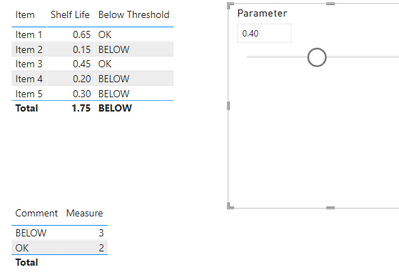
Data looks like this: (Assumming slicer Threshold = 40%)

[Column][Column][Metric]
ItemShelf LifeBelow Threshold?
Item 165%OK
Item 215%BELOW
Item 345%OK
Item 420%BELOW
Item 530%BELOW


(There are a few other categories in the live data, simplified here.) I would like to do some summary metrics based on the Below Threshold Metric (Count, also later sum of item inventory value, etc.). Like this:


CommentTotal Items
OK2
BELOW3


I have a Comment table with the list of possible comments, but am struggling to find the right formula to get the Count calculation correct. Any help would be appreciated. Thank you.

1 ACCEPTED SOLUTION
v-chenwuz-msft
Community Support
Community Support

Hi @StevenHiatt ,


First, create a table named Comment which contains OK and BELOW.

vchenwuzmsft_0-1649661067943.png

Then, create a measure use the following expression:

Measure = 
var _s = SUMMARIZE('Table',[Item],"if below",[Below Threshold])
return
COUNTROWS(FILTER(_s,[if below]=SELECTEDVALUE(Comment[Comment])))

Result:

vchenwuzmsft_1-1649661140881.png

Pbix in the end you can refer.

Best Regards

Community Support Team _ chenwu zhu


If this post helps, then please consider Accept it as the solution to help the other members find it more quickly.

View solution in original post

2 REPLIES 2
v-chenwuz-msft
Community Support
Community Support

Hi @StevenHiatt ,


First, create a table named Comment which contains OK and BELOW.

vchenwuzmsft_0-1649661067943.png

Then, create a measure use the following expression:

Measure = 
var _s = SUMMARIZE('Table',[Item],"if below",[Below Threshold])
return
COUNTROWS(FILTER(_s,[if below]=SELECTEDVALUE(Comment[Comment])))

Result:

vchenwuzmsft_1-1649661140881.png

Pbix in the end you can refer.

Best Regards

Community Support Team _ chenwu zhu


If this post helps, then please consider Accept it as the solution to help the other members find it more quickly.

Thanks @v-chenwuz-msft, that worked exactly as I'd hoped. Looks like I need to learn more about SUMMARIZE and how it works. I appreciate your help. 

Helpful resources

Announcements
November Power BI Update Carousel

Power BI Monthly Update - November 2025

Check out the November 2025 Power BI update to learn about new features.

Fabric Data Days Carousel

Fabric Data Days

Advance your Data & AI career with 50 days of live learning, contests, hands-on challenges, study groups & certifications and more!

FabCon Atlanta 2026 carousel

FabCon Atlanta 2026

Join us at FabCon Atlanta, March 16-20, for the ultimate Fabric, Power BI, AI and SQL community-led event. Save $200 with code FABCOMM.

Top Solution Authors
Top Kudoed Authors