Don't miss your chance to take exam DP-600 or DP-700 on us!
Request nowLearn from the best! Meet the four finalists headed to the FINALS of the Power BI Dataviz World Championships! Register now
I have a table with such columns:
| Clients | Point | Date |
| Client 1 | P1 | 01.01.2019 |
| Client 1 | P1 | 01.01.2019 |
| Client 1 | P2 | 01.01.2019 |
| Client 2 | P1 | 01.01.2019 |
| Client 2 | P1 | 01.01.2019 |
| Client 3 | P3 | 01.01.2019 |
| Client 4 | P1 | 01.01.2019 |
I need to count clients, who visited points P1 && P2, I tried different ways, but nothing.
Solved! Go to Solution.
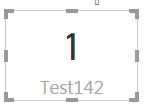
@Anonymous Hope you are looking for something like this...
Test142 = VAR _P1 = SELECTCOLUMNS(FILTER(Test142Measure,Test142Measure[Point]="P1"),"Client",[Clients]) VAR _P2 = SELECTCOLUMNS(FILTER(Test142Measure,Test142Measure[Point]="P2"),"Client",[Clients]) VAR _Both = CALCULATE(DISTINCTCOUNT(Test142Measure[Clients]),INTERSECT(_P1,_P2)) RETURN _Both
Proud to be a PBI Community Champion
@Anonymous Hope you are looking for something like this...
Test142 = VAR _P1 = SELECTCOLUMNS(FILTER(Test142Measure,Test142Measure[Point]="P1"),"Client",[Clients]) VAR _P2 = SELECTCOLUMNS(FILTER(Test142Measure,Test142Measure[Point]="P2"),"Client",[Clients]) VAR _Both = CALCULATE(DISTINCTCOUNT(Test142Measure[Clients]),INTERSECT(_P1,_P2)) RETURN _Both
Proud to be a PBI Community Champion
Share feedback directly with Fabric product managers, participate in targeted research studies and influence the Fabric roadmap.
Check out the February 2026 Power BI update to learn about new features.
| User | Count |
|---|---|
| 50 | |
| 40 | |
| 37 | |
| 14 | |
| 14 |
| User | Count |
|---|---|
| 85 | |
| 69 | |
| 38 | |
| 29 | |
| 27 |