cancel
Showing results for 
Search instead for 
Did you mean: 

The Power BI Data Visualization World Championships is back! Get ahead of the game and start preparing now! Learn more

Reply
Fair-UL
Helper II
Helper II

Calculate Max value from a calculated measure per category

Hi,

I have this problem and tried/searched several solutions, nothing worked


project idsectionitemssum of responsesmax scorePercent rating
6s15154533.33%
6s2675412.94%
6s320180%
7s120180%
7s26105418.52%
7s390810%


Max score= Items*9 (i have it as calculated measure)

sum of responses= sum(response)- the response is a field, each instance has a value, but I put it here to explain how I want data to look like

Percent Rating= Sum of Responses/Max Score


I want to be able to calculate the Maximum of Percent Rating per each category (section). Results should look like


sectionMax of percent per section
s133.33%
s218.52%
s30%


I tried quick measure Max per category, not giving me what I need when I filter by each section. I tried many DAX statements, with calculate, all, allselected, no luck

all help is appreciated


1 ACCEPTED SOLUTION

True. The table aggregates the data as I need but when I filter by Project ID it does not keep the max value that has been calculated to an instance.

To solve this I used the GROUPBY function to crteate a new table and have the Max score and percent rating be calculated columns. then used the expression= calculate(maxx(percent rating),all(project Id)). I put it on the graph and filtered by audit id and it produced what I needed. Thank you @v-lionel-msft @amitchandak

View solution in original post

5 REPLIES 5
amitchandak
Super User
Super User

@Fair-UL , Assuming Percent rating is a measure,

Try a measure like, and plot with a section in a visual

maxx(values(Table[section]),[Percent rating])

Share with Power BI Enthusiasts: Full Power BI Video (20 Hours) YouTube
Microsoft Fabric Series 60+ Videos YouTube
Microsoft Fabric Hindi End to End YouTube

I tried the solution you provided. It gave me the same results as the other two DAX calculations I used

here are those dax

Max of Percent =
MAXX(
KEEPFILTERS(VALUES('Table'[section])),
CALCULATE([Percent Rating])
)
then I calculated this measure=
calculate([Max of Percent],ALL('SAFETYAUDITS Responses'[project_id]))

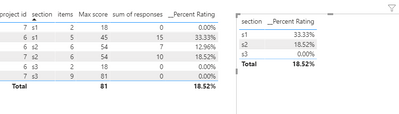
Hi @Fair-UL ,


v-lionel-msft_0-1602495953452.png

The table visual seems to automate this aggregation work.


Best regards,
Lionel Chen

If this post helps, then please consider Accept it as the solution to help the other members find it more quickly.

True. The table aggregates the data as I need but when I filter by Project ID it does not keep the max value that has been calculated to an instance.

To solve this I used the GROUPBY function to crteate a new table and have the Max score and percent rating be calculated columns. then used the expression= calculate(maxx(percent rating),all(project Id)). I put it on the graph and filtered by audit id and it produced what I needed. Thank you @v-lionel-msft @amitchandak

Anonymous
Not applicable

Hello,

I have the same problem but I don't understand the fix using the GROUPBY function. Is it possible to be more explicit ?


Thank you for your help. 

Helpful resources

Announcements
Power BI DataViz World Championships

Power BI Dataviz World Championships

The Power BI Data Visualization World Championships is back! Get ahead of the game and start preparing now!

November Power BI Update Carousel

Power BI Monthly Update - November 2025

Check out the November 2025 Power BI update to learn about new features.

FabCon Atlanta 2026 carousel

FabCon Atlanta 2026

Join us at FabCon Atlanta, March 16-20, for the ultimate Fabric, Power BI, AI and SQL community-led event. Save $200 with code FABCOMM.