cancel
Showing results for 
Search instead for 
Did you mean: 

The Power BI Data Visualization World Championships is back! Get ahead of the game and start preparing now! Learn more

Reply
Anonymous
Not applicable

Calculate CYTD and PYTD depending on the filter slicer in power bi

Hello,

Please help me on the following 
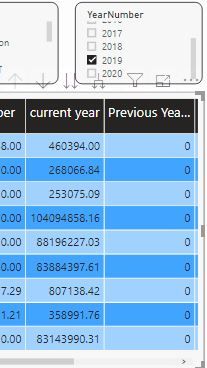
I have many filters like Region, Territory, Product and Year. On checking year, I have to update the checked year YTD and checked Previous year YTD.

cap.JPG


Can you help me with that ?
 

1 ACCEPTED SOLUTION
Anonymous
Not applicable

5 REPLIES 5
amitchandak
Super User
Super User

In case you have date table and the year is coming from that. You can have measure like these

YTD Sales = CALCULATE(SUM(Sales[Sales Amount]),DATESYTD(('Date'[Date]),"12/31"))
This Sales = CALCULATE(SUM(Sales[Sales Amount]),DATESYTD((ENDOFYEAR('Date'[Date])),"12/31"))

Last YTD Sales = CALCULATE(SUM(Sales[Sales Amount]),DATESYTD(dateadd('Date'[Date],-1,Year),"12/31"))
Last YTD complete Sales = CALCULATE(SUM(Sales[Sales Amount]),DATESYTD(ENDOFYEAR(dateadd('Date'[Date],-1,Year)),"12/31"))
Last to last YTD Sales = CALCULATE(SUM(Sales[Sales Amount]),DATESYTD(dateadd('Date'[Date],-2,Year),"12/31"))
Year behind Sales = CALCULATE(SUM(Sales[Sales Amount]),dateadd('Date'[Date],-1,Year))
Year behind Sales = CALCULATE(SUM(Sales[Sales Amount]),dateadd(dateadd('Date'[Date],-1,Year),-21,Day))


To get the best of the time intelligence function. Make sure you have a date calendar and it has been marked as the date in model view. Also, join it with the date column of your fact/s. Refer :
https://radacad.com/creating-calendar-table-in-power-bi-using-dax-functions
https://www.archerpoint.com/blog/Posts/creating-date-table-power-bi
https://www.sqlbi.com/articles/creating-a-simple-date-table-in-dax/

Appreciate your Kudos. In case, this is the solution you are looking for, mark it as the Solution.
In case it does not help, please provide additional information and mark me with @

Thanks. My Recent Blogs -Decoding Direct Query - Time Intelligence, Winner Coloring on MAP, HR Analytics, Power BI Working with Non-Standard TimeAnd Comparing Data Across Date Ranges
Proud to be a Datanaut Connect on Linkedin

Share with Power BI Enthusiasts: Full Power BI Video (20 Hours) YouTube
Microsoft Fabric Series 60+ Videos YouTube
Microsoft Fabric Hindi End to End YouTube
Anonymous
Not applicable

Hey @amitchandak ,

I am not using any date table as I am connecting 3 tables and each table has region, Territory and Product to be filtered.
For Example, each date will have multiple products/Region/Territory. But in the DateTable, we can have only one date.

in my table
6th March 2019 - Central Region
6th March 2019 - North East Region

6th March 2019 - South Region

in date table, I can't have 3 rows with same date right ?

Let me know if I can do anything else.

Hi,


What's your relationships and linked columns among your three tables?

I advise creating a dimension date table to filter these tables with one-to-many relationship.

Please create a date-slicer-table like this:

DateSlicerTable = DISTINCT(SELECTCOLUMNS('Table',"Date",'Table'[Date]))


Best Regards,

Giotto Zhi


Anonymous
Not applicable

My Issue is Solved in another ticket.
https://community.powerbi.com/t5/Desktop/Not-getting-the-YTD-of-previous-year-using-measures/m-p/940...

Thank you all for the support. 

Date table will have only date and date related columns like the year , month, qtr, etc. Why we need a region in that. that should be part of a different dimension.


Refer this file we have date and other common dim between few tables :https://www.dropbox.com/s/y47ah38sr157l7t/Order_delivery_date_diff.pbix?dl=0

Share with Power BI Enthusiasts: Full Power BI Video (20 Hours) YouTube
Microsoft Fabric Series 60+ Videos YouTube
Microsoft Fabric Hindi End to End YouTube
Helpful resources

Announcements
Power BI DataViz World Championships

Power BI Dataviz World Championships

The Power BI Data Visualization World Championships is back! Get ahead of the game and start preparing now!

November Power BI Update Carousel

Power BI Monthly Update - November 2025

Check out the November 2025 Power BI update to learn about new features.

FabCon Atlanta 2026 carousel

FabCon Atlanta 2026

Join us at FabCon Atlanta, March 16-20, for the ultimate Fabric, Power BI, AI and SQL community-led event. Save $200 with code FABCOMM.