Jumpstart your career with the Fabric Career Hub
Find everything you need to get certified on Fabric—skills challenges, live sessions, exam prep, role guidance, and more.
Get started- Power BI forums
- Updates
- News & Announcements
- Get Help with Power BI
- Desktop
- Service
- Report Server
- Power Query
- Mobile Apps
- Developer
- DAX Commands and Tips
- Custom Visuals Development Discussion
- Health and Life Sciences
- Power BI Spanish forums
- Translated Spanish Desktop
- Power Platform Integration - Better Together!
- Power Platform Integrations (Read-only)
- Power Platform and Dynamics 365 Integrations (Read-only)
- Training and Consulting
- Instructor Led Training
- Dashboard in a Day for Women, by Women
- Galleries
- Community Connections & How-To Videos
- COVID-19 Data Stories Gallery
- Themes Gallery
- Data Stories Gallery
- R Script Showcase
- Webinars and Video Gallery
- Quick Measures Gallery
- 2021 MSBizAppsSummit Gallery
- 2020 MSBizAppsSummit Gallery
- 2019 MSBizAppsSummit Gallery
- Events
- Ideas
- Custom Visuals Ideas
- Issues
- Issues
- Events
- Upcoming Events
- Community Blog
- Power BI Community Blog
- Custom Visuals Community Blog
- Community Support
- Community Accounts & Registration
- Using the Community
- Community Feedback
Grow your Fabric skills and prepare for the DP-600 certification exam by completing the latest Microsoft Fabric challenge.
- Power BI forums
- Forums
- Get Help with Power BI
- Desktop
- Re: Calcualte 100% stacked of each column in stack...
- Subscribe to RSS Feed
- Mark Topic as New
- Mark Topic as Read
- Float this Topic for Current User
- Bookmark
- Subscribe
- Printer Friendly Page

- Mark as New
- Bookmark
- Subscribe
- Mute
- Subscribe to RSS Feed
- Permalink
- Report Inappropriate Content
Calcualte 100% stacked of each column in stacked visualization
Hello Power BI community
I Need to build a measure that can calculate 100% based on all categories for each month. I want to apply this measure to my visualized Stacked column Chart. (I know I can use a 100 % Stacked column chart to show the correct percentage) But I only want to show this measure in my tooltips and keep the original visualization.
This is my Dax code so far:
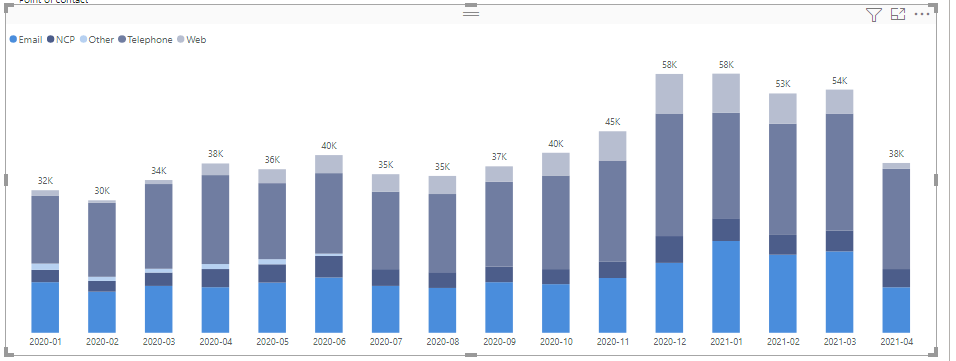 Original visualizaiton
 group based of a column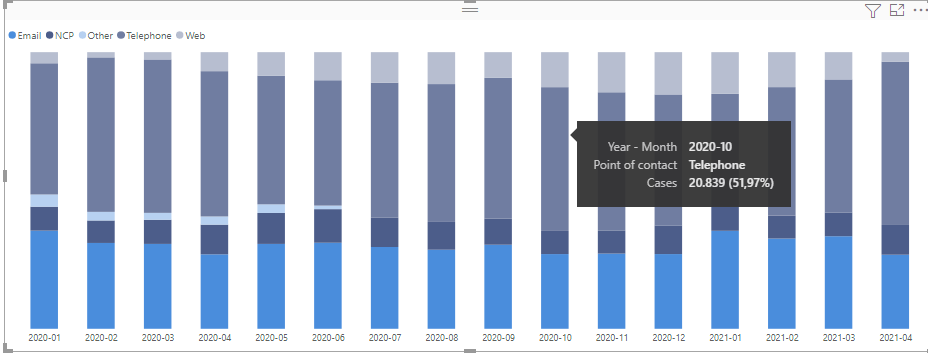
Solved! Go to Solution.


- Mark as New
- Bookmark
- Subscribe
- Mute
- Subscribe to RSS Feed
- Permalink
- Report Inappropriate Content
Hi @Anonymous ,
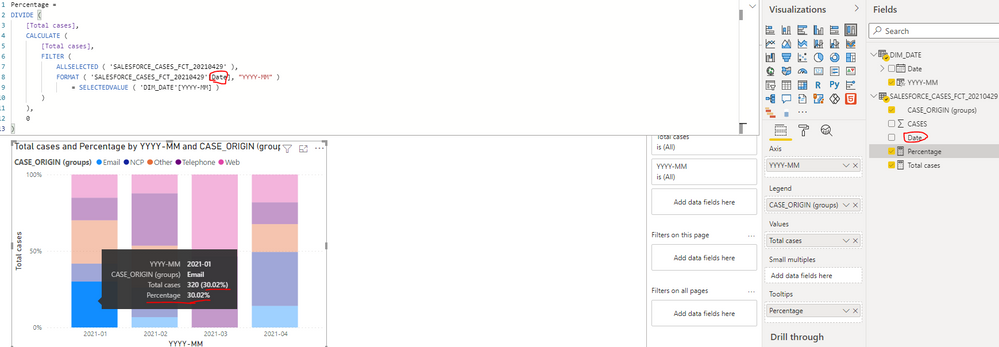
You can update the formula of measure [Percentage] as below:
Note: please update the name of date field with the correct one in the table SALESFORCE_CASES_FCT_20210429 .
| Percentage = DIVIDE ( [Total cases], CALCULATE ( [Total cases], FILTER ( ALLSELECTED ( 'SALESFORCE_CASES_FCT_20210429' ), FORMAT ( 'SALESFORCE_CASES_FCT_20210429'[Date], "YYYY-MM" ) = SELECTEDVALUE ( 'DIM_DATE'[YYYY-MM] ) ) ), 0 ) |
Best Regards
If this post helps, then please consider Accept it as the solution to help the other members find it more quickly.
- Mark as New
- Bookmark
- Subscribe
- Mute
- Subscribe to RSS Feed
- Permalink
- Report Inappropriate Content
Hi @_Rena
thanks you for your help.
I don't know why but Its also works when I tried with All function.
Best regards
Khanh


- Mark as New
- Bookmark
- Subscribe
- Mute
- Subscribe to RSS Feed
- Permalink
- Report Inappropriate Content
@Anonymous , I think it should be the only case Origin in all except
Percentage = DIVIDE([Total cases],CALCULATE([Total cases],ALLEXCEPT(SALESFORCE_CASES_FCT_20210429, SALESFORCE_CASES_FCT_20210429[CASE_ORIGIN (groups)])),0)
Microsoft Power BI Learning Resources, 2023 !!
Learn Power BI - Full Course with Dec-2022, with Window, Index, Offset, 100+ Topics !!
Did I answer your question? Mark my post as a solution! Appreciate your Kudos !! Proud to be a Super User! !!
- Mark as New
- Bookmark
- Subscribe
- Mute
- Subscribe to RSS Feed
- Permalink
- Report Inappropriate Content
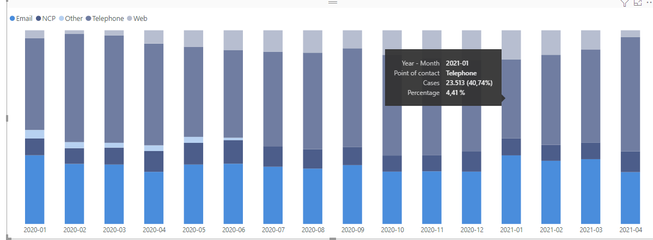
Hello amitchandak thanks for the answer.
However, I still experienced the issue. Example, Its give me percentage of 4,41 % when it should be 40,74 %
- Mark as New
- Bookmark
- Subscribe
- Mute
- Subscribe to RSS Feed
- Permalink
- Report Inappropriate Content
Hi @Anonymous ,
You can update the formula of measure [Percentage] as below:
Note: please update the name of date field with the correct one in the table SALESFORCE_CASES_FCT_20210429 .
| Percentage = DIVIDE ( [Total cases], CALCULATE ( [Total cases], FILTER ( ALLSELECTED ( 'SALESFORCE_CASES_FCT_20210429' ), FORMAT ( 'SALESFORCE_CASES_FCT_20210429'[Date], "YYYY-MM" ) = SELECTEDVALUE ( 'DIM_DATE'[YYYY-MM] ) ) ), 0 ) |
Best Regards
If this post helps, then please consider Accept it as the solution to help the other members find it more quickly.
- Mark as New
- Bookmark
- Subscribe
- Mute
- Subscribe to RSS Feed
- Permalink
- Report Inappropriate Content
Hi @_Rena
thanks you for your help.
I don't know why but Its also works when I tried with All function.
Best regards
Khanh
Helpful resources

New forum boards available in Real-Time Intelligence.
Ask questions in Eventhouse and KQL, Eventstream, and Reflex.

Power BI Monthly Update - May 2024
Check out the May 2024 Power BI update to learn about new features.

| User | Count |
|---|---|
| 77 | |
| 75 | |
| 67 | |
| 65 | |
| 47 |


| User | Count |
|---|---|
| 108 | |
| 105 | |
| 93 | |
| 83 | |
| 65 |


