FabCon is coming to Atlanta
Join us at FabCon Atlanta from March 16 - 20, 2026, for the ultimate Fabric, Power BI, AI and SQL community-led event. Save $200 with code FABCOMM.
Register now!- Power BI forums
- Get Help with Power BI
- Desktop
- Service
- Report Server
- Power Query
- Mobile Apps
- Developer
- DAX Commands and Tips
- Custom Visuals Development Discussion
- Health and Life Sciences
- Power BI Spanish forums
- Translated Spanish Desktop
- Training and Consulting
- Instructor Led Training
- Dashboard in a Day for Women, by Women
- Galleries
- Data Stories Gallery
- Themes Gallery
- Contests Gallery
- QuickViz Gallery
- Quick Measures Gallery
- Visual Calculations Gallery
- Notebook Gallery
- Translytical Task Flow Gallery
- TMDL Gallery
- R Script Showcase
- Webinars and Video Gallery
- Ideas
- Custom Visuals Ideas (read-only)
- Issues
- Issues
- Events
- Upcoming Events
The Power BI Data Visualization World Championships is back! Get ahead of the game and start preparing now! Learn more
- Power BI forums
- Forums
- Get Help with Power BI
- Desktop
- CONDITIONAL DATES
- Subscribe to RSS Feed
- Mark Topic as New
- Mark Topic as Read
- Float this Topic for Current User
- Bookmark
- Subscribe
- Printer Friendly Page

- Mark as New
- Bookmark
- Subscribe
- Mute
- Subscribe to RSS Feed
- Permalink
- Report Inappropriate Content
CONDITIONAL DATES
Hi,
I'm developing a daily report in Power BI, but if the user select a date where there´s no data, Power BI should select data from the last date with information:
CASE 1 - The user selected a date with data: Power BI should list the information for the selected date.
CASE 2 - The user selected a date with no data: Power BI should show information from the last date for each Facility:
Facilities Date Values
---------------------------------
FAC001 2021-08-16 3,000
FAC002 2020-10-01 2,500
FAC003 2019-11-03 4,000
Is there a way to do this?
Thank you,
Benedito Almeida.
Solved! Go to Solution.

- Mark as New
- Bookmark
- Subscribe
- Mute
- Subscribe to RSS Feed
- Permalink
- Report Inappropriate Content
Try:
Sum Values =
VAR MaxDate = MAXX(FILTER(ALL(Table[Date), Table[Date] <= SELECTEDVALUE(IndDate[Date]) && NOT(ISBLANK(SUM(Table[Values])))), Table[Date])

RETURN

CALCULATE(SUM(Table[Values]), FILTER(ALL(Table[Date]), Table[Date] = MaxDate)
Did I answer your question? Mark my post as a solution!
In doing so, you are also helping me. Thank you!
Proud to be a Super User!
Paul on Linkedin.


- Mark as New
- Bookmark
- Subscribe
- Mute
- Subscribe to RSS Feed
- Permalink
- Report Inappropriate Content
Hi, @Anonymous
I simulated some optional dates, hoping to achieve your expected results.
- Create a new column in the Date table.
New date =
IF (
    [Selectable date]
        = CALCULATE (
            MAX ( 'Table'[Date ] ),
            FILTER ( 'Table', [Date ] = EARLIER ( 'Date'[Selectable date] ) )
        ),
    [Selectable date],
    CALCULATE (
        MAX ( 'Table'[Date ] ),
        FILTER ( 'Table', [Date ] < EARLIER ( 'Date'[Selectable date] ) )
    )
)
New value =
CALCULATE (
    MAX ( 'Table'[Values] ),
    FILTER ( 'Table', [Date] = EARLIER ( 'Date'[New date] ) )
)
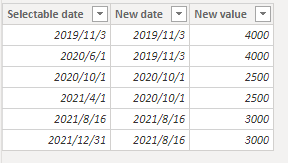
2. The new Date table needs to establish a relationship with the original table.

3. Create a new date slicer in the view, and the final result is shown in the figure.
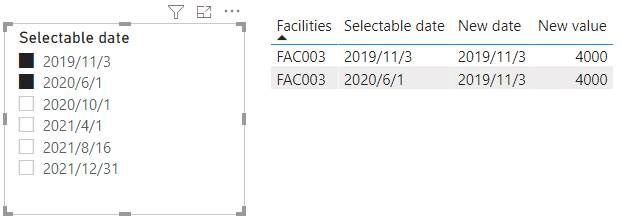
If the method I provided above can't solve your problem, what's your expected result? Could you please provide more details for it?
Best Regards,
Community Support Team _Charlotte
If this post helps, then please consider Accept it as the solution to help the other members find it more quickly.
- Mark as New
- Bookmark
- Subscribe
- Mute
- Subscribe to RSS Feed
- Permalink
- Report Inappropriate Content
Hello, everyone
I would like to thank you all for your help.
I've decided to create a stored procedure to select the data I need for the report.
The SP is working corretly.
My question now is: can I pass the report slicer (it's a date) as a parameter to the stored procedure?
This would solve my problem completely.
Thank you all.
Benedito_1967.
- Mark as New
- Bookmark
- Subscribe
- Mute
- Subscribe to RSS Feed
- Permalink
- Report Inappropriate Content
Hi, @Anonymous
Create a new calendar table.
Date = CALENDAR(MIN('Table'[Date]),MAX('Table'[Date]))
New measure takes the date selected in the slicer.
New Date = MAX('Date'[Date])
Output date =
IF (
    [New Date] = MAX ( 'Table'[Date] ),
    CALCULATE (
        MAX ( 'Table'[Date] ),
        FILTER ( ALL ( 'Table' ), [Date] = MAX ( 'Table'[Date] ) )
    ),
    CALCULATE (
        MAX ( 'Table'[Date] ),
        FILTER ( ALL ( 'Table' ), [Date] < MAX ( 'Date'[Date] ) )
    )
)
New Facilities =
CALCULATE (
    MAX ( 'Table'[Facilities] ),
    FILTER ( ALL ( 'Table' ), [Output date] = MAX ( 'Table'[Date] ) )
)
New value =
CALCULATE (
    MAX ( 'Table'[Values] ),
    FILTER ( ALL('Table'), [Date] =MAX('Table'[Date] ) )
)

Is this the case when the date slicer you mentioned is selected as a parameter? If you have any other questions, please reply.
Best Regards,
Community Support Team _Charlotte
If this post helps, then please consider Accept it as the solution to help the other members find it more quickly.
- Mark as New
- Bookmark
- Subscribe
- Mute
- Subscribe to RSS Feed
- Permalink
- Report Inappropriate Content
Hello,
I would like to thank you all for your help.
You really saved me hours of work.
Benedito_1967.
- Mark as New
- Bookmark
- Subscribe
- Mute
- Subscribe to RSS Feed
- Permalink
- Report Inappropriate Content
You will need an independent date table for the slicer. Let's call this table IndDate
Sum Values =
VAR MaxDate = MAXX(FILTER(ALL(Table), Table [Date] <= SELECTEDVALUE(IndDate[Date]) && NOT(ISBLANK(SUM(Table[Values])))), Table[Date])
RETURN
CALCULATE(SUM(Table[Values]), FILTER(ALL(Table), Table[Date] = MaxDate)
Did I answer your question? Mark my post as a solution!
In doing so, you are also helping me. Thank you!
Proud to be a Super User!
Paul on Linkedin.
- Mark as New
- Bookmark
- Subscribe
- Mute
- Subscribe to RSS Feed
- Permalink
- Report Inappropriate Content
Good morning, Paul
Thank you very much for your input.
I tried to use your sugestion, but the report now returns the same value for all FACILITIES, like this:
Facilities Date Values
---------------------------------
FAC001 2021-08-16 90.24
FAC002 2021-08-16 90.24
FAC003 2021-08-16 90.24
What I really need is that for each FACILITY the report returns its last date and value.
Benedito Almeida.
- Mark as New
- Bookmark
- Subscribe
- Mute
- Subscribe to RSS Feed
- Permalink
- Report Inappropriate Content
Try:
Sum Values =
VAR MaxDate = MAXX(FILTER(ALL(Table[Date), Table[Date] <= SELECTEDVALUE(IndDate[Date]) && NOT(ISBLANK(SUM(Table[Values])))), Table[Date])

RETURN

CALCULATE(SUM(Table[Values]), FILTER(ALL(Table[Date]), Table[Date] = MaxDate)
Did I answer your question? Mark my post as a solution!
In doing so, you are also helping me. Thank you!
Proud to be a Super User!
Paul on Linkedin.

- Mark as New
- Bookmark
- Subscribe
- Mute
- Subscribe to RSS Feed
- Permalink
- Report Inappropriate Content
@Anonymous Maybe something like:
Measure =
  VAR __Date = SELECTEDVALUE('Calendar'[Date])
  VAR __Value = CALCULATE(SUM('Table'[Values]),[Date]=__Date)
  VAR __NewDate = IF(ISBLANK(__Value),MAX('Table'[Date]),__Date)
RETURN
  CALCULATE(SUM('Table'[Values]),[Date]=__NewDate)
Follow on LinkedIn
@ me in replies or I'll lose your thread!!!
Instead of a Kudo, please vote for this idea
Become an expert!: Enterprise DNA
External Tools: MSHGQM
YouTube Channel!: Microsoft Hates Greg
Latest book!: DAX For Humans
DAX is easy, CALCULATE makes DAX hard...
Helpful resources

Power BI Dataviz World Championships
The Power BI Data Visualization World Championships is back! Get ahead of the game and start preparing now!

Power BI Monthly Update - December 2025
Check out the December 2025 Power BI Holiday Recap!

FabCon Atlanta 2026
Join us at FabCon Atlanta, March 16-20, for the ultimate Fabric, Power BI, AI and SQL community-led event. Save $200 with code FABCOMM.

| User | Count |
|---|---|
| 39 | |
| 37 | |
| 33 | |
| 32 | |
| 29 |


| User | Count |
|---|---|
| 133 | |
| 88 | |
| 85 | |
| 68 | |
| 64 |


