cancel
Showing results for 
Search instead for 
Did you mean: 

The Power BI Data Visualization World Championships is back! Get ahead of the game and start preparing now! Learn more

Reply
Anonymous
Not applicable

CALCULATE produces a blank result with a seconde FILTER

This measure works (All the associations from the begining of time since the lower date in my slicer).


Association Total - Début = CALCULATE(
    COUNTROWS(Associations),
    FILTER(
        ALL('Date'),
        'Date'[Date] < MIN('Date'[Date])
    )
)


But then I wanted to add another filter to get only the associations with a certain state I got a Blank result.

Association Total - Début = CALCULATE(
    COUNTROWS(Associations),
    FILTER(
        ALL('Date'),
        'Date'[Date] < MIN('Date'[Date])
    ),
    FILTER(
        Associations,
        Associations[state] = "Publiee"
    )
)

Adding filter is doing so with a Logical AND. Why don't I have a result here ?

1 ACCEPTED SOLUTION
MFelix
Super User
Super User

Hi @Anonymous,


Try one of the following measures:


Association Total - Début _ = CALCULATE(
    COUNTROWS(Associations);
    FILTER(
        ALL('Date');
        'Date'[Date] < MIN('Date'[Date])
    );
    FILTER(ALLSELECTED(Associations[State])
        ;
        Associations[State] = "Publiee"
    )
)


Association Total - Début _ = CALCULATE(
    COUNTROWS(Associations);
    FILTER(
        ALL('Date');
        'Date'[Date] < MIN('Date'[Date])
    );
    FILTER(ALL(Associations[State])
        ;
        Associations[State] = "Publiee"
    )
)

Regards,

MFelix


Regards

Miguel Félix


Did I answer your question? Mark my post as a solution!

Proud to be a Super User!

Check out my blog: Power BI em Português


View solution in original post

5 REPLIES 5
MFelix
Super User
Super User

Hi @Anonymous,


Try one of the following measures:


Association Total - Début _ = CALCULATE(
    COUNTROWS(Associations);
    FILTER(
        ALL('Date');
        'Date'[Date] < MIN('Date'[Date])
    );
    FILTER(ALLSELECTED(Associations[State])
        ;
        Associations[State] = "Publiee"
    )
)


Association Total - Début _ = CALCULATE(
    COUNTROWS(Associations);
    FILTER(
        ALL('Date');
        'Date'[Date] < MIN('Date'[Date])
    );
    FILTER(ALL(Associations[State])
        ;
        Associations[State] = "Publiee"
    )
)

Regards,

MFelix


Regards

Miguel Félix


Did I answer your question? Mark my post as a solution!

Proud to be a Super User!

Check out my blog: Power BI em Português


Anonymous
Not applicable

Can you explain to me why my formula wasn't working and what's up with yours ?
I really want to learn and I'm still struggling to understand some concept here.

Hi @Anonymous,


This as to do with the context of the measures, using a full table as context for a filter table will give you unexpected results since other fields in the visualizations or pages of your report can impact on the final result.


When using the ALL we are removing any context filter that the calculations have so it ignores the context given by any other columns slicers, etc from your report, using the full table the fiilters based on other context is used so you get blank values.


Check this post from SQLBI where they explain filter arguments.


also check this on the use of all in the functions.


Regards,

MFelix


Regards

Miguel Félix


Did I answer your question? Mark my post as a solution!

Proud to be a Super User!

Check out my blog: Power BI em Português


MFelix
Super User
Super User

Hi @Anonymous,


Without any additional information is difficult to help you can you please share a sample of your data model?


Please see this post regarding How to Get Your Question Answered Quickly:

https://community.powerbi.com/t5/Community-Blog/How-to-Get-Your-Question-Answered-Quickly/ba-p/38490 (courtesy of @Greg_Deckler).


Regards,

MFelix


Regards

Miguel Félix


Did I answer your question? Mark my post as a solution!

Proud to be a Super User!

Check out my blog: Power BI em Português


Anonymous
Not applicable

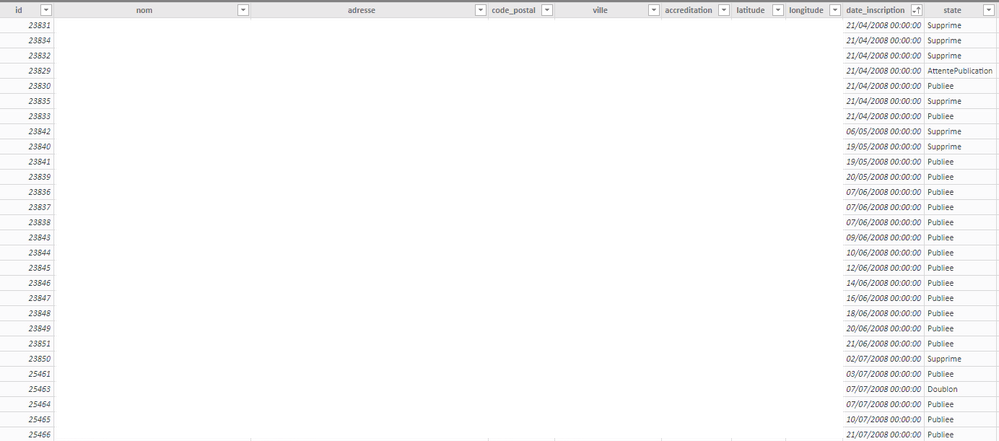
I thought it was enough.

Here a screenshot of the sample
PBI_Sample.png

the status part is simply another column that I have aggragated from the query onto PBI from another table. But it is as it in PBI.

Helpful resources

Announcements
Power BI DataViz World Championships

Power BI Dataviz World Championships

The Power BI Data Visualization World Championships is back! Get ahead of the game and start preparing now!

December 2025 Power BI Update Carousel

Power BI Monthly Update - December 2025

Check out the December 2025 Power BI Holiday Recap!

FabCon Atlanta 2026 carousel

FabCon Atlanta 2026

Join us at FabCon Atlanta, March 16-20, for the ultimate Fabric, Power BI, AI and SQL community-led event. Save $200 with code FABCOMM.