FabCon is coming to Atlanta
Join us at FabCon Atlanta from March 16 - 20, 2026, for the ultimate Fabric, Power BI, AI and SQL community-led event. Save $200 with code FABCOMM.
Register now!- Power BI forums
- Get Help with Power BI
- Desktop
- Service
- Report Server
- Power Query
- Mobile Apps
- Developer
- DAX Commands and Tips
- Custom Visuals Development Discussion
- Health and Life Sciences
- Power BI Spanish forums
- Translated Spanish Desktop
- Training and Consulting
- Instructor Led Training
- Dashboard in a Day for Women, by Women
- Galleries
- Data Stories Gallery
- Themes Gallery
- Contests Gallery
- QuickViz Gallery
- Quick Measures Gallery
- Visual Calculations Gallery
- Notebook Gallery
- Translytical Task Flow Gallery
- TMDL Gallery
- R Script Showcase
- Webinars and Video Gallery
- Ideas
- Custom Visuals Ideas (read-only)
- Issues
- Issues
- Events
- Upcoming Events
The Power BI Data Visualization World Championships is back! Get ahead of the game and start preparing now! Learn more
- Power BI forums
- Forums
- Get Help with Power BI
- Desktop
- Build a BY LINE Report with a Count of Type Card
- Subscribe to RSS Feed
- Mark Topic as New
- Mark Topic as Read
- Float this Topic for Current User
- Bookmark
- Subscribe
- Printer Friendly Page


- Mark as New
- Bookmark
- Subscribe
- Mute
- Subscribe to RSS Feed
- Permalink
- Report Inappropriate Content
Build a BY LINE Report with a Count of Type Card
Good morning, I have built a measure to calculate the counts of issues in total by issue type.
Solved! Go to Solution.


- Mark as New
- Bookmark
- Subscribe
- Mute
- Subscribe to RSS Feed
- Permalink
- Report Inappropriate Content
Hi , @Sonia316
I'm so sorry , i still can not understand the logic for the sample data.
Where is the [Color WidthBottom]? And which field to check the color? And what is the meaning of the "count of each time something is red by line in the last 24 hours"?
"in the last 24 hours", i can not see the Date/Time column to judge the times. And in the result table , i seems the red text return '1' and the yellow text return BLANK(). But it has no field to judge the text color.
Can you explain more detailed for your logic you want to me? I am very confused now.
Thank you for your time and sharing, and thank you for your support and understanding of PowerBI!
Best Regards,
Aniya Zhang
If this post helps, then please consider Accept it as the solution to help the other members find it more quickly
- Mark as New
- Bookmark
- Subscribe
- Mute
- Subscribe to RSS Feed
- Permalink
- Report Inappropriate Content
Not exactly, but I like this one and I may use it as well. That count is a cumulation of each line that is running at the plant. I want to break it down by line.
So let's say line 201, 202, 203, 204 and 205 all have 3 reds in the last 24 hours (rolling-that part I already have figured out), I was hoping to have the main one that says how many total, like I did and then do another that actually breaks it all down.
- Mark as New
- Bookmark
- Subscribe
- Mute
- Subscribe to RSS Feed
- Permalink
- Report Inappropriate Content
Hi, @Sonia316
Hi, i have no your sample data and your table relationship. i am not fully understanding your end result you need. It seems like a dax question . Can you share some sample data as a table and the end result you want as a table according to the sample data to us so that we can help you better!
Thank you for your time and sharing, and thank you for your support and understanding of PowerBI!
Best Regards,
Aniya Zhang
If this post helps, then please consider Accept it as the solution to help the other members find it more quickly
- Mark as New
- Bookmark
- Subscribe
- Mute
- Subscribe to RSS Feed
- Permalink
- Report Inappropriate Content
| Line | Width | WidthTop | WidthBottom | ||
| 201 | 5.550 | 5.570 | 5.570 | ||
| 202 | 5.550 | 5.570 | 5.560 | ||
| 203 | 5.550 | 5.579 | 5.570 |
So I would like to count of each time something is red by line in the last 24 hours.
So I should end up with
| Line | Width | WidthTop | WidthBottom |
| 201 | 1 | 1 | |
| 202 | 1 | ||
| 203 | 1 | 1 |
- Mark as New
- Bookmark
- Subscribe
- Mute
- Subscribe to RSS Feed
- Permalink
- Report Inappropriate Content
Hi , @Sonia316
I'm so sorry , i still can not understand the logic for the sample data.
Where is the [Color WidthBottom]? And which field to check the color? And what is the meaning of the "count of each time something is red by line in the last 24 hours"?
"in the last 24 hours", i can not see the Date/Time column to judge the times. And in the result table , i seems the red text return '1' and the yellow text return BLANK(). But it has no field to judge the text color.
Can you explain more detailed for your logic you want to me? I am very confused now.
Thank you for your time and sharing, and thank you for your support and understanding of PowerBI!
Best Regards,
Aniya Zhang
If this post helps, then please consider Accept it as the solution to help the other members find it more quickly
- Mark as New
- Bookmark
- Subscribe
- Mute
- Subscribe to RSS Feed
- Permalink
- Report Inappropriate Content
I already have the charts done by 24 hours. I originally attached my PBIX file on the original thread. I just need to know how to do BY LINE. I already have the counts as a whole, I just need to do the breakdown.
- Mark as New
- Bookmark
- Subscribe
- Mute
- Subscribe to RSS Feed
- Permalink
- Report Inappropriate Content
Hi, @Sonia316
According to your dax expression, you calculate the count of the [Color WidthBottom]="Red"> right?
Do you mean you want to show the different [Color WidthBottom] count in your line chart?
If this , you can put the [Color WidthBottom] in the "Legend".
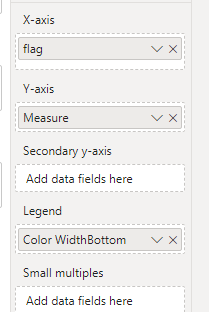
And you can just use this measure :
Measure = COUNTROWS('Table')Then we can get the different count group by [Color WidthBottom].
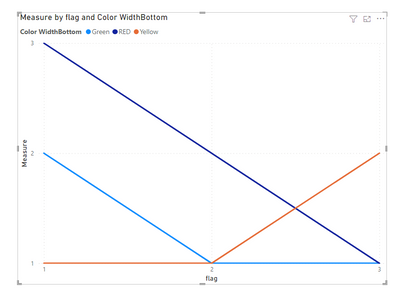
If this method does not meet your needs, you can provide us with your special sample data and the desired output sample data in the form of tables, so that we can better help you solve the problem.
Thank you for your time and sharing, and thank you for your support and understanding of PowerBI!
Best Regards,
Aniya Zhang
If this post helps, then please consider Accept it as the solution to help the other members find it more quickly

Helpful resources

Power BI Monthly Update - November 2025
Check out the November 2025 Power BI update to learn about new features.

Fabric Data Days
Advance your Data & AI career with 50 days of live learning, contests, hands-on challenges, study groups & certifications and more!

FabCon Atlanta 2026
Join us at FabCon Atlanta, March 16-20, for the ultimate Fabric, Power BI, AI and SQL community-led event. Save $200 with code FABCOMM.


