Join us at FabCon Atlanta from March 16 - 20, 2026, for the ultimate Fabric, Power BI, AI and SQL community-led event. Save $200 with code FABCOMM.
Register now!The Power BI Data Visualization World Championships is back! It's time to submit your entry. Live now!
Hello Everyone,
I am working on creating a table and was wondering if someone could help me with a problem I am facing.
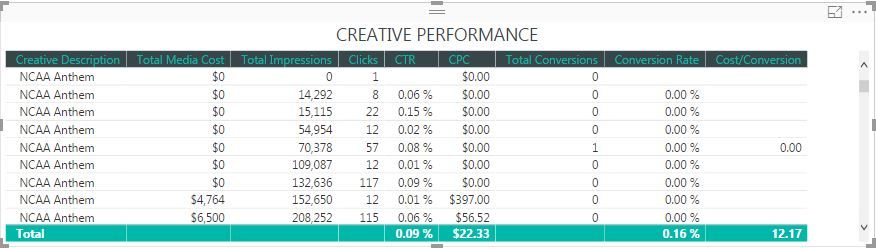
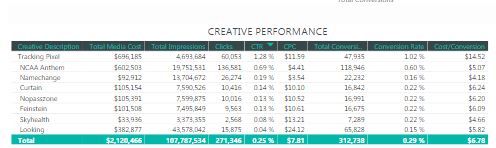
There are multiple names for ads that are being run i.e., NCAA Anthem, Cardio, Genomics etc. There are also multiple appearances of these (meaning there are roughly 100 NCAA Anthems, 50 Cardio, 25 Genomics) and I want the table to reflect all the instances under ONE topic (all the 100 NCAA Anthems should appear in one).
Can anyone help?
How it looks now is below...
How I want it too look >
Solved! Go to Solution.
If all of the subsequent columns in that table are aggregates (e.g. "Sum of Total Media Cost"), then the table will automatically group on your Creative Description column.
Take a look at the list of fields in your "Values" section, and ensure that nothing says "Don't Summarize".
If all of the subsequent columns in that table are aggregates (e.g. "Sum of Total Media Cost"), then the table will automatically group on your Creative Description column.
Take a look at the list of fields in your "Values" section, and ensure that nothing says "Don't Summarize".
Thank you so much! Worked just fine.
The Power BI Data Visualization World Championships is back! It's time to submit your entry.
Check out the January 2026 Power BI update to learn about new features.
| User | Count |
|---|---|
| 66 | |
| 45 | |
| 38 | |
| 26 | |
| 23 |
| User | Count |
|---|---|
| 133 | |
| 120 | |
| 58 | |
| 37 | |
| 31 |