Join us at FabCon Atlanta from March 16 - 20, 2026, for the ultimate Fabric, Power BI, AI and SQL community-led event. Save $200 with code FABCOMM.
Register now!The Power BI Data Visualization World Championships is back! Get ahead of the game and start preparing now! Learn more
Trying to get a look at how many purchases our customers make. I have a data table that includes customer ID, and Transaction ID. How do I calculate something like the following using DAX.
Quartile 1 = 1 order
Quartile 2 = 1.5 orders
Quartile 3 = 2 orders
Quartile 4 = 4+ orders
I created a calculated column "Lifetime Orders" and tried this approach: http://community.powerbi.com/t5/Desktop/How-do-you-slice-data-into-quartiles-and-quintiles/m-p/15726...
but it is only returning values for quartile 1 and quartile 4, so something isn't right.
Quartile (Orders) # =
var FirstQ = CALCULATE(PERCENTILE.INC('Order Information'[Lifetime Orders], .25), ALL('Order Information'[Lifetime Orders]))
var SecondQ = CALCULATE(PERCENTILE.INC('Order Information'[Lifetime Orders], .50), ALL('Order Information'[Lifetime Orders]))
var ThirdQ = CALCULATE(PERCENTILE.INC('Order Information'[Lifetime Orders], .75), ALL('Order Information'[Lifetime Orders]))
var ThisVal = MIN('Order Information'[Lifetime Orders])
return
IF(ThisVal <= FirstQ, 1,
IF(ThisVal > FirstQ && ThisVal <= SecondQ, 2,
IF(ThisVal > SecondQ && ThisVal <= ThirdQ, 3, 4)
)
)
Solved! Go to Solution.
Hi @AAbell,
Please new a measure with below formula:
Quartile (Orders) # measure =
VAR FirstQ =
PERCENTILEX.INC (
ALL ( 'Order Information'[Lifetime Orders] ),
'Order Information'[Lifetime Orders],
.25
)
VAR SecondQ =
PERCENTILEX.INC (
ALL ( 'Order Information'[Lifetime Orders] ),
'Order Information'[Lifetime Orders],
.50
)
VAR ThirdQ =
PERCENTILEX.INC (
ALL ( 'Order Information'[Lifetime Orders] ),
'Order Information'[Lifetime Orders],
.75
)
VAR ThisVal =
SELECTEDVALUE ( 'Order Information'[Lifetime Orders] )
RETURN
IF (
ThisVal <= FirstQ,
1,
IF (
ThisVal > FirstQ
&& ThisVal <= SecondQ,
2,
IF ( ThisVal > SecondQ && ThisVal <= ThirdQ, 3, 4 )
)
)
Best regards,
Yuliana Gu
Hi @AAbell,
The DAX formula looks correct. Please share your sample data and show us your desired result so that I can check for you.
Regards,
Yuliana Gu
Here is a sample data set.
| Customer ID | Lifetime Orders |
| 123456 | 1 |
| 123458 | 1 |
| 123460 | 1 |
| 123462 | 2 |
| 123464 | 1 |
| 123466 | 3 |
| 123468 | 1 |
| 123470 | 1 |
| 123472 | 1 |
| 123474 | 1 |
| 123476 | 2 |
| 123478 | 1 |
| 123480 | 3 |
| 123482 | 1 |
| 123484 | 1 |
| 123486 | 1 |
| 123488 | 1 |
| 123490 | 10 |
| 123492 | 1 |
| 123494 | 1 |
| 123496 | 2 |
| 123498 | 1 |
| 123500 | 1 |
| 123502 | 1 |
| 123504 | 1 |
| 123506 | 1 |
I'm expecting something like this, but it's returning only 1's and 4's
| Customer ID | Lifetime Orders | Quartile |
| 123456 | 1 | 1 |
| 123458 | 1 | 1 |
| 123460 | 1 | 1 |
| 123462 | 2 | 2 |
| 123464 | 1 | 1 |
| 123466 | 3 | 3 |
| 123468 | 1 | 1 |
| 123470 | 1 | 1 |
| 123472 | 1 | 1 |
| 123474 | 1 | 1 |
| 123476 | 2 | 2 |
| 123478 | 1 | 1 |
| 123480 | 3 | 3 |
| 123482 | 1 | 1 |
| 123484 | 1 | 1 |
| 123486 | 1 | 1 |
| 123488 | 1 | 1 |
| 123490 | 10 | 4 |
| 123492 | 1 | 1 |
| 123494 | 1 | 1 |
| 123496 | 2 | 2 |
| 123498 | 1 | 1 |
| 123500 | 1 | 1 |
| 123502 | 1 | 1 |
| 123504 | 1 | 1 |
| 123506 | 1 | 1 |
I'm wondering if it is because I have such a huge dataset and around 80% of the values are 1, making the mean 1 and forcing things into either quartile 1 or 4.
If so, is there a way to chunk or bucket these in power BI? Is 1 = bucket 1, is between 1 and 2 = bucket 2, is between 2 and 3 = bucket 3, is 4 or more = bucket 4?
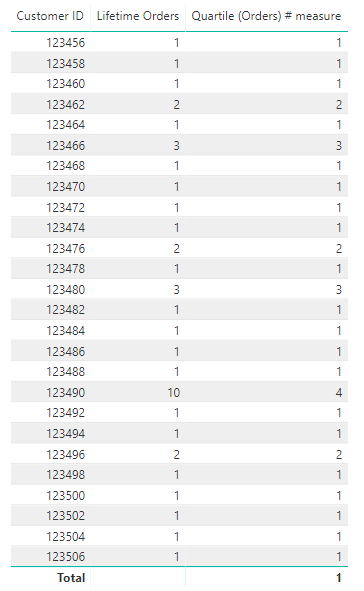
Hi @AAbell,
Please new a measure with below formula:
Quartile (Orders) # measure =
VAR FirstQ =
PERCENTILEX.INC (
ALL ( 'Order Information'[Lifetime Orders] ),
'Order Information'[Lifetime Orders],
.25
)
VAR SecondQ =
PERCENTILEX.INC (
ALL ( 'Order Information'[Lifetime Orders] ),
'Order Information'[Lifetime Orders],
.50
)
VAR ThirdQ =
PERCENTILEX.INC (
ALL ( 'Order Information'[Lifetime Orders] ),
'Order Information'[Lifetime Orders],
.75
)
VAR ThisVal =
SELECTEDVALUE ( 'Order Information'[Lifetime Orders] )
RETURN
IF (
ThisVal <= FirstQ,
1,
IF (
ThisVal > FirstQ
&& ThisVal <= SecondQ,
2,
IF ( ThisVal > SecondQ && ThisVal <= ThirdQ, 3, 4 )
)
)
Best regards,
Yuliana Gu
Thanks Yuliana! This worked - but I found out the problem was that I had so many orders of only 1, that the median was 1 and therefore the 1st, 2nd and 3rd quartiles were all 1 as well.
I appreciate your assistance!
The Power BI Data Visualization World Championships is back! Get ahead of the game and start preparing now!
Check out the November 2025 Power BI update to learn about new features.
| User | Count |
|---|---|
| 59 | |
| 43 | |
| 42 | |
| 23 | |
| 17 |
| User | Count |
|---|---|
| 190 | |
| 122 | |
| 96 | |
| 66 | |
| 47 |