cancel
Showing results for 
Search instead for 
Did you mean: 

The Power BI Data Visualization World Championships is back! Get ahead of the game and start preparing now! Learn more

Reply
Tibo_Belgium
New Member

Both direction filter messes up further 'logic relationship' with RLS

hi,


we hope you could help us. We search the forum & tried everything we thought of.


Problem

We expect the following result (see photo1), but once we activate the 'both direction' filter on a related table. It gives us another result.


Expected result:

the claim filters the amounts

This is the case, when we delete the 'both relationship' between contact & claim -> However we need the relationship 😉

2020-03-06_170247.png


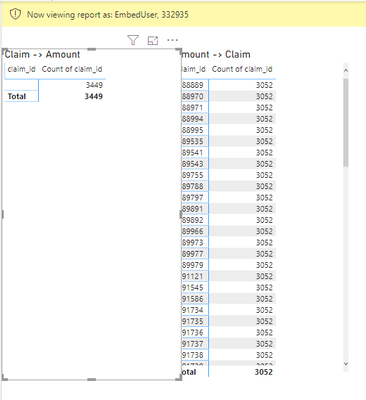
However once we activate the both direction filter, as can be seen below. The result changes completely towards.

The claimId (of claim table), shows nothing...

2020-03-06_171145.png


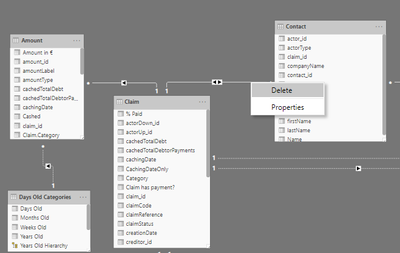
The structure is as follows

user (many) -> (many) Contacts (many) <-> Claim (one) 

Claim (one) -> Amount( many)  

2020-03-06_165826.png2020-03-06_170404.png2020-03-06_1702253.png


Thanks for your help.


1 ACCEPTED SOLUTION
edhans
Super User
Super User

First of all ensure 100% that the field types are the same in Power Query. Second, I'd advise you read this article on many to many relationships. They can often cause unexpected results, and often a bridge table is the better alternative.


Your bi-directional relationships can also cause unexpected issues. I try to avoid those at all costs in the model, but then activation bidirectional filtering on a measure basis with the CROSSFILTER() modifier to CALCULATE(). For example, see the following pseudo-code:

Measure =
CALCULATE(
     SUM(SomeTable[ColumnX]),
     CROSSFILTER(SomeTable[ColumnY],DifferentTable[Column4],BOTH)
     )

That leaves the model alone, but for that measure only, it does a bi-directional crossfilter on the relationship between SomeTable[ColumnY] and DifferentTable[Column4]. The relationship has to exist in the model - and can be inactive, though if it is inactive, you also have to use the USERELATIONSHIP() modifier to turn it on or CROSSFILTER still won't work. CROSSFILTER doesn't create relationships, it modifies them.


Did I answer your question? Mark my post as a solution!
Did my answers help arrive at a solution? Give it a kudos by clicking the Thumbs Up!

DAX is for Analysis. Power Query is for Data Modeling


Proud to be a Super User!

MCSA: BI Reporting

View solution in original post

2 REPLIES 2
amitchandak
Super User
Super User

@Tibo_Belgium 

does the above reply helps. if you need more help make me @


Appreciate your Kudos.

Share with Power BI Enthusiasts: Full Power BI Video (20 Hours) YouTube
Microsoft Fabric Series 60+ Videos YouTube
Microsoft Fabric Hindi End to End YouTube
edhans
Super User
Super User

First of all ensure 100% that the field types are the same in Power Query. Second, I'd advise you read this article on many to many relationships. They can often cause unexpected results, and often a bridge table is the better alternative.


Your bi-directional relationships can also cause unexpected issues. I try to avoid those at all costs in the model, but then activation bidirectional filtering on a measure basis with the CROSSFILTER() modifier to CALCULATE(). For example, see the following pseudo-code:

Measure =
CALCULATE(
     SUM(SomeTable[ColumnX]),
     CROSSFILTER(SomeTable[ColumnY],DifferentTable[Column4],BOTH)
     )

That leaves the model alone, but for that measure only, it does a bi-directional crossfilter on the relationship between SomeTable[ColumnY] and DifferentTable[Column4]. The relationship has to exist in the model - and can be inactive, though if it is inactive, you also have to use the USERELATIONSHIP() modifier to turn it on or CROSSFILTER still won't work. CROSSFILTER doesn't create relationships, it modifies them.


Did I answer your question? Mark my post as a solution!
Did my answers help arrive at a solution? Give it a kudos by clicking the Thumbs Up!

DAX is for Analysis. Power Query is for Data Modeling


Proud to be a Super User!

MCSA: BI Reporting

Helpful resources

Announcements
Power BI DataViz World Championships

Power BI Dataviz World Championships

The Power BI Data Visualization World Championships is back! Get ahead of the game and start preparing now!

December 2025 Power BI Update Carousel

Power BI Monthly Update - December 2025

Check out the December 2025 Power BI Holiday Recap!

FabCon Atlanta 2026 carousel

FabCon Atlanta 2026

Join us at FabCon Atlanta, March 16-20, for the ultimate Fabric, Power BI, AI and SQL community-led event. Save $200 with code FABCOMM.