Don't miss your chance to take the Fabric Data Engineer (DP-600) exam for FREE! Find out how by attending the DP-600 session on April 23rd (pacific time), live or on-demand.
Learn moreNext up in the FabCon + SQLCon recap series: The roadmap for Microsoft SQL and Maximizing Developer experiences in Fabric. All sessions are available on-demand after the live show. Register now
Hi Everyone
I'm struggling trying to get my bookmarks to work appropriately and maybe it's not possible. I'm hoping there is a solution I can use.
I have a Report with 3 pages.
Page 1 is the main page broken down by Regions with a slicer for Year. The Grey buttons at the top each have a bookmark. There is also a year slicer on the left. The user chooses the year in the slicer and then clicks a region button such as De or EMEA Dist, it takes you to page 2.
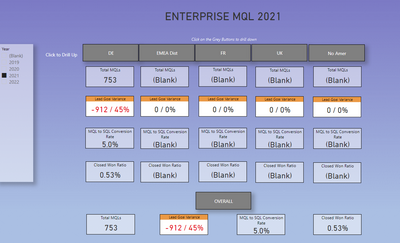
Page 2 should sync the slicer and the bookmark attached to the grey region button calls the appropriate bookmark that filters the 2nd page to Region and the slicer synced with the chosen year.
The bookmarks for page 2 uses filters, not slicers. I'm trying to get both the slicer AND the filters to update properly.
I have both these fields check on the slicer on page 1 and page 2
Eventually I want the slicers to be invisible but for now so I can see them
Page 1 Sync Slicers:

Page 2 Sync Slicers:

I have tried both checking data and unchecking data
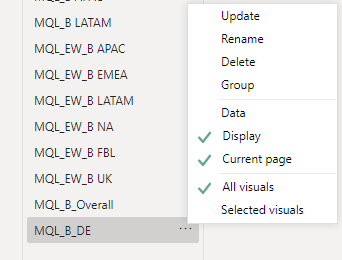
When Data is checked, the slicer doesn't work but the filters do. With data unchecked, the filters don't change in the bookmarks but the slicer does.
So I'm wondering if this is even possible.
Does anyone see anything I'm missing?
Thank you in Advance
Hi,
I am sending a video, this is an option in bookmarks "Selected visuals"
Hi @Cathryn,
Did these suggestions help with your scenario? if that is the case, you can consider Kudo or accept the helpful suggestions to help others who faced similar requirements to find it more quickly.
If these also not help, please share more detailed information to help us clarify your scenario to test.
How to Get Your Question Answered Quickly
Regards,
Xiaoxin Sheng
HI @Cathryn,
As the document mentions, the bookmark will save current filter effects. So it will restore the saved filters instead of keeping the original filter effect when you click on the bookmark.
You can take a look at the official document to know more about these:
Use bookmarks in Power BI Desktop to share insights and build stories - Power BI | Microsoft Docs
Regards,
Xiaoxin Sheng
On YT there are vids by Patrick and Adam (Guy in a Cube) that, among others, discuss such things. You are very likely to find an answer to this puzzle there. Guy in a Cube - YouTube
Just look for the vids that treat about bookmarks.
If you have recently started exploring Fabric, we'd love to hear how it's going. Your feedback can help with product improvements.
A new Power BI DataViz World Championship is coming this June! Don't miss out on submitting your entry.
| User | Count |
|---|---|
| 44 | |
| 43 | |
| 38 | |
| 19 | |
| 15 |
| User | Count |
|---|---|
| 68 | |
| 64 | |
| 31 | |
| 29 | |
| 24 |