Join us at FabCon Atlanta from March 16 - 20, 2026, for the ultimate Fabric, Power BI, AI and SQL community-led event. Save $200 with code FABCOMM.
Register now!The Power BI Data Visualization World Championships is back! Get ahead of the game and start preparing now! Learn more
Is there a way to make sure that the filters I have in a bookmark interacts with another filter on the page ?
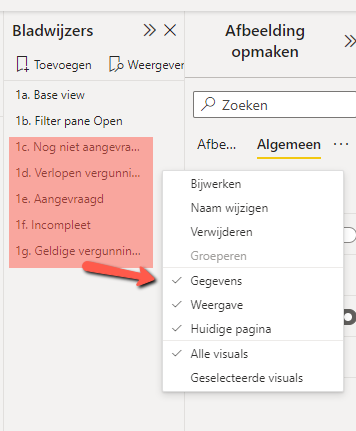
I Have different bookmarks based on Permits and the status of those Permits for example, Permits that are overdue, permits that are valid, permits that aren't valid anymore etc etc.
I have buttons in place with a bookmark based on a filter set to the Permit status
However I can use filters (that are not part of the bookmark) in order to specifically filter on a project but when I use them it cleares the filter in my bookmark.
So when I set the status on Valid Permit (bookmark) and then use my filter to Project A, the visual just shows Project A but ignores the filter set in my bookmark and vice versa
How can I change that ? I've already tried boxing and unboxing the Data value in the bookmark pane
@RonaldvdH , Do not get it completely. But you can opt-out of data option.
https://towardsdatascience.com/bookmarks-in-power-bi-what-this-data-mean-866857fe719b
@amitchandak ive tried that very option but when I uncheck the Data box on a Bookmark the button doesn't seem to do anything anymore.
Lets get something clear because if my question isn't clear then I can't expect you to give me the right answer obviously 🙂 🙂
My bookmark buttons works perfectly when I only use them because each bookmark has a filter based on a status.
That part works fine
Then .... i have a few other filters (not in the bookmark) so that I can filter on a specific project or subproject but that filter overrules the Bookmark filter and vice versa.
If it's not clear please ask questions which I can answer and again thank you for your time and input
@amitchandak maybe this is one of those problems you can't figure out. I'm not sure if there is a solution to this
The Power BI Data Visualization World Championships is back! Get ahead of the game and start preparing now!
| User | Count |
|---|---|
| 38 | |
| 36 | |
| 33 | |
| 32 | |
| 28 |
| User | Count |
|---|---|
| 129 | |
| 88 | |
| 79 | |
| 68 | |
| 63 |