cancel
Showing results for 
Search instead for 
Did you mean: 

The Power BI Data Visualization World Championships is back! Get ahead of the game and start preparing now! Learn more

Reply
awangCF
Regular Visitor

Bing Map not plotting correctly

I'm plotting an address in Texas, however Bing maps it to New York. Any idea why this is so? It maps correctly on ESRI, but I need to use Bing in this visual.


The address is "127 E I-20 Hwy, Arlington, TX, United States, 76018"

1 ACCEPTED SOLUTION
TomMartens
Super User
Super User

Hey,


this is weird, if i use the address you provided

with the data category set to "address"

it doesn't show on bing, but on esri

with the data category set to "place"

it shows correct on both


If you change the order of the address components into a "hierarchical order" like so:

United States, TX, Arlington, 76018, 127 E I-20 Hwy
with the data category "Address"
It also shows correct on Bing (left Bing, right esri)
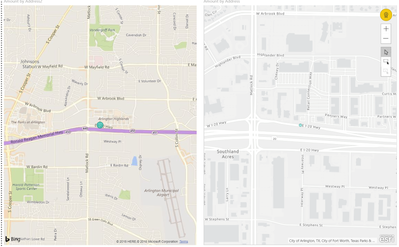
image.png


Personally, I always try to provide the full hierarch of an address in this way:

Country, State, City, Zip, Street


Here is a link to a post that explains how certain issues with the correct mapping can be overcome:

http://biinsight.com/how-to-overcome-map-related-issues-in-power-bi-power-view-and-power-map/


Maybe this Whitepaper that is available also provides some additional information, at least it's a great read:

https://www.blue-granite.com/maps-power-bi-whitepaper


Hopefully this will help to answer your question!


Regards,

Tom


Did I answer your question? Mark my post as a solution, this will help others!

Proud to be a Super User!
I accept Kudos 😉
Hamburg, Germany

View solution in original post

1 REPLY 1
TomMartens
Super User
Super User

Hey,


this is weird, if i use the address you provided

with the data category set to "address"

it doesn't show on bing, but on esri

with the data category set to "place"

it shows correct on both


If you change the order of the address components into a "hierarchical order" like so:

United States, TX, Arlington, 76018, 127 E I-20 Hwy
with the data category "Address"
It also shows correct on Bing (left Bing, right esri)

image.png


Personally, I always try to provide the full hierarch of an address in this way:

Country, State, City, Zip, Street


Here is a link to a post that explains how certain issues with the correct mapping can be overcome:

http://biinsight.com/how-to-overcome-map-related-issues-in-power-bi-power-view-and-power-map/


Maybe this Whitepaper that is available also provides some additional information, at least it's a great read:

https://www.blue-granite.com/maps-power-bi-whitepaper


Hopefully this will help to answer your question!


Regards,

Tom


Did I answer your question? Mark my post as a solution, this will help others!

Proud to be a Super User!
I accept Kudos 😉
Hamburg, Germany

Helpful resources

Announcements
Power BI DataViz World Championships

Power BI Dataviz World Championships

The Power BI Data Visualization World Championships is back! Get ahead of the game and start preparing now!

December 2025 Power BI Update Carousel

Power BI Monthly Update - December 2025

Check out the December 2025 Power BI Holiday Recap!

FabCon Atlanta 2026 carousel

FabCon Atlanta 2026

Join us at FabCon Atlanta, March 16-20, for the ultimate Fabric, Power BI, AI and SQL community-led event. Save $200 with code FABCOMM.