cancel
Showing results for 
Search instead for 
Did you mean: 

The Power BI Data Visualization World Championships is back! Get ahead of the game and start preparing now! Learn more

Reply
Anonymous
Not applicable

Best way to make this visual in Power BI?

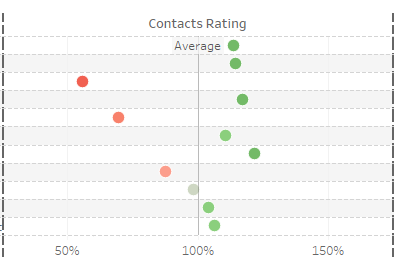
I am trying to port over some reports we have in Tableau over to Power BI. One of these reports involves a scatterplot graph with names on the Y axis and scores on the X-axis. Image is below.


I can't seem to put names on the Y axis in Power BI with a scatterplot graph, what would be the best way of making this visual in Power BI?


Thanks,


6 REPLIES 6
Greg_Deckler
Community Champion
Community Champion

You could create a number for each person for the Y-axis and put their name in the legend perhaps, what does the color represent?


Sample data would be great to play around with different visuals. Might look at R or Py visuals or perhaps SVG, maybe something creative with a line chart visual perhaps.


Follow on LinkedIn
@ me in replies or I'll lose your thread!!!
Instead of a Kudo, please vote for this idea
Become an expert!: Enterprise DNA
External Tools: MSHGQM
YouTube Channel!: Microsoft Hates Greg
Latest book!:
DAX For Humans

DAX is easy, CALCULATE makes DAX hard...
Anonymous
Not applicable

The color represents the scores of each student. I don't think we can number the Y-axis since each it's important that we know the names of each student, as well as a color to understand how their score sits before the average of the rest of the other students. 

So the test score is used for both color and the x-axis?


Follow on LinkedIn
@ me in replies or I'll lose your thread!!!
Instead of a Kudo, please vote for this idea
Become an expert!: Enterprise DNA
External Tools: MSHGQM
YouTube Channel!: Microsoft Hates Greg
Latest book!:
DAX For Humans

DAX is easy, CALCULATE makes DAX hard...
Anonymous
Not applicable

Yes

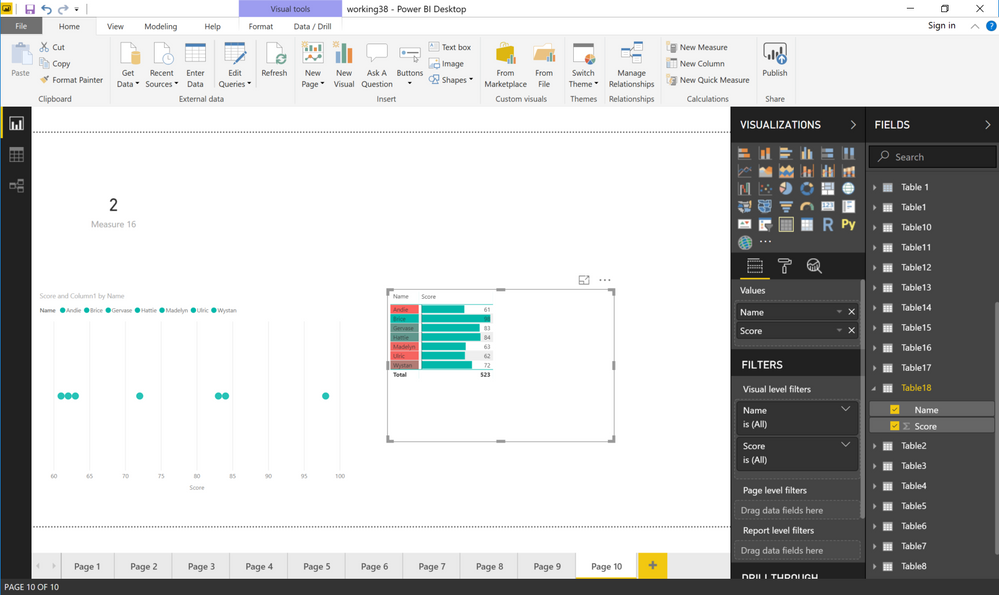
I'm not getting the use of a scatterplot in this case, seems like you could do it with a simple table:


image.png


Follow on LinkedIn
@ me in replies or I'll lose your thread!!!
Instead of a Kudo, please vote for this idea
Become an expert!: Enterprise DNA
External Tools: MSHGQM
YouTube Channel!: Microsoft Hates Greg
Latest book!:
DAX For Humans

DAX is easy, CALCULATE makes DAX hard...
Anonymous
Not applicable

The thing is that the scores are translated out to an "index score" where 1.0 = Average and anything above 1.0 represents above average and anything below 1.0 is below average like below.


Untitled.png

I am not really in the job of reinterpreting the best way to represent data back to my customers. Currently we are switching due to cost and licensing, it would be best if the transition involved the least amount of change possible between the two reporting systems. 

Helpful resources

Announcements
Power BI DataViz World Championships

Power BI Dataviz World Championships

The Power BI Data Visualization World Championships is back! Get ahead of the game and start preparing now!

November Power BI Update Carousel

Power BI Monthly Update - November 2025

Check out the November 2025 Power BI update to learn about new features.

FabCon Atlanta 2026 carousel

FabCon Atlanta 2026

Join us at FabCon Atlanta, March 16-20, for the ultimate Fabric, Power BI, AI and SQL community-led event. Save $200 with code FABCOMM.