Join us at FabCon Atlanta from March 16 - 20, 2026, for the ultimate Fabric, Power BI, AI and SQL community-led event. Save $200 with code FABCOMM.
Register now!The Power BI Data Visualization World Championships is back! Get ahead of the game and start preparing now! Learn more
Been trying to accurately calculate the date difference between two difference dates and times from two different columns.
I have a table of Job Ids, which has the created on date column for that table.
I have another table jobresponse which has the succeedon column job response time.
These two tables are related by 1 (Job Id) to many relationship. (Job response), and therefore to relate both tables I would have to use related table clause in my calculation. I have tried the following calculation.
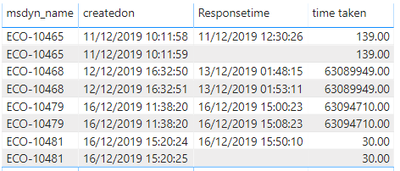
I want the time taken column to give me the values back in decimals simliar to this in hours rather than the zeros as decimal points
also the provide me the right calculation by a row by row basis so if the response time is blank in one row for the same work order then the time taken would be blank on the time taken column.
All responses are appreciated.
Solved! Go to Solution.
hi,
According to your description, please try this measure:
Time taken = DIVIDE(DATEDIFF(Job[createdon],SUMX(RELATEDTABLE(slakpiinstances),slakpiinstances[Responsetime]),SECOND),60)
You can also use ‘Fixed’ to set how many decimals you want.
Here is my test table:


And remember to click ‘Show data with no item’ to shows the blank rows.
The result shows:

Here is my test pbix file.
If you still have questions about it, please for free to let me know.
Best Regards,
Giotto Zhi
hi,
According to your description, please try this measure:
Time taken = DIVIDE(DATEDIFF(Job[createdon],SUMX(RELATEDTABLE(slakpiinstances),slakpiinstances[Responsetime]),SECOND),60)
You can also use ‘Fixed’ to set how many decimals you want.
Here is my test table:


And remember to click ‘Show data with no item’ to shows the blank rows.
The result shows:

Here is my test pbix file.
If you still have questions about it, please for free to let me know.
Best Regards,
Giotto Zhi
Thank you
The Power BI Data Visualization World Championships is back! Get ahead of the game and start preparing now!
Check out the November 2025 Power BI update to learn about new features.
| User | Count |
|---|---|
| 59 | |
| 46 | |
| 42 | |
| 23 | |
| 18 |
| User | Count |
|---|---|
| 193 | |
| 124 | |
| 101 | |
| 67 | |
| 49 |