Join us at FabCon Atlanta from March 16 - 20, 2026, for the ultimate Fabric, Power BI, AI and SQL community-led event. Save $200 with code FABCOMM.
Register now!The Power BI Data Visualization World Championships is back! Get ahead of the game and start preparing now! Learn more
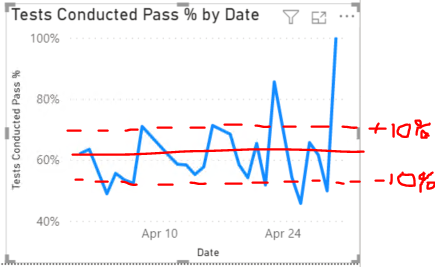
Does anyone know how to get a straight line average for a measure?
I have been using this measure on a line and stakced column chart for school tests with AppointmentDate[Date] as my x-axis and
Tests Conducted Pass % = [Tests Conducted Pass]/[Tests Conducted]Solved! Go to Solution.
@Anonymous ,
Create measures like
upper= calculate([Tests Conducted Pass]/[Tests Conducted], allselected()) * 1.1
lower= calculate([Tests Conducted Pass]/[Tests Conducted], allselected()) * 1.1
Use then in y axis constant line (under Analytic pane in visualization) , You have fx option to use measures
@Anonymous ,
Create measures like
upper= calculate([Tests Conducted Pass]/[Tests Conducted], allselected()) * 1.1
lower= calculate([Tests Conducted Pass]/[Tests Conducted], allselected()) * 1.1
Use then in y axis constant line (under Analytic pane in visualization) , You have fx option to use measures
The Power BI Data Visualization World Championships is back! Get ahead of the game and start preparing now!
| User | Count |
|---|---|
| 37 | |
| 36 | |
| 33 | |
| 33 | |
| 29 |
| User | Count |
|---|---|
| 132 | |
| 86 | |
| 85 | |
| 68 | |
| 64 |