Join us at FabCon Atlanta from March 16 - 20, 2026, for the ultimate Fabric, Power BI, AI and SQL community-led event. Save $200 with code FABCOMM.
Register now!Get Fabric Certified for FREE during Fabric Data Days. Don't miss your chance! Request now
Hello everyone,
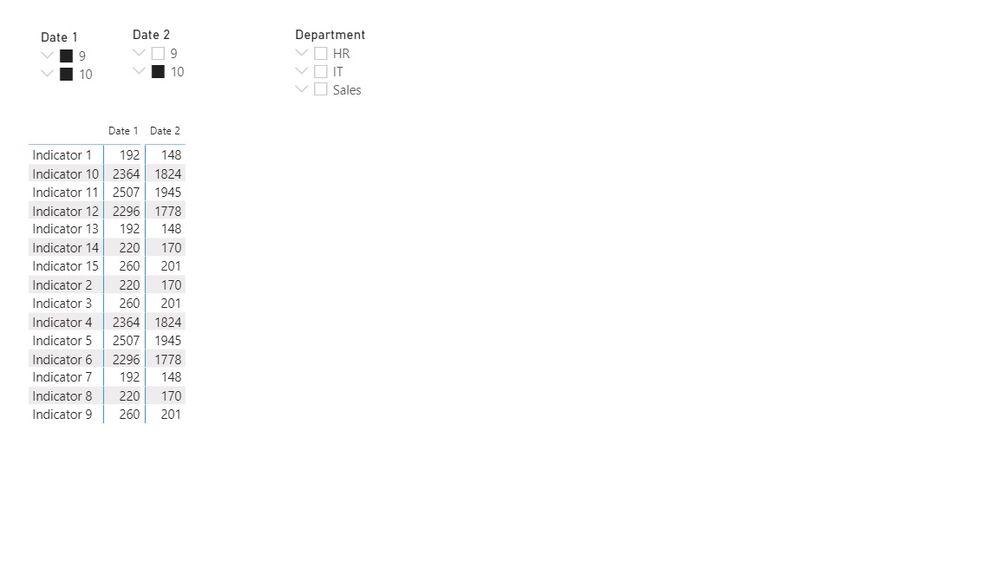
Is it possible to filter columns in the matrix separately by its own slicer? I have a bunch of indicators in the row for different people. I want to compare their performance by two different date range according to my wish. Right now I have two separate tables for that, but I'd like to have it in one. Is there a way to do that? Matrix doesn't allow me to add another column to 'columns' tab
Highly appreciate any solution. Attached are the pbix and the image of what I'd like to achieve
Solved! Go to Solution.
Hi @powerbiuser444 ,
You have to restructure the data a bit.
Take a look at the attached PBIX file.
Marcus Wegener works as Full Stack Power BI Engineer at BI or DIE.
His mission is clear: "Get the most out of data, with Power BI."
twitter - LinkedIn - YouTube - website - podcast - Power BI Tutorials
Hi @powerbiuser444 ,
see if you can follow the logic of the attached PBIX file.
I have added a KPI table to build a star schema bit by bit.
Also your date tables should contain unique values and thus have a 1:* relationship.
The measure decides how it is calculated depending on the KPI displayed.
Marcus Wegener works as Full Stack Power BI Engineer at BI or DIE.
His mission is clear: "Get the most out of data, with Power BI."
twitter - LinkedIn - YouTube - website - podcast - Power BI Tutorials
Hi @powerbiuser444 ,
You have to restructure the data a bit.
Take a look at the attached PBIX file.
Marcus Wegener works as Full Stack Power BI Engineer at BI or DIE.
His mission is clear: "Get the most out of data, with Power BI."
twitter - LinkedIn - YouTube - website - podcast - Power BI Tutorials
@mwegener hello, could you please help to solve the next issue I encountered? After data transformation and unpivoting columns I added another ratio measure (SPH), but because you used 'calculate(sum...' in the formula it sums up the numbers for higher hierarchy (the logic should be the division of talk time by sales for the department, not the sum of agents in that department). How that can be fixed? Appreciate you help!
I'm attaching the link Link to pbix
Hi @powerbiuser444 ,
see if you can follow the logic of the attached PBIX file.
I have added a KPI table to build a star schema bit by bit.
Also your date tables should contain unique values and thus have a 1:* relationship.
The measure decides how it is calculated depending on the KPI displayed.
Marcus Wegener works as Full Stack Power BI Engineer at BI or DIE.
His mission is clear: "Get the most out of data, with Power BI."
twitter - LinkedIn - YouTube - website - podcast - Power BI Tutorials
Check out the November 2025 Power BI update to learn about new features.
Advance your Data & AI career with 50 days of live learning, contests, hands-on challenges, study groups & certifications and more!