cancel
Showing results for 
Search instead for 
Did you mean: 

We've captured the moments from FabCon & SQLCon that everyone is talking about, and we are bringing them to the community, live and on-demand. Starts on April 14th. Register now

Reply
Rookarumba
Helper III
Helper III

Bayes Model (PowerQuery or Dax)

Hello Everyone Here, 
I'm hoping someone is able to help me solve a few questions on a Data Model I'm working on which are Mutually Exclusive 🙂

Basically here are the conditions;
1) Each Customer Segmentation can only buy only 1 Item Segmentation that is assigned to them
2) If Item Code Classification contained both Set & Single then Set is split by 50% and Single is 100% each
2a) If Item Code Classification contained Set then is 100%
2b) If Item Code Classification is Single then is 100% for both

Things I'have done within PowerQuery;

  1. Item Segmentation - I did a Percentage Split for each Set
  2. Item Code Classification - I did a Percentage Split for each Item Code Classification
  3. Grouping Based on Customers & Item Segment
  4. Grouping Based on Customers & Item Code Classification


These are the current problem I'm facing;

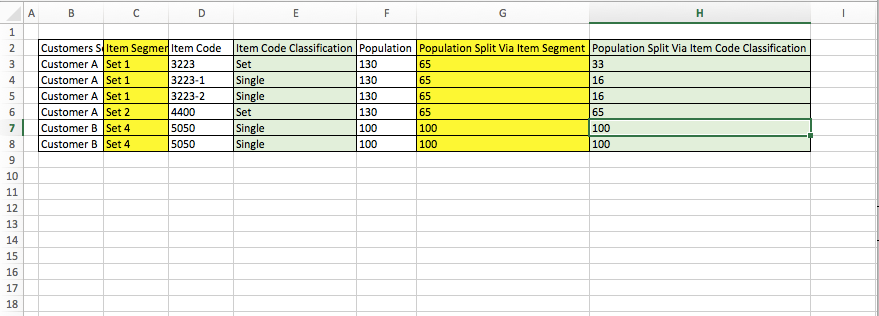
  • Row 6, Set 2 is supposed to have a Set & Single but only Set is available for Customer A, thus "Population Split Via  Item Code Classification" should be 100% instead of 50%

(I've Created a Rule in Rule Tab and merge it to the main table, thus it is bringing in 50%)

  • Row 3 - 5: "Population Split Via  Item Code Classification", as is not logical to have decimal for this column, thus if there is, I've to Roundup/down and minus off with the Population from "Population Split Via Item Segment" and split it against  "Population Split Via  Item Code Classification"

I can't do this part as I can't find a method to lookup via the column

I've the excel file with the desire outcome, i can send the file over as i cant attached file here 🙂


appreciate any help here 🙂


Screen Shot 2018-06-07 at 8.14.09 PM.png

2 REPLIES 2
v-yulgu-msft
Microsoft Employee
Microsoft Employee

Hi @Rookarumba,


Please create calculated columns via DAX

Population split via Item Segmentation =
IF (
    CALCULATE (
        DISTINCTCOUNT ( Test_1[Item Code Classification] ),
        ALLEXCEPT ( Test_1, Test_1[Customer Segmentation], Test_1[Item Segmentation] )
    )
        > 1,
    Test_1[Population] * 0.5,
    Test_1[Population] * 1
)

Population split via Item Code Classification =
Test_1[Population split via Item Segmentation]
    / CALCULATE (
        DISTINCTCOUNT ( Test_1[Item Code Classification] ),
        ALLEXCEPT ( Test_1, Test_1[Customer Segmentation], Test_1[Item Segmentation] )
    )
    / CALCULATE (
        DISTINCTCOUNT ( Test_1[Item Code] ),
        ALLEXCEPT (
            Test_1,
            Test_1[Customer Segmentation],
            Test_1[Item Segmentation],
            Test_1[Item Code Classification]
        )
    )

Best regards,

Yuliana Gu

Community Support Team _ Yuliana Gu
If this post helps, then please consider Accept it as the solution to help the other members find it more quickly.

@v-yulgu-msft, Thanks for the solution but I might have oversimplified my original question.


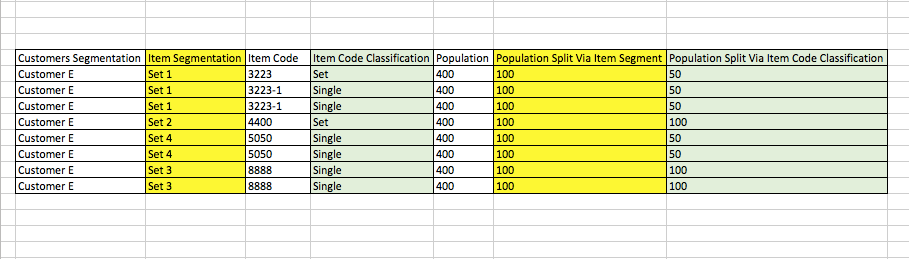
I've print screen another scenario, whereby there a total of 8 rows and 4 sets.

I try to troubleshoot and found out that; 

Population split via Item Segmentation =
IF (
    CALCULATE (
        DISTINCTCOUNT ( Test_1[Item Code Classification] ),
        ALLEXCEPT ( Test_1, Test_1[Customer Segmentation], Test_1[Item Segmentation] )
    )

Give me a count of 2, instead of 4.


I tried to run it in PowerQuery too, via Groupby "Customer Segmentation", "Item Segmentation", "Population", and distinct count rows.

And I got a count of 2 instead of 4 too.


The rest seems fine except for this part, I can't figure it out whats going on...


Appreciate it again 🙂Screen Shot 2018-06-11 at 6.53.14 PM.png

Helpful resources

Announcements
New to Fabric survey Carousel

New to Fabric Survey

If you have recently started exploring Fabric, we'd love to hear how it's going. Your feedback can help with product improvements.

Power BI DataViz World Championships carousel

Power BI DataViz World Championships - June 2026

A new Power BI DataViz World Championship is coming this June! Don't miss out on submitting your entry.

Join our Fabric User Panel

Join our Fabric User Panel

Share feedback directly with Fabric product managers, participate in targeted research studies and influence the Fabric roadmap.

March Power BI Update Carousel

Power BI Community Update - March 2026

Check out the March 2026 Power BI update to learn about new features.