cancel
Showing results for 
Search instead for 
Did you mean: 

The Power BI Data Visualization World Championships is back! Get ahead of the game and start preparing now! Learn more

Reply
Jasonvl
Frequent Visitor

Basic Filter For Text Column?

Hi,


I'm sure this should be simple but I'm not a coder and am struggling to get my head around the DAX logic I think I need.


Consider the Transport table below -


IDVehicleMode
1CarPrivate
2BusPublic
3LorryPrivate
4BoatPublic

5

Motorbike

Private


If I'd like to drop the vehicle field into a table but filter it to only show the private mode options how would I need to write the Dax code please? I know I can simply add a filter button that the user can click on but I'm trying to put a number of different columns into one table with each column showing specific data based on the mode.


Also I don't want count them or anything, I just want the column to show the data but exclude the relevant modes in each column. So in the table visual it woud show one column saying car, lorry, motorbike and then another column showing bus, boat.


Hope that makes sense?


Regards, Jason.

2 ACCEPTED SOLUTIONS
az38
Community Champion
Community Champion

@Jasonvl 

go to power query editor mode (Edit Queries or Transform Data buttons)

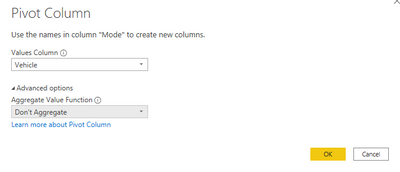
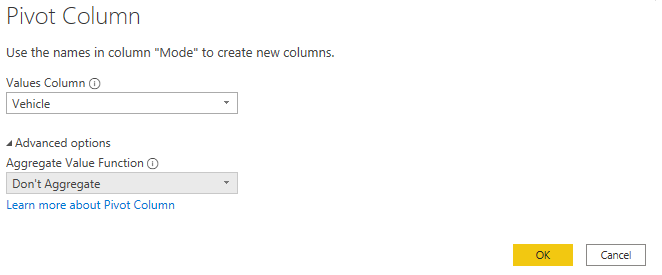
Then in your Data Source remove ID column. then pic to Mode column and press to button Pivot Column in Transform mode and set parameters in Dialog window as 


Снимок.PNG


do not hesitate to give a kudo to useful posts and mark solutions as solution
LinkedIn

View solution in original post

Hi @Jasonvl ,


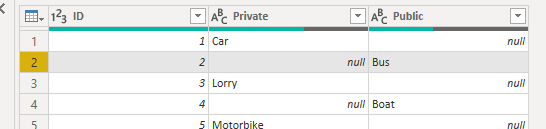
First, use "Pivot column" feature:

y9.PNG

y10.PNG

If you want to modify the data, please refer to how to merge rows:

Merge 2 rows in one row 


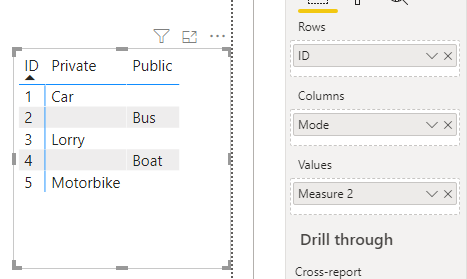
Or you can create a measure:

Measure 2 = 
CALCULATE(
    MAX(Sheet3[Vehicle]),
    ALLEXCEPT(
        Sheet3,
        Sheet3[Mode],Sheet3[ID]
    )
)

ii2.PNG


Best regards,
Lionel Chen

If this post helps, then please consider Accept it as the solution to help the other members find it more quickly.

View solution in original post

4 REPLIES 4
az38
Community Champion
Community Champion

Hi @Jasonvl 

you don't need to code anything, just drop Mode field on filter visual in Visualization Pane and set active "Private" value


do not hesitate to give a kudo to useful posts and mark solutions as solution
LinkedIn
Jasonvl
Frequent Visitor

Hi,


Thanks for the reply.


My issue with that is that it filters the whole visual on the selected mode whereas I want it to only filter one column and then have another column with a different mode filter etc.


So I end up with something like the below -


PublicPrivate
CarBus
MotorbikeBoat
Van 

Hi @Jasonvl ,


First, use "Pivot column" feature:

y9.PNG

y10.PNG

If you want to modify the data, please refer to how to merge rows:

Merge 2 rows in one row 


Or you can create a measure:

Measure 2 = 
CALCULATE(
    MAX(Sheet3[Vehicle]),
    ALLEXCEPT(
        Sheet3,
        Sheet3[Mode],Sheet3[ID]
    )
)

ii2.PNG


Best regards,
Lionel Chen

If this post helps, then please consider Accept it as the solution to help the other members find it more quickly.

az38
Community Champion
Community Champion

@Jasonvl 

go to power query editor mode (Edit Queries or Transform Data buttons)

Then in your Data Source remove ID column. then pic to Mode column and press to button Pivot Column in Transform mode and set parameters in Dialog window as 


Снимок.PNG


do not hesitate to give a kudo to useful posts and mark solutions as solution
LinkedIn

Helpful resources

Announcements
Power BI DataViz World Championships

Power BI Dataviz World Championships

The Power BI Data Visualization World Championships is back! Get ahead of the game and start preparing now!

December 2025 Power BI Update Carousel

Power BI Monthly Update - December 2025

Check out the December 2025 Power BI Holiday Recap!

FabCon Atlanta 2026 carousel

FabCon Atlanta 2026

Join us at FabCon Atlanta, March 16-20, for the ultimate Fabric, Power BI, AI and SQL community-led event. Save $200 with code FABCOMM.