cancel
Showing results for 
Search instead for 
Did you mean: 

The Power BI Data Visualization World Championships is back! Get ahead of the game and start preparing now! Learn more

Reply
jasgun
Frequent Visitor

Basic Data Modelling

Hi all,


I have a basic model that I would like create in Power BI, but I'm having issues!


I have a Fact table that I would like to track Policy Ref over months on a cumulative basis.

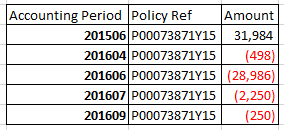
Fact table is below, theAmount measure is movement in the month:

Fact table - OBM_ReconciliationFact table - OBM_Reconciliation

The basic result I need is:

2019-02-15_1249.png


I've got as far as this:

  • Created a new table with all accounting preiods from 201506 to 201901.
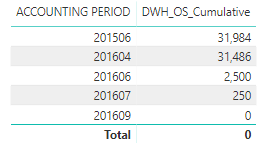
  • Created a new measure to calculate the cumulative position using the running total quick measure. This works:

2019-02-15_1401.png


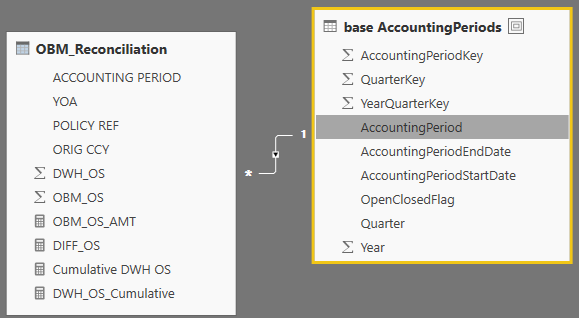
So then I created a relationship to the new accounting period table I created to get culumative figures for months even if there wasn't a transaction.

2019-02-15_1413.png


However the two issues I have are:

  1. As the accounting month I use in the visual is based on the new accounting period table, the cumulative total doesn't work.
  2. It still only gives me accounting periods where there is a transactions for it.


Can someone please help me to set this up correctly? It's driving me mad!

Seems simple in my mind!!


Thanks


Jason

1 ACCEPTED SOLUTION
v-juanli-msft
Community Support
Community Support

Hi @jasgun 

You need to create a table with all month period (eg, for this example, 201506~201804) for each "Policy Ref",

leave "Amount" for some period blank, (eg, in this example, "Amount" for 201507, 201508 are blank)

->these could be done with Power Query


then fill blanks with previous value

->see similar thread:

https://community.powerbi.com/t5/Desktop/Fill-blanks-with-previous-value/td-p/492501


Best Regards

Maggie


View solution in original post

1 REPLY 1
v-juanli-msft
Community Support
Community Support

Hi @jasgun 

You need to create a table with all month period (eg, for this example, 201506~201804) for each "Policy Ref",

leave "Amount" for some period blank, (eg, in this example, "Amount" for 201507, 201508 are blank)

->these could be done with Power Query


then fill blanks with previous value

->see similar thread:

https://community.powerbi.com/t5/Desktop/Fill-blanks-with-previous-value/td-p/492501


Best Regards

Maggie


Helpful resources

Announcements
Power BI DataViz World Championships

Power BI Dataviz World Championships

The Power BI Data Visualization World Championships is back! Get ahead of the game and start preparing now!

December 2025 Power BI Update Carousel

Power BI Monthly Update - December 2025

Check out the December 2025 Power BI Holiday Recap!

FabCon Atlanta 2026 carousel

FabCon Atlanta 2026

Join us at FabCon Atlanta, March 16-20, for the ultimate Fabric, Power BI, AI and SQL community-led event. Save $200 with code FABCOMM.

Top Solution Authors