Join us at FabCon Atlanta from March 16 - 20, 2026, for the ultimate Fabric, Power BI, AI and SQL community-led event. Save $200 with code FABCOMM.
Register now!The Power BI Data Visualization World Championships is back! Get ahead of the game and start preparing now! Learn more
Hey Team,
Im trying to display blank values as 0 and tried to add that to the chart.
Total Tickets = CALCULATE(COUNTA('Data'[Ticket])+0)
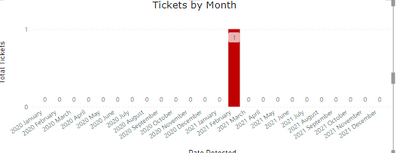
When I try to use this to the bar graph it shows me all the months from 2020 and 2021 for some reason.
How would I be able to just show Dec 2020, Jan 2021 and Feb 2021 (Last 3 months)
Solved! Go to Solution.
HI @Anonymous,
I'd like to suggest you add a variable to extract and store the current date. Then you can add an 'if statement' to package your expression and compare it with the current date and block some calculations on not wanted ranges.
Total Tickets =
VAR currDate =
MAX ( Calendar[Date] )
VAR prevDate =
DATE ( YEAR ( currDate ), MONTH ( currDate ) - 3, DAY ( currDate ) )
RETURN
IF (
MAX ( 'Data'[Date] ) >= prevDate
&& MAX ( 'Data'[Date] ) <= currDate,
CALCULATE ( COUNTA ( 'Data'[Ticket] ) + 0 )
)
Regards,
Xiaoxin Sheng
HI @Anonymous,
I'd like to suggest you add a variable to extract and store the current date. Then you can add an 'if statement' to package your expression and compare it with the current date and block some calculations on not wanted ranges.
Total Tickets =
VAR currDate =
MAX ( Calendar[Date] )
VAR prevDate =
DATE ( YEAR ( currDate ), MONTH ( currDate ) - 3, DAY ( currDate ) )
RETURN
IF (
MAX ( 'Data'[Date] ) >= prevDate
&& MAX ( 'Data'[Date] ) <= currDate,
CALCULATE ( COUNTA ( 'Data'[Ticket] ) + 0 )
)
Regards,
Xiaoxin Sheng
The Power BI Data Visualization World Championships is back! Get ahead of the game and start preparing now!
| User | Count |
|---|---|
| 41 | |
| 38 | |
| 36 | |
| 30 | |
| 28 |
| User | Count |
|---|---|
| 128 | |
| 88 | |
| 79 | |
| 67 | |
| 62 |