Join us at FabCon Atlanta from March 16 - 20, 2026, for the ultimate Fabric, Power BI, AI and SQL community-led event. Save $200 with code FABCOMM.
Register now!The Power BI Data Visualization World Championships is back! Get ahead of the game and start preparing now! Learn more
Hi.
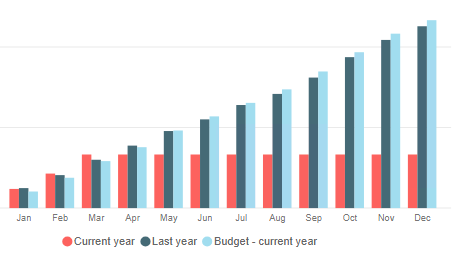
We have a bar chart where we show YTD Current year, YTD last year and YTD budget figures.
However, for the actual YTD figures we would like only to show figures for the previous and currents months. This means that for May-December the red bar should be empty. Is this possible?
The measure for Actual YTD is:
Net sales Local YTD:=CALCULATE(SUM(Invoices[NetSalesLocal]);DATESYTD('Month'[Date]))
Thanks a lot in advance.
Br.
Helen
Solved! Go to Solution.
First, you adjust the YTD to your financial year. Year from May -April will look like
YTD Sales = CALCULATE(SUM(Sales[Sales Amount]),DATESYTD(('Date'[Date]),"4/30"))
Also you can stop it max date of data
YTD Sales =
var _max = maxx(Sales,Sales[Sales date])
return
CALCULATE(SUM(Sales[Sales Amount]),DATESYTD(('Date'[Date]),"4/30"),Sales[Sales date]<=_max)
First, you adjust the YTD to your financial year. Year from May -April will look like
YTD Sales = CALCULATE(SUM(Sales[Sales Amount]),DATESYTD(('Date'[Date]),"4/30"))
Also you can stop it max date of data
YTD Sales =
var _max = maxx(Sales,Sales[Sales date])
return
CALCULATE(SUM(Sales[Sales Amount]),DATESYTD(('Date'[Date]),"4/30"),Sales[Sales date]<=_max)
The Power BI Data Visualization World Championships is back! Get ahead of the game and start preparing now!
| User | Count |
|---|---|
| 38 | |
| 36 | |
| 33 | |
| 31 | |
| 28 |
| User | Count |
|---|---|
| 129 | |
| 88 | |
| 79 | |
| 68 | |
| 63 |