Join us at FabCon Atlanta from March 16 - 20, 2026, for the ultimate Fabric, Power BI, AI and SQL community-led event. Save $200 with code FABCOMM.
Register now!The Power BI Data Visualization World Championships is back! Get ahead of the game and start preparing now! Learn more
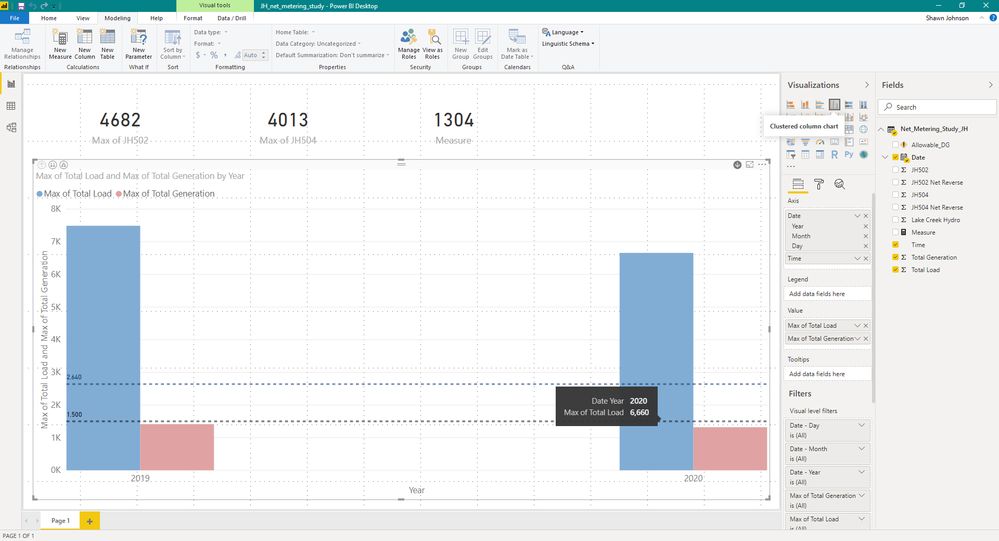
Can anyone please tell me why the bars on this chart are so far apart? It doesn't look correct to me and I have tried everything.
Thanks
HI @heberpower,
I think it may be related to your axis fields, you are using two fields that cannot correctly be mapped. It is hard to troubleshoot without any detailed data, can you please share a pbix file with some dummy data to test?
How to Get Your Question Answered Quickly
Regards,
Xiaoxin Sheng
Try getting rid of the date hierarchy on the axis. you just want the Year.
DAX is for Analysis. Power Query is for Data Modeling
Proud to be a Super User!
MCSA: BI ReportingThanks for the reply!
My issue is that this chart is set up so that I can drill down to the hours of day so I need the date hierarchy. The chart works, it just looks horrible.
Thanks again!
I'd have to play with it. You are using the heirarchy from the automatic date/time intelligence it appears, not one you built. I think that is the issue, but without a PBIX to tinker with, I am not an expert on the visuals to say exactly what needs to be done from must a screen cap.
DAX is for Analysis. Power Query is for Data Modeling
Proud to be a Super User!
MCSA: BI ReportingThe Power BI Data Visualization World Championships is back! Get ahead of the game and start preparing now!
| User | Count |
|---|---|
| 39 | |
| 37 | |
| 33 | |
| 32 | |
| 29 |
| User | Count |
|---|---|
| 133 | |
| 88 | |
| 85 | |
| 68 | |
| 64 |