cancel
Showing results for 
Search instead for 
Did you mean: 

The Power BI Data Visualization World Championships is back! Get ahead of the game and start preparing now! Learn more

Reply
bpeters
Advocate II
Advocate II

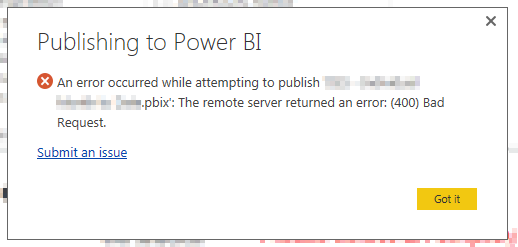
Bad Requests when publishing from Power BI Desktop post tenant migration to Australia Southeast

The organisation I work for recently migrated their tenant from Singapore to Australian South East.

Since the migration when publishing around 50% of the time I must be hitting the old tenant urls, as I get Bad Request 400 errors. I can simply log out and log in again in top right of Power BI Desktop and it publishes straight away.


Initially I thought it must be something in the pbix file and make sure I save always after doing a relog in, hoping that would correct the issue, but I have noticed it still recurs around 50% of the time with any of the reports I wish to publish.

I have tried uninstalling Power Bi Desktop and reinstalling, wondering if there is any setting I can clear so that it no longer hits the old tenant when trying to publish and always uses the current one.


badrequest.png

1 ACCEPTED SOLUTION

Hi @bpeters I just managed to log into my Office 365 Admin Portal and saw the following message below. Could that possibly be the issue?


Power BI - Service Issue - 17 Nov 2016.png


Did I answer your question? Mark my post as a solution!

Proud to be a Super User!


Power BI Blog

View solution in original post

4 REPLIES 4
GilbertQ
Super User
Super User

Hi @bpeters have you tried flushing your DNS cache?


You can do this by going into your command prompt and type: ipconfig /flushdns


Did I answer your question? Mark my post as a solution!

Proud to be a Super User!


Power BI Blog

Yeah I tried that early on, but the migration took place 5 November 2016, so its been around 12 days now, with 3 environments I use rebooted many times since also. Fortunately I can make it work with the relog workaround, but would prefer to work out how to prevent this happening moving forward.

Hi @bpeters I just managed to log into my Office 365 Admin Portal and saw the following message below. Could that possibly be the issue?


Power BI - Service Issue - 17 Nov 2016.png


Did I answer your question? Mark my post as a solution!

Proud to be a Super User!


Power BI Blog

Problems appear resolved now, so likely the tenant migration coincided with the outtage issue, and that I had found a workaround that kept me publishing... Thanks for your ideas 😄

Helpful resources

Announcements
Power BI DataViz World Championships

Power BI Dataviz World Championships

The Power BI Data Visualization World Championships is back! Get ahead of the game and start preparing now!

December 2025 Power BI Update Carousel

Power BI Monthly Update - December 2025

Check out the December 2025 Power BI Holiday Recap!

FabCon Atlanta 2026 carousel

FabCon Atlanta 2026

Join us at FabCon Atlanta, March 16-20, for the ultimate Fabric, Power BI, AI and SQL community-led event. Save $200 with code FABCOMM.