We've captured the moments from FabCon & SQLCon that everyone is talking about, and we are bringing them to the community, live and on-demand. Starts on April 14th. Register now
Hi,
I published a specific dashboard to show sales performances per region, commodity type etc.
In dashboard, there are customer, month and year select option in slicer.
And we can also filter/highlight items by selecting on a specific visual etc.
After all, when i need to check and filter with different options, i have to deselect all selected items which is annoying.
Is there a shortcut to create a "back to default" option on dashboards?
If issue isn't clear enough i can share a sample.
Thanks,
Caglar
Solved! Go to Solution.
@Anonymous,
There is no such clear all slicers selection button in Power BI, an idea about this issue has been submitted in this link, please vote it up.
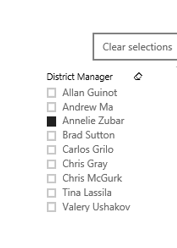
Currently, you would need to go through each slicer, and click “Clear selections” to deselect all items in each slicer.
In addition, in Power BI Service, if you change slicers selection and come back/reload the webpage in a dashboard, it will return to the default slicers selection.
Regards,
Lydia
@Anonymous,
There is no such clear all slicers selection button in Power BI, an idea about this issue has been submitted in this link, please vote it up.
Currently, you would need to go through each slicer, and click “Clear selections” to deselect all items in each slicer.
In addition, in Power BI Service, if you change slicers selection and come back/reload the webpage in a dashboard, it will return to the default slicers selection.
Regards,
Lydia
If you have recently started exploring Fabric, we'd love to hear how it's going. Your feedback can help with product improvements.
A new Power BI DataViz World Championship is coming this June! Don't miss out on submitting your entry.
Share feedback directly with Fabric product managers, participate in targeted research studies and influence the Fabric roadmap.
| User | Count |
|---|---|
| 53 | |
| 38 | |
| 33 | |
| 17 | |
| 17 |
| User | Count |
|---|---|
| 67 | |
| 62 | |
| 38 | |
| 34 | |
| 22 |