Hi all, I hope you can help me.
I've the following problem, I'd to average the first quarter and aslo the second quarter, of a matrix that I created. This is mi code dax to create this matrx.
Comportamiento =

VAR CategoriaHUentreCompleto =
CALCULATE(
    [Clientes],
    ALLEXCEPT(Data, Data[fecha_mes], Data[Fecha_Año], Data[Trimestres], Data[Segmento], Data[Ubicación.Columna2])
)

VAR AntiguedadentreHU =
CALCULATE(
    [Clientes],
    ALLEXCEPT(Data, Data[fecha_mes], Data[Fecha_Año], Data[Trimestres], Data[CategoríaHU.EstadoHU], Data[Segmento], Data[Ubicación.Columna2])
)

VAR CancelaltionentreAntiguedad =
CALCULATE(
    [Clientes],
    ALLEXCEPT(Data, Data[fecha_mes], Data[Fecha_Año], Data[Trimestres], Data[CategoríaHU.EstadoHU], Data[Antiguedad], Data[Segmento], Data[Ubicación.Columna2])
)

VAR CancelaltionSubTypeEntreAntiguedad =
CALCULATE(
    [Clientes],
    ALLEXCEPT(Data, Data[fecha_mes], Data[Fecha_Año], Data[Trimestres], Data[CategoríaHU.EstadoHU], Data[Antiguedad], Data[Cancellation Type], Data[Segmento], Data[Ubicación.Columna2])
)

RETURN
SWITCH(
    TRUE(),
    ISINSCOPE(Data[Cancellation Subtype]), DIVIDE([Clientes], CancelaltionSubTypeEntreAntiguedad),
    ISINSCOPE(Data[Cancellation Type]), DIVIDE([Clientes], CancelaltionentreAntiguedad),
    ISINSCOPE(Data[Antiguedad]), DIVIDE([Clientes], AntiguedadentreHU),
    ISINSCOPE(Data[CategoríaHU.EstadoHU]), DIVIDE([Clientes], CategoriaHUentreCompleto))
Making this syntax I could create the next matrix.
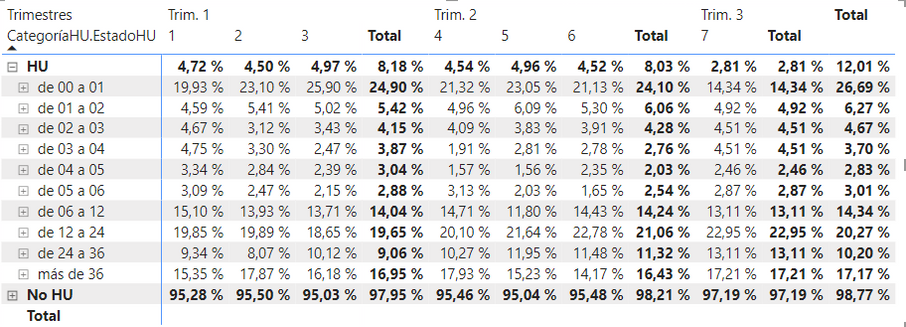
I would like to average the first quarter (4,72%, 4,50%, 4,97%) and also the second quarter (4,54%, 4,96%, 4,52%), both have the following name (trim. 1 and trim. 2).
Are there any syntax to calculate them, I tried with AVERAGEX but I couldn't get it.
Hope yoy can help me.
Best regards.
Diego F.


