Join us at FabCon Atlanta from March 16 - 20, 2026, for the ultimate Fabric, Power BI, AI and SQL community-led event. Save $200 with code FABCOMM.
Register now!The Power BI Data Visualization World Championships is back! Get ahead of the game and start preparing now! Learn more
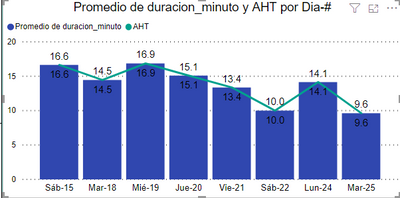
So I am trying to show average handle time per day with bars and the average of the month with a line. So I wrote a dax fuction but when I want to see the day by day it ended being the quantity of the bars which makes senses so I am stuck. I also do not want to use all since it will not work with any filter if do so.
So for the bar ir drag the column Select average but for the líne I am not sure what fax function i should use so i get the average of the month. I dont want yo use "ALL" since it would not work with Any filter
Solved! Go to Solution.
Hi @Anonymous
Try the below measure
Calculate(AVERAGE(Base[duracion_minuto]), allexcept(Base,FORMAT(Base[date],"YYYY-MM")))or
Post the sample data
Hi @Anonymous
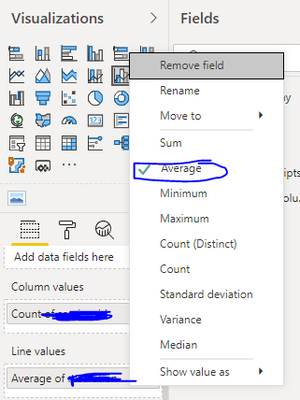
Use the line and clustered column chart and put handle time in the line values section select average as shown below.
@Anonymous i am usi g average gor the bars so i can ser the daily average but u Wanna compare the daily average with the monthly average
Hi @Anonymous
Try the below measure
Calculate(AVERAGE(Base[duracion_minuto]), allexcept(Base,FORMAT(Base[date],"YYYY-MM")))or
Post the sample data
@Anonymous I had to check allexcept and I used on my calendar table and it worked! thanks!!
The Power BI Data Visualization World Championships is back! Get ahead of the game and start preparing now!
| User | Count |
|---|---|
| 39 | |
| 37 | |
| 33 | |
| 32 | |
| 29 |
| User | Count |
|---|---|
| 133 | |
| 88 | |
| 85 | |
| 68 | |
| 64 |