FabCon is coming to Atlanta
Join us at FabCon Atlanta from March 16 - 20, 2026, for the ultimate Fabric, Power BI, AI and SQL community-led event. Save $200 with code FABCOMM.
Register now!- Power BI forums
- Get Help with Power BI
- Desktop
- Service
- Report Server
- Power Query
- Mobile Apps
- Developer
- DAX Commands and Tips
- Custom Visuals Development Discussion
- Health and Life Sciences
- Power BI Spanish forums
- Translated Spanish Desktop
- Training and Consulting
- Instructor Led Training
- Dashboard in a Day for Women, by Women
- Galleries
- Data Stories Gallery
- Themes Gallery
- Contests Gallery
- QuickViz Gallery
- Quick Measures Gallery
- Visual Calculations Gallery
- Notebook Gallery
- Translytical Task Flow Gallery
- TMDL Gallery
- R Script Showcase
- Webinars and Video Gallery
- Ideas
- Custom Visuals Ideas (read-only)
- Issues
- Issues
- Events
- Upcoming Events
The Power BI Data Visualization World Championships is back! Get ahead of the game and start preparing now! Learn more
- Power BI forums
- Forums
- Get Help with Power BI
- Desktop
- Average of Max Date taken from 4 different columns
- Subscribe to RSS Feed
- Mark Topic as New
- Mark Topic as Read
- Float this Topic for Current User
- Bookmark
- Subscribe
- Printer Friendly Page


- Mark as New
- Bookmark
- Subscribe
- Mute
- Subscribe to RSS Feed
- Permalink
- Report Inappropriate Content
Average of Max Date taken from 4 different columns
Hello,
I am stuck trying to make an average of the maximum date that is taken from 4 different columns.
I have 4 different columns of approved dates as a subdivision and i want to take the max from all the columns and then show that as average in each month. While some have blank values as well in them. So how do I measure or calculate all these factors in one?
So basically i was trying to get one different column to tell me the max date of each row (keeping null values in account). From that column, I hope to make an average count to filter by month.
Any help would be appreciated.
Thank you
| A Approved | B Approved | C Approved | D Approved | |||
| 5/31/2017 | 5/31/2017 | 5/30/2017 | 5/31/2017 | |||
| 3/2/2018 | 3/6/2018 | 3/6/2018 | 3/3/2018 | 3/6/2018 | ||
| 8/8/2017 | 8/10/2017 | 8/8/2017 | 8/10/2017 | |||
| 3/15/2018 | 3/15/2018 | 3/17/2018 | 3/18/2018 | 3/18/2018 | ||
| average= May=1 | ||||||
| March=2 | ||||||
| August=1 |
Solved! Go to Solution.


- Mark as New
- Bookmark
- Subscribe
- Mute
- Subscribe to RSS Feed
- Permalink
- Report Inappropriate Content
Try this Column
Max Date =
VAR temp = {
        Table1[A Approved],
        Table1[B Approved],
        Table1[C Approved],
        Table1[D Approved] }
RETURN
    MAXX ( temp, [Value] )
Regards
Zubair
Please try my custom visuals
- Mark as New
- Bookmark
- Subscribe
- Mute
- Subscribe to RSS Feed
- Permalink
- Report Inappropriate Content
Hi @C097986
When i use above sample data...i get correct results... see the pic below
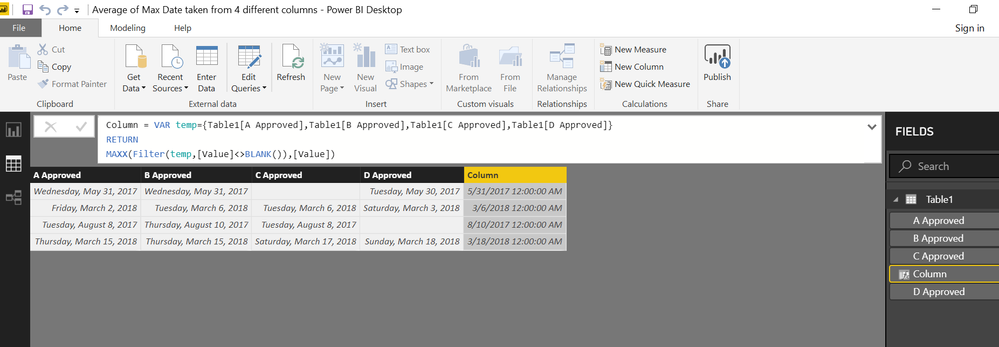
Regards
Zubair
Please try my custom visuals
- Mark as New
- Bookmark
- Subscribe
- Mute
- Subscribe to RSS Feed
- Permalink
- Report Inappropriate Content
Try this Column
Max Date =
VAR temp = {
        Table1[A Approved],
        Table1[B Approved],
        Table1[C Approved],
        Table1[D Approved] }
RETURN
    MAXX ( temp, [Value] )
Regards
Zubair
Please try my custom visuals
- Mark as New
- Bookmark
- Subscribe
- Mute
- Subscribe to RSS Feed
- Permalink
- Report Inappropriate Content
Thank you, that worked. I was doing only the max function and didn't think about using var temp. this is great.
So i could just take this data calculated and filter it in visulaziation to come up with the average per month, correct.
- Mark as New
- Bookmark
- Subscribe
- Mute
- Subscribe to RSS Feed
- Permalink
- Report Inappropriate Content
Do you know how I would ensure that any blanks are not accounted for in this formula? When i do this, I get what i was looking for but columns that are blanks with no value, I get a result of eg 1793 for the dates. so i need that to not happen. any suggestions?
- Mark as New
- Bookmark
- Subscribe
- Mute
- Subscribe to RSS Feed
- Permalink
- Report Inappropriate Content
Try this to ignore the BLANKS
Column =
VAR temp = {
        Table1[A Approved],
        Table1[B Approved],
        Table1[C Approved],
        Table1[D Approved] }
RETURN
    MAXX ( FILTER ( temp, [Value] <> BLANK () ), [Value] )
Regards
Zubair
Please try my custom visuals
- Mark as New
- Bookmark
- Subscribe
- Mute
- Subscribe to RSS Feed
- Permalink
- Report Inappropriate Content
it does not work. I am still getting odd values.
- Mark as New
- Bookmark
- Subscribe
- Mute
- Subscribe to RSS Feed
- Permalink
- Report Inappropriate Content
Could you show me a screenshot of what results you get and what you expect?
Regards
Zubair
Please try my custom visuals
- Mark as New
- Bookmark
- Subscribe
- Mute
- Subscribe to RSS Feed
- Permalink
- Report Inappropriate Content
so this is what i'm expecting to get as a result.
eg. first row column is blank but the result (in red) still gives me the latest date.
| A Approved | B Approved | C Approved | D Approved | |||
| 5/31/2017 | 5/31/2017 | 5/30/2017 | 5/31/2017 | |||
| 3/2/2018 | 3/6/2018 | 3/6/2018 | 3/3/2018 | 3/6/2018 | ||
| 8/8/2017 | 8/10/2017 | 8/8/2017 | 8/10/2017 | |||
| 3/15/2018 | 3/15/2018 | 3/17/2018 | 3/18/2018 | 3/18/2018 | ||
| average= May=1 | ||||||
| March=2 | ||||||
| August=1 |
this is what i'm getting:
| A Approved | B Approved | C Approved | D Approved | |||
| 5/31/2017 | 5/31/2017 | 5/30/2017 | 9/31/1783 | |||
| 3/2/2018 | 3/6/2018 | 3/6/2018 | 3/3/2018 | 3/6/2018 | ||
| 8/8/2017 | 8/10/2017 | 8/8/2017 | 4/10/1798 | |||
| 3/15/2018 | 3/15/2018 | 3/17/2018 | 3/18/2018 | 3/18/2018 | ||
i just get a random date automatically populated.
- Mark as New
- Bookmark
- Subscribe
- Mute
- Subscribe to RSS Feed
- Permalink
- Report Inappropriate Content
Hi @C097986
When i use above sample data...i get correct results... see the pic below
Regards
Zubair
Please try my custom visuals
- Mark as New
- Bookmark
- Subscribe
- Mute
- Subscribe to RSS Feed
- Permalink
- Report Inappropriate Content
thanks. i was misspelling. my bad
- Mark as New
- Bookmark
- Subscribe
- Mute
- Subscribe to RSS Feed
- Permalink
- Report Inappropriate Content

Helpful resources

Power BI Dataviz World Championships
The Power BI Data Visualization World Championships is back! Get ahead of the game and start preparing now!

Power BI Monthly Update - November 2025
Check out the November 2025 Power BI update to learn about new features.

FabCon Atlanta 2026
Join us at FabCon Atlanta, March 16-20, for the ultimate Fabric, Power BI, AI and SQL community-led event. Save $200 with code FABCOMM.

| User | Count |
|---|---|
| 59 | |
| 43 | |
| 42 | |
| 23 | |
| 17 |


| User | Count |
|---|---|
| 190 | |
| 122 | |
| 96 | |
| 66 | |
| 47 |


