cancel
Showing results for 
Search instead for 
Did you mean: 

The Power BI Data Visualization World Championships is back! Get ahead of the game and start preparing now! Learn more

Reply
sirros_iot
Helper III
Helper III

Average of Average

Hello All!

I have this sheet as example of data

https://drive.google.com/file/d/1NjNrDtDuRZSNFSvja0LCVJ6eF69LInmS/view?usp=sharing

I have a measure that does it:

Measure A = (MAX( RealTimeData[_ts]) - MIN( RealTimeData[_ts)) / COUNT( RealTimeData[sensor])

So, I put it into the visual table, and Measure A works with the time slicer and is filtered and by sensor as I put it into the table.
sensor         Measure A
A                        X
B                        Y
C                        Z

But, I would like to make also de average with X, Y, Z.
Example: X = 1, Y = 2, Z = 3.
Measure B = 2

Any Idea?
Thanks,
Diego
      

1 ACCEPTED SOLUTION
Phil_Seamark
Microsoft Employee
Microsoft Employee

HI @sirros_iot 


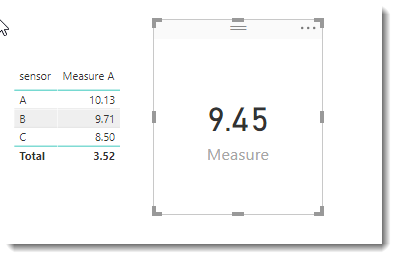
Is this what you mean?  I have attached a PBIX file


Measure = AVERAGEX(VALUES('RealTimeData'[sensor]),[Measure A])

image.png


To learn more about DAX visit : aka.ms/practicalDAX

Proud to be a Datanaut!

View solution in original post

2 REPLIES 2
Phil_Seamark
Microsoft Employee
Microsoft Employee

HI @sirros_iot 


Is this what you mean?  I have attached a PBIX file


Measure = AVERAGEX(VALUES('RealTimeData'[sensor]),[Measure A])

image.png


To learn more about DAX visit : aka.ms/practicalDAX

Proud to be a Datanaut!

Yes! It's working!

Thank you @Phil_Seamark.

Best Regards,
Diego

Helpful resources

Announcements
Power BI DataViz World Championships

Power BI Dataviz World Championships

The Power BI Data Visualization World Championships is back! Get ahead of the game and start preparing now!

November Power BI Update Carousel

Power BI Monthly Update - November 2025

Check out the November 2025 Power BI update to learn about new features.

FabCon Atlanta 2026 carousel

FabCon Atlanta 2026

Join us at FabCon Atlanta, March 16-20, for the ultimate Fabric, Power BI, AI and SQL community-led event. Save $200 with code FABCOMM.