Join us at FabCon Atlanta from March 16 - 20, 2026, for the ultimate Fabric, Power BI, AI and SQL community-led event. Save $200 with code FABCOMM.
Register now!Get Fabric Certified for FREE during Fabric Data Days. Don't miss your chance! Request now
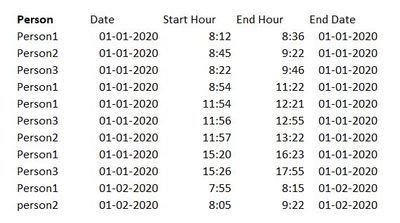
Hello, I need a little help, my problem is this, I have some values like this:
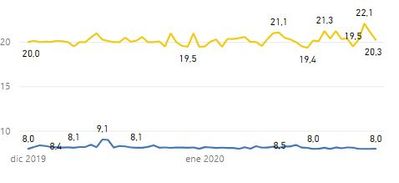
And i need to take the average for the Start hour BUT only in with the first value of the person that day and make it some graph like this
Right now it shows the first value of the day of all persons, but i dont know how to make the average of all the persons and put that on the graph (i transformed the hour in number format)
Solved! Go to Solution.
Create measures
min start hour =
CALCULATE (
MIN ( 'Table'[start hour] ),
FILTER (
ALLSELECTED ( 'Table' ),
'Table'[person]
= MAX ( 'Table'[person] )
&& 'Table'[date]
= MAX ( 'Table'[date] )
)
)
start hour number = HOUR([min start hour])
average = AVERAGEX('Table',[start hour number])
Best Regards
Maggie
Community Support Team _ Maggie Li
If this post helps, then please consider Accept it as the solution to help the other members find it more quickly.
Create measures
min start hour =
CALCULATE (
MIN ( 'Table'[start hour] ),
FILTER (
ALLSELECTED ( 'Table' ),
'Table'[person]
= MAX ( 'Table'[person] )
&& 'Table'[date]
= MAX ( 'Table'[date] )
)
)
start hour number = HOUR([min start hour])
average = AVERAGEX('Table',[start hour number])
Best Regards
Maggie
Community Support Team _ Maggie Li
If this post helps, then please consider Accept it as the solution to help the other members find it more quickly.
Check out the November 2025 Power BI update to learn about new features.
Advance your Data & AI career with 50 days of live learning, contests, hands-on challenges, study groups & certifications and more!