
cancel
Showing results for 
Search instead for 
Did you mean: 

Get Fabric Certified for FREE during Fabric Data Days. Don't miss your chance! Request now

Reply
nsadams87xx
Helper III
Helper III

Average Issue

Hey Everyone,


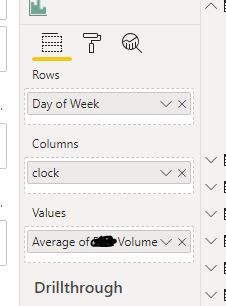
I'm having an issue with Power BI calculating an average.  We are tracking client arrivals to our business locations and in this visualization the label says Average arrivals by Day and Hours.  But what's actually going on is that Power BI is averaging these arrivals by Day, Hours, AND an additional data field that is not being used in this graph.  Does that sound right to anyone?


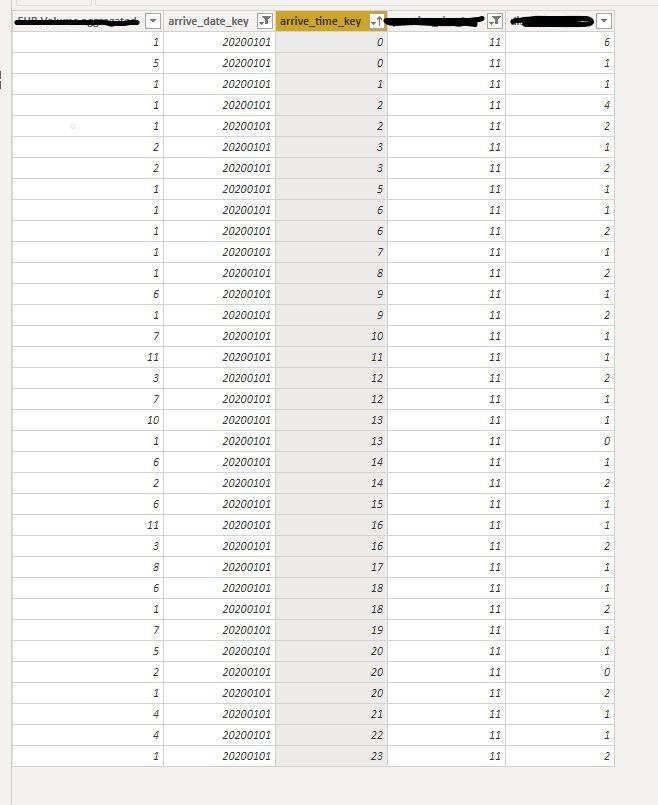
Example, if you look at the data model you'll see there are 3 combinations of Hour 20.  8 total arrivals that came in at Hour 20 for the day of Wednesday (or Jan 1, 2020), and 3 different types of arrivals, 2 of arrival type 0, 5 of type 1 and 1 of type 2.  For the visualization, shouldn't Power BI be ignoring the arrival type unless I've included it in the visualization to calculate the average?


3.JPGaverage issue 2.JPGaverage issue.JPG


1 ACCEPTED SOLUTION


@nsadams87xx wrote:

Okay, thanks.  Yeah for Hour 20, I was expecting the visualization to calculate the average to 8.  I have a date slicer that I set to display just Jan 1, 2020.  So I thought because there was just 1 Wednesday and 1 series of Hour 20 that has happened in that time frame, Power BI would do (5 + 2 + 1) / 1 = 8.


So the "built-in" average just does a "sum of rows" divided by "count of rows" which is why you are getting (5 + 2 + 1) / 3 = 2.667


If what you want is a daily average you would have to build a measure like the following


Daily Average = SUM( Table[<arrival column>] ) / COUNTROWS( VALUES( Table[arrival_date_key] ) )


The call to VALUES() will give you a distinct list of the date keys in the current filter context. So if you are looking at 1 day it will return 1 row, if you are looking at a week it will return 7 rows etc.

View solution in original post

4 REPLIES 4
d_gosbell
Super User
Super User


@nsadams87xx wrote:


Example, if you look at the data model you'll see there are 3 combinations of Hour 20.  8 total arrivals that came in at Hour 20 for the day of Wednesday (or Jan 1, 2020), and 3 different types of arrivals, 2 of arrival type 0, 5 of type 1 and 1 of type 2.  For the visualization, shouldn't Power BI be ignoring the arrival type unless I've included it in the visualization to calculate the average?


It's hard to say without seeing the measure code, but if it is a simple AVERAGE( [arrival column] ) then it is not directly using the arrival type as a filter. All the average does is to calculate a SUM and then divide by a row count, so for hour 20 it's doing (5 + 2 + 1) / 3 = 2.667


Based on the data in the table the result makes sense to me. What result are you expecting? 

Okay, thanks.  Yeah for Hour 20, I was expecting the visualization to calculate the average to 8.  I have a date slicer that I set to display just Jan 1, 2020.  So I thought because there was just 1 Wednesday and 1 series of Hour 20 that has happened in that time frame, Power BI would do (5 + 2 + 1) / 1 = 8.


I'm also not using a measure, I'm just using the built in average feature.


built in.JPG


@nsadams87xx wrote:

Okay, thanks.  Yeah for Hour 20, I was expecting the visualization to calculate the average to 8.  I have a date slicer that I set to display just Jan 1, 2020.  So I thought because there was just 1 Wednesday and 1 series of Hour 20 that has happened in that time frame, Power BI would do (5 + 2 + 1) / 1 = 8.


So the "built-in" average just does a "sum of rows" divided by "count of rows" which is why you are getting (5 + 2 + 1) / 3 = 2.667


If what you want is a daily average you would have to build a measure like the following


Daily Average = SUM( Table[<arrival column>] ) / COUNTROWS( VALUES( Table[arrival_date_key] ) )


The call to VALUES() will give you a distinct list of the date keys in the current filter context. So if you are looking at 1 day it will return 1 row, if you are looking at a week it will return 7 rows etc.

Actually that's exactly what I did.  Thanks!

Helpful resources

Announcements
November Power BI Update Carousel

Power BI Monthly Update - November 2025

Check out the November 2025 Power BI update to learn about new features.

Fabric Data Days Carousel

Fabric Data Days

Advance your Data & AI career with 50 days of live learning, contests, hands-on challenges, study groups & certifications and more!

FabCon Atlanta 2026 carousel

FabCon Atlanta 2026

Join us at FabCon Atlanta, March 16-20, for the ultimate Fabric, Power BI, AI and SQL community-led event. Save $200 with code FABCOMM.

Top Solution Authors
Top Kudoed Authors