Join us at FabCon Atlanta from March 16 - 20, 2026, for the ultimate Fabric, Power BI, AI and SQL community-led event. Save $200 with code FABCOMM.
Register now!Get Fabric Certified for FREE during Fabric Data Days. Don't miss your chance! Request now
Hi all
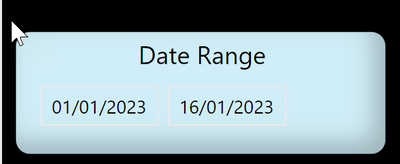
on many reports, I use a slicer to select dates, as in the screen shot below.
The slicer style is set to "Between".
On some reports, the 2nd date will automatically display today's date, when I open the file.
On other reports, the 2nd date will not automatically display today's date.
I can't figure out the difference.
Any idea, please?
@EVEAdmin , You need to use a workaround
Default Date Today/ This Month / This Year: https://www.youtube.com/watch?v=hfn05preQYA
new columns, needed in date table
Is Today = if('Date'[Date]=TODAY(),"Today",[Date]&"")
Is Last 30 = if('Date'[Date]>=TODAY()-30 && 'Date'[Date]<=TODAY(),"Today",[Date]&"")
Is Last 90 = if('Date'[Date]>=TODAY()-90 && 'Date'[Date]<=TODAY(),"Last 90 Days",[Date]&"")
@amitchandak thank you, appreciated.
I added this column to my Calendar table:
Is Today = if('Date'[Date]=TODAY(),"Today",[Date]&"")
However, when I add the column to the slicer, then I loose the option "Between dates", in the formatting pane. And I need to be able to select any random date range.
@EVEAdmin , because that is text column, And that is limitation as of now.
Please log an idea or vote https://ideas.powerbi.com/ideas/
Check out the November 2025 Power BI update to learn about new features.
Advance your Data & AI career with 50 days of live learning, contests, hands-on challenges, study groups & certifications and more!