cancel
Showing results for 
Search instead for 
Did you mean: 

The Power BI Data Visualization World Championships is back! Get ahead of the game and start preparing now! Learn more

Reply
Anonymous
Not applicable

Automatic Slicer

Hello,


I have a report which adds in a months data through SQL agent at the end of each month.


This populates the slicer like in the image.


As currently, I have to get the report from the server and amend it locally to the correct updated date period and then publish back to the server.


Is there a way to make the slicer automatic to the correct month e.g. once it hits the 1st this will have that period as the default instead of doing it manually.


Period.png


Thanks in advance


Liam

1 ACCEPTED SOLUTION
Anonymous
Not applicable

Managed to get around this by putting a case statement into my SQL view that would show the previous months data.


case when LEFT(CONVERT(varchar,DATEADD(MONTH,-1,GETDATE()),112),6) = SnapshotPeriod then 1 else 0 end as IsCurrentMth.


I then merged the 1 from IsCurrentMth with the standard SnapshotPeriod to get my new slicer.

View solution in original post

5 REPLIES 5
v-easonf-msft
Community Support
Community Support

Hi , @Anonymous 

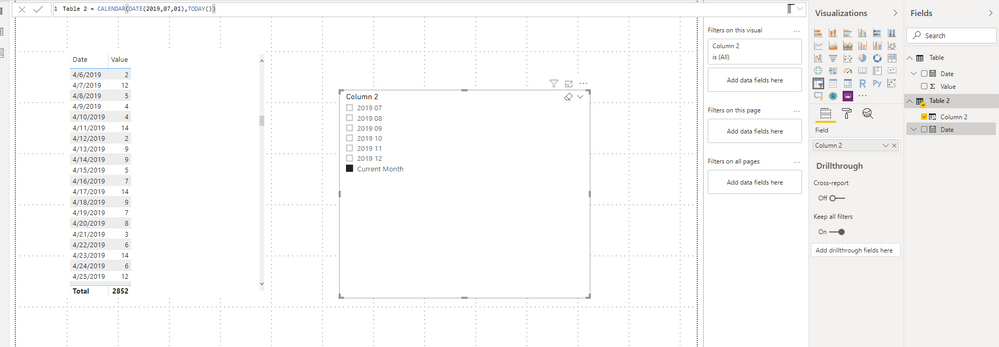
According to your current description ,you can try to create a calculated table and create a column like followings:

Table 2 = CALENDAR(DATE(2019,07,01),TODAY())
Column 2 = IF(FORMAT([Date],"YYYY MM")=FORMAT(TODAY(),"YYYY MM"),"Current Month",FORMAT([Date],"YYYY MM"))

Here is  sample :

2020103.png


(This month is January, then in the next month, “2020 1” will be added in the slicer, and the current month will point to ”2020 02”)

Url: https://wicren-my.sharepoint.com/:u:/g/personal/michael_wicren_onmicrosoft_com/EcJuwmZtQkdJuLxTDHiQL_ABdcfl83k2ZmHELE1k04hoqQ?e=meMYZg


Best Regards,
Community Support Team _ Eason
If this post helps, then please consider Accept it as the solution to help the other members find it more quickly.

Anonymous
Not applicable

Hi @v-easonf-msft ,


If the slicer date E.G. 201912 was coming from a column in a SQL view, would there be an alternative way to make it default to current month in the slicer?


Thanks


Liam

Anonymous
Not applicable

Managed to get around this by putting a case statement into my SQL view that would show the previous months data.


case when LEFT(CONVERT(varchar,DATEADD(MONTH,-1,GETDATE()),112),6) = SnapshotPeriod then 1 else 0 end as IsCurrentMth.


I then merged the 1 from IsCurrentMth with the standard SnapshotPeriod to get my new slicer.

Anonymous
Not applicable

@v-easonf-msft 


Thanks for the reply


Could I ask which part tells the slicer to default to stay on current month?

Anonymous
Not applicable

Hi,


Thanks for the reply. Could I ask which part tells the slicer to default to stay on current month?


Thanks in advance


Liam

Helpful resources

Announcements
Power BI DataViz World Championships

Power BI Dataviz World Championships

The Power BI Data Visualization World Championships is back! Get ahead of the game and start preparing now!

December 2025 Power BI Update Carousel

Power BI Monthly Update - December 2025

Check out the December 2025 Power BI Holiday Recap!

FabCon Atlanta 2026 carousel

FabCon Atlanta 2026

Join us at FabCon Atlanta, March 16-20, for the ultimate Fabric, Power BI, AI and SQL community-led event. Save $200 with code FABCOMM.