Join us at FabCon Atlanta from March 16 - 20, 2026, for the ultimate Fabric, Power BI, AI and SQL community-led event. Save $200 with code FABCOMM.
Register now!The Power BI Data Visualization World Championships is back! Get ahead of the game and start preparing now! Learn more
Hello,
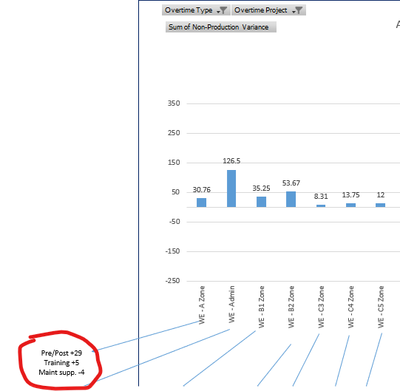
I am releatively new to Power BI so I apologize if I explain this poorly, right now I have a very manual graph in excel where it highlights variance from actual hours to planned hours by work area. In excel I have to type the reasons manually. Can I use a clustered column chart in Power BI that would highlight the top 3 reasons for each work area? Excel screenshot below
Actual hours, planned hours, variance, and overtime reason (OT project) are all in the index I pull the data from
Solved! Go to Solution.
You might try a custom tool tip to present the reasons, or alternatively drill through to the reasons.
Check out the November 2025 Power BI update to learn about new features.
Advance your Data & AI career with 50 days of live learning, contests, hands-on challenges, study groups & certifications and more!
| User | Count |
|---|---|
| 57 | |
| 43 | |
| 41 | |
| 22 | |
| 17 |
| User | Count |
|---|---|
| 183 | |
| 114 | |
| 93 | |
| 62 | |
| 45 |