cancel
Showing results for 
Search instead for 
Did you mean: 

The Power BI Data Visualization World Championships is back! Get ahead of the game and start preparing now! Learn more

Reply
GlassShark1
Helper III
Helper III

Arc GIS maps for Power Bi - map point colour by category

I've got Red, Green and Amber categories for map points that i'm trying to have coloured in the same way on the map. I can't seem to get this to work though. When i set the map to Size and Colour and drag the field into 'Colour', it treats this as a numeric field, and suggests a colour ramp for it (i'm presuming it's doing a count of 'Green' etc). I just want to set the text value 'Green' to a green colour.


Any help? Driving me crazy...

1 ACCEPTED SOLUTION
v-easonf-msft
Community Support
Community Support

Hi, @GlassShark1 

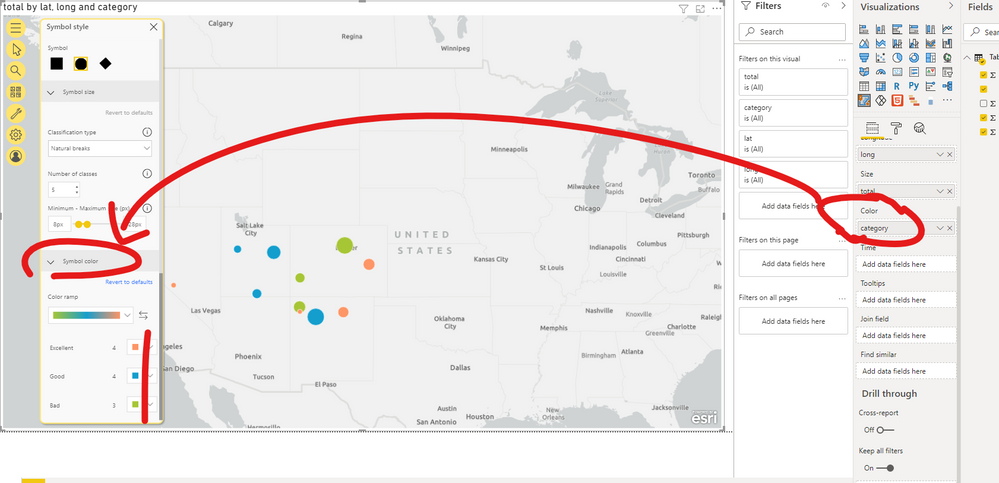
The field dragged into 'Colour' shoud be "Category".

And then you can  set  color you want  for each category  in  "Symbol color" .

80.png


Please check my pbix file for more details.

If I misunderstand, please let me know.


Best Regards,
Community Support Team _ Eason
If this post helps, then please consider Accept it as the solution to help the other members find it more quickly.


View solution in original post

2 REPLIES 2
v-easonf-msft
Community Support
Community Support

Hi, @GlassShark1 

The field dragged into 'Colour' shoud be "Category".

And then you can  set  color you want  for each category  in  "Symbol color" .

80.png


Please check my pbix file for more details.

If I misunderstand, please let me know.


Best Regards,
Community Support Team _ Eason
If this post helps, then please consider Accept it as the solution to help the other members find it more quickly.


Thanks - i'll mark this as the solution as it's confirmed i'm doing it the right way. It hasn't solved my problem though, as when i put on a slicer for a category it still shows point for all 3 colours. I'm working with dummy data though (with duplicates), so i'm guessing the problem is with the data - likely showing a record as being both one category and another, so it is just showing each in turn when i apply a filter. Thanks again - at least i can see i've approached it the right way 🙂

Helpful resources

Announcements
Power BI DataViz World Championships

Power BI Dataviz World Championships

The Power BI Data Visualization World Championships is back! Get ahead of the game and start preparing now!

December 2025 Power BI Update Carousel

Power BI Monthly Update - December 2025

Check out the December 2025 Power BI Holiday Recap!

FabCon Atlanta 2026 carousel

FabCon Atlanta 2026

Join us at FabCon Atlanta, March 16-20, for the ultimate Fabric, Power BI, AI and SQL community-led event. Save $200 with code FABCOMM.