Hello everyone!
I have a table ("TPSMeasurements") with a category, a datetime and the measured values I want to study (the slope distance). What I have to do is find the difference between the current value and a value "n" time before (usually 24h or 7 days) on the same category. The measurements are not regular, so I'm not able to find the exact "Epoch" to look for. Please see an example below:
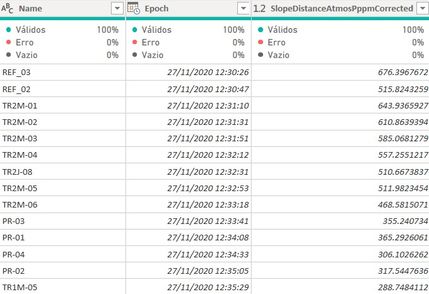
In order to find the value needed without knowing the exact date/time I've created an Index column with the following DAX:
Index =
var point = fTPSMeasurements[Name]
var tab =
FILTER(
fTPSMeasurements;
fTPSMeasurements[Name]=point
)
return
RANKX(
tab;
fTPSMeasurements[Epoch];;
ASC
)
Afterwards, I calculated how many IDs there are between the current reading and the first reading after the set "n" time:
obs.: [AnalysisTime] is a parameter the user can set, in hours
IDCount =
var epoch = fTPSMeasurements[Epoch]
var day = epoch-fTPSMeasurements[AnalysisTime]/24
var point = fTPSMeasurements[Name]
var LagDate =
CALCULATE(
COUNTROWS(fTPSMeasurements);
FILTER(
fTPSMeasurements;
fTPSMeasurements[Name]=point &&
fTPSMeasurements[Epoch] >= day &&
fTPSMeasurements[Epoch] < epoch
)
)
return
LagDate
I can finally do the following and subtract the two values:
SlopeDelta (mm) =
var point = RELATED(dPoints[Name])
var ind = fTPSMeasurements[Index] - fTPSMeasurements[IDCount]
var LagValue =
MAXX(
FILTER(
fTPSMeasurements;
fTPSMeasurements[Name] = point &&
fTPSMeasurements[Index] = ind
);
fTPSMeasurements[SlopeDistanceAtmosPppmCorrected]
)
var epoch =
MAXX(
FILTER(
fTPSMeasurements;
fTPSMeasurements[Name] = point &&
fTPSMeasurements[Index] = ind
);
fTPSMeasurements[Epoch]
)
var DeltaY =
IF(
ISBLANK(LagValue) || fTPSMeasurements[Index] = fTPSMeasurements[IDCount]+1; 0 ; //Filter values on the start of the project
fTPSMeasurements[SlopeDistanceAtmosPppmCorrected]-LagValue
)
var DeltaX = fTPSMeasurements[AnalysisTime]
RETURN
DeltaY*1000 //Return value in mm
So far so good, it works fine on small datasets (tested on ~500k rows and worked with some loading time).
However, I now have a 1.6kk rows dataset and it is taking a very long time to load.
The IDCount column has the worst performance, by far. Is it possible to do these calculations on any other way?
Please let me know if I can explain it better.
Any help will be much appreciated! Thanks!


