cancel
Showing results for 
Search instead for 
Did you mean: 

We've captured the moments from FabCon & SQLCon that everyone is talking about, and we are bringing them to the community, live and on-demand. Starts on April 14th. Register now

Reply
derria
Frequent Visitor

Applying Visual Theme via JSON file

Hi guys,


I am trying to configure a corporate theme within Power BI and would like to set the title bar of all visual to be blue (#428BCA) with white (#FFFFFF).  However I am struggling to find the correct property which will do this, I have tried combinations of the following but to no avail:


{
   "name": "Corp Std",
   "dataColors": ["#FF00FF", "#5B6B72", "#D72825", "#E57F29", "#12C705"],
   "background": "#FFFFFF",
   "foreground": "#428BCA",
   "tableAccent": "#F21C75",
   "visualStyles":{
                    "*":{
                          "*":{
                                "*":[{  "showTitle":true,
                                        "color":"#428BCA",
                                        "fontcolor":"#FFFFFF"}]
                                }
                         }
                  }
  }
 

Any help with the JSON syntax would be greatly appreciated.


Thanks in advance


1 ACCEPTED SOLUTION

Hi @derria,


Unfortunately, it doesn't support formatting the title of visuals through themes. Please see this similar thread: Using Theme to set Title Background & Font Color


Best regards,
Yuliana Gu

Community Support Team _ Yuliana Gu
If this post helps, then please consider Accept it as the solution to help the other members find it more quickly.

View solution in original post

5 REPLIES 5
v-yulgu-msft
Microsoft Employee
Microsoft Employee

Hi @derria,


Please refer to below article for information about the correct format of the detailed JSON file:

Use Report Themes in Power BI Desktop


Best regards,
Yuliana Gu

Community Support Team _ Yuliana Gu
If this post helps, then please consider Accept it as the solution to help the other members find it more quickly.

Hi Yuliana,


I have previously read through the article you mentioned and hence why I posted onto the forum.


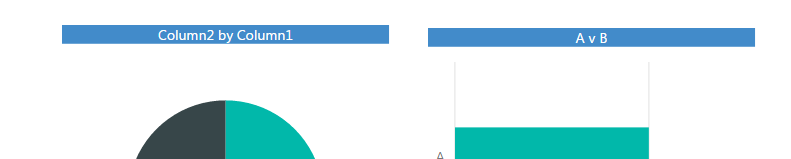
I am looking to create theme where any visual added will automatically default to having a blue title bar, as below:


Intended Theme.png


However, I am unable to locate a property setting via the JSON file which can do this,  and am looking for confirmation as to whether this is possible?

Hi @derria,


Unfortunately, it doesn't support formatting the title of visuals through themes. Please see this similar thread: Using Theme to set Title Background & Font Color


Best regards,
Yuliana Gu

Community Support Team _ Yuliana Gu
If this post helps, then please consider Accept it as the solution to help the other members find it more quickly.
MaryF
Advocate II
Advocate II

If you check out this website, it may help show you what you need. https://powerbi.tips/tools/color-theme-generator/

derria
Frequent Visitor

Thanks MaryF.


Unfortunately, there is no property shown for the 'Title' on any of the visuals and I am starting to wondering if it is not feasible to set the title Smiley Sad

Helpful resources

Announcements
New to Fabric survey Carousel

New to Fabric Survey

If you have recently started exploring Fabric, we'd love to hear how it's going. Your feedback can help with product improvements.

Power BI DataViz World Championships carousel

Power BI DataViz World Championships - June 2026

A new Power BI DataViz World Championship is coming this June! Don't miss out on submitting your entry.

Join our Fabric User Panel

Join our Fabric User Panel

Share feedback directly with Fabric product managers, participate in targeted research studies and influence the Fabric roadmap.

March Power BI Update Carousel

Power BI Community Update - March 2026

Check out the March 2026 Power BI update to learn about new features.