FabCon is coming to Atlanta
Join us at FabCon Atlanta from March 16 - 20, 2026, for the ultimate Fabric, Power BI, AI and SQL community-led event. Save $200 with code FABCOMM.
Register now!- Power BI forums
- Get Help with Power BI
- Desktop
- Service
- Report Server
- Power Query
- Mobile Apps
- Developer
- DAX Commands and Tips
- Custom Visuals Development Discussion
- Health and Life Sciences
- Power BI Spanish forums
- Translated Spanish Desktop
- Training and Consulting
- Instructor Led Training
- Dashboard in a Day for Women, by Women
- Galleries
- Data Stories Gallery
- Themes Gallery
- Contests Gallery
- QuickViz Gallery
- Quick Measures Gallery
- Visual Calculations Gallery
- Notebook Gallery
- Translytical Task Flow Gallery
- TMDL Gallery
- R Script Showcase
- Webinars and Video Gallery
- Ideas
- Custom Visuals Ideas (read-only)
- Issues
- Issues
- Events
- Upcoming Events
The Power BI Data Visualization World Championships is back! Get ahead of the game and start preparing now! Learn more
- Power BI forums
- Forums
- Get Help with Power BI
- Desktop
- Apply a value to every duplicated ID
- Subscribe to RSS Feed
- Mark Topic as New
- Mark Topic as Read
- Float this Topic for Current User
- Bookmark
- Subscribe
- Printer Friendly Page

- Mark as New
- Bookmark
- Subscribe
- Mute
- Subscribe to RSS Feed
- Permalink
- Report Inappropriate Content
Apply a value to every duplicated ID
Hi all,
I am having trouble to apply a particular value for a row if the id number is a duplicate. I want to apply a value based on a calculated colomn (state of the mission, which is based on the begening and ending dates of a mission).
By the way, i already have identify duplicates thanks to this formula, which gives me a result >1 if ID is a duplicate :
What i have :
| Id | State of the mission |
| m9306 | Finished |
| m9306 | |
| m9306 | In progress |
What I want to show :
| Id | State of the mission |
| m9306 | In progress |
Any idea on how to achieve that ?
Regards
Pingouin Puni
Solved! Go to Solution.


- Mark as New
- Bookmark
- Subscribe
- Mute
- Subscribe to RSS Feed
- Permalink
- Report Inappropriate Content
Hi @Pingouin_Puni ,
We can create a calculate column to meet your requirement.
Column =
VAR max_date =
    CALCULATE (
        MAX ( 'Table'[date] ),
        FILTER ( 'Table', 'Table'[id] = EARLIER ( 'Table'[id] ) )
    )
RETURN
    CALCULATE (
        MAX ( 'Table'[State of the mission] ),
        FILTER (
            'Table',
            'Table'[id] = EARLIER ( 'Table'[id] )
                && 'Table'[date] = max_date
        )
)
The result like this,
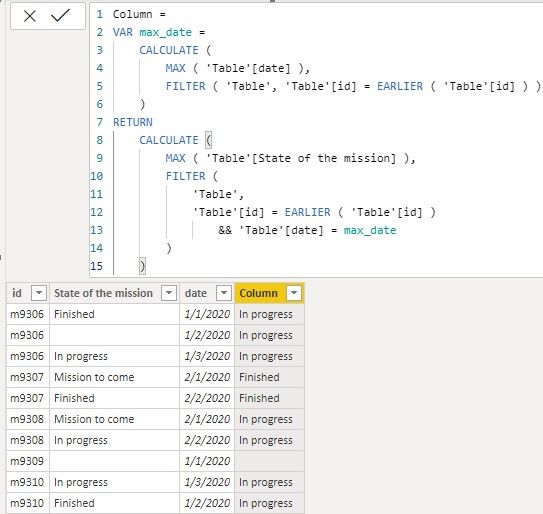
If it doesn’t meet your requirement, could you please show the exact expected result based on the table that we have shared?
BTW, pbix as attached.
Best regards,
Community Support Team _ zhenbw
If this post helps, then please consider Accept it as the solution to help the other members find it more quickly.
- Mark as New
- Bookmark
- Subscribe
- Mute
- Subscribe to RSS Feed
- Permalink
- Report Inappropriate Content
Hi @Pingouin_Puni ,
We can create a calculate column to meet your requirement.
Column =
VAR max_date =
    CALCULATE (
        MAX ( 'Table'[date] ),
        FILTER ( 'Table', 'Table'[id] = EARLIER ( 'Table'[id] ) )
    )
RETURN
    CALCULATE (
        MAX ( 'Table'[State of the mission] ),
        FILTER (
            'Table',
            'Table'[id] = EARLIER ( 'Table'[id] )
                && 'Table'[date] = max_date
        )
)
The result like this,
If it doesn’t meet your requirement, could you please show the exact expected result based on the table that we have shared?
BTW, pbix as attached.
Best regards,
Community Support Team _ zhenbw
If this post helps, then please consider Accept it as the solution to help the other members find it more quickly.
- Mark as New
- Bookmark
- Subscribe
- Mute
- Subscribe to RSS Feed
- Permalink
- Report Inappropriate Content
Hello @v-zhenbw-msft ,
This last solution with a calculated colomn worked perfectly and answered my need. I just replaced dates with the priority idea of @camargos88 , so thank you both of you 🙂
Regards,
Pingouin Puni


- Mark as New
- Bookmark
- Subscribe
- Mute
- Subscribe to RSS Feed
- Permalink
- Report Inappropriate Content
Hi @Pingouin_Puni ,
How are you ordering the State of missing column ?
You can give them a numerical values (by priority).
After that you can get the last value per id.
Does that help you ?
Ricardo
Did I answer your question? Mark my post as a solution!
Proud to be a Super User!
- Mark as New
- Bookmark
- Subscribe
- Mute
- Subscribe to RSS Feed
- Permalink
- Report Inappropriate Content
Thank you for answering @camargos88 ,
This are the different sates of mission i have and i gave them a priority value:
| Status of the mission | Priority |
| No mission | 0 |
| Mission to come | 0 |
| Finished | 0 |
| In progress | 1 |
As for the last value par ID, do you know what would be the dax formula ? I'm guessing MAX( ) would be involved but I can't figure it out. I'm still new on DAX, but learn every day 🙂
Pingouin Puni
- Mark as New
- Bookmark
- Subscribe
- Mute
- Subscribe to RSS Feed
- Permalink
- Report Inappropriate Content
Hi @Pingouin_Puni ,
Just related both tables by status and create this measure:
Did I answer your question? Mark my post as a solution!
Proud to be a Super User!

Helpful resources

Power BI Dataviz World Championships
The Power BI Data Visualization World Championships is back! Get ahead of the game and start preparing now!

Power BI Monthly Update - December 2025
Check out the December 2025 Power BI Holiday Recap!

FabCon Atlanta 2026
Join us at FabCon Atlanta, March 16-20, for the ultimate Fabric, Power BI, AI and SQL community-led event. Save $200 with code FABCOMM.

| User | Count |
|---|---|
| 40 | |
| 38 | |
| 36 | |
| 29 | |
| 28 |


| User | Count |
|---|---|
| 127 | |
| 88 | |
| 78 | |
| 66 | |
| 65 |


