cancel
Showing results for 
Search instead for 
Did you mean: 

The Power BI Data Visualization World Championships is back! Get ahead of the game and start preparing now! Learn more

Reply
mmace1
Impactful Individual

Anyway to let users select visual header of Date slicer in service?

2022-01-05 11_42_18-Window.png

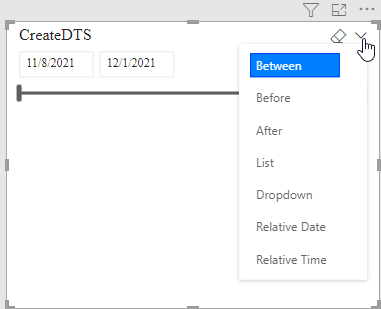
In Power BI Desktop - one can switch between the various types of built-in date slicers  - see above. 

I'd like users in the service to have this same flexibility. But seemingly the only way for them to access that menu, is if they go to 'Edit' on the report - and that's no good. 

The only workaround I can find is instead putting the date in the slicer pane - but that then mixes in the slicer pane, which is something I don't want to do. 

Any other way to give users the above date slicer flexibility? 

1 ACCEPTED SOLUTION
VahidDM
Super User
Super User

Hi @mmace1 


You can set different bookmarks for different types of Slicer, and add those bookmarks as a buttons to your report.


If this post helps, please consider accepting it as the solution to help the other members find it more quickly.
Appreciate your Kudos!!
LinkedIn: 
www.linkedin.com/in/vahid-dm/


View solution in original post

5 REPLIES 5
parry2k
Super User
Super User

@Watsky Totally agree. if one person gets the benefit, the job is done. Keep it up. 


Subscribe to the @PowerBIHowTo YT channel for an upcoming video on List and Record functions in Power Query!!

Learn Power BI and Fabric - subscribe to our YT channel - Click here: @PowerBIHowTo

If my solution proved useful, I'd be delighted to receive Kudos. When you put effort into asking a question, it's equally thoughtful to acknowledge and give Kudos to the individual who helped you solve the problem. It's a small gesture that shows appreciation and encouragement! ❤


Did I answer your question? Mark my post as a solution. Proud to be a Super User! Appreciate your Kudos 🙂
Feel free to email me with any of your BI needs.

parry2k
Super User
Super User

@Watsky oh boy that's a lot of work. Well done @Watsky 👏


Subscribe to the @PowerBIHowTo YT channel for an upcoming video on List and Record functions in Power Query!!

Learn Power BI and Fabric - subscribe to our YT channel - Click here: @PowerBIHowTo

If my solution proved useful, I'd be delighted to receive Kudos. When you put effort into asking a question, it's equally thoughtful to acknowledge and give Kudos to the individual who helped you solve the problem. It's a small gesture that shows appreciation and encouragement! ❤


Did I answer your question? Mark my post as a solution. Proud to be a Super User! Appreciate your Kudos 🙂
Feel free to email me with any of your BI needs.

@parry2k  lol yes indeed it was! But I figured it could be benefical for others who want to give it a spin. It's worth it if at least one person gets some use out of it.


Did my answer(s) help you? Give it a kudos by clicking the Thumbs Up!
Did my post answer your question(s)? Mark my post as a solution. This will help others find the solution.

Proud to be a Super User!

Watsky
Solution Sage
Solution Sage

Hey @mmace1 , 

I agree with @VahidDM. What I would add is that there are some ideas out there that haven't really gained any traction on this subject that need more votes see:

Microsoft Idea  · Allow Users to Change Date Slicer Type (powerbi.com)

Microsoft Idea  · Allow date slicer type change without edit permission (powerbi.com)


Also, if you're interested. After you initially posted this question. I started writing a blog post on how to create the slicer using bookmarks. I wrote it step-by-step for you and included a demo so you can try it out. You can check it out here:

Give users the ability to change a slicer on a pub... - Microsoft Power BI Community


Did my answer(s) help you? Give it a kudos by clicking the Thumbs Up!
Did my post answer your question(s)? Mark my post as a solution. This will help others find the solution.

Proud to be a Super User!

VahidDM
Super User
Super User

Hi @mmace1 


You can set different bookmarks for different types of Slicer, and add those bookmarks as a buttons to your report.


If this post helps, please consider accepting it as the solution to help the other members find it more quickly.
Appreciate your Kudos!!
LinkedIn: 
www.linkedin.com/in/vahid-dm/


Helpful resources

Announcements
November Power BI Update Carousel

Power BI Monthly Update - November 2025

Check out the November 2025 Power BI update to learn about new features.

Fabric Data Days Carousel

Fabric Data Days

Advance your Data & AI career with 50 days of live learning, contests, hands-on challenges, study groups & certifications and more!

FabCon Atlanta 2026 carousel

FabCon Atlanta 2026

Join us at FabCon Atlanta, March 16-20, for the ultimate Fabric, Power BI, AI and SQL community-led event. Save $200 with code FABCOMM.

Top Kudoed Authors