New Offer! Become a Certified Fabric Data Engineer
Check your eligibility for this 50% exam voucher offer and join us for free live learning sessions to get prepared for Exam DP-700.
Get Started- Power BI forums
- Get Help with Power BI
- Desktop
- Service
- Report Server
- Power Query
- Mobile Apps
- Developer
- DAX Commands and Tips
- Custom Visuals Development Discussion
- Health and Life Sciences
- Power BI Spanish forums
- Translated Spanish Desktop
- Training and Consulting
- Instructor Led Training
- Dashboard in a Day for Women, by Women
- Galleries
- Community Connections & How-To Videos
- COVID-19 Data Stories Gallery
- Themes Gallery
- Data Stories Gallery
- R Script Showcase
- Webinars and Video Gallery
- Quick Measures Gallery
- 2021 MSBizAppsSummit Gallery
- 2020 MSBizAppsSummit Gallery
- 2019 MSBizAppsSummit Gallery
- Events
- Ideas
- Custom Visuals Ideas
- Issues
- Issues
- Events
- Upcoming Events
Don't miss out! 2025 Microsoft Fabric Community Conference, March 31 - April 2, Las Vegas, Nevada. Use code MSCUST for a $150 discount. Prices go up February 11th. Register now.
- Power BI forums
- Forums
- Get Help with Power BI
- Desktop
- Re: Any timeline on when a live connection to a ms...
- Subscribe to RSS Feed
- Mark Topic as New
- Mark Topic as Read
- Float this Topic for Current User
- Bookmark
- Subscribe
- Printer Friendly Page


- Mark as New
- Bookmark
- Subscribe
- Mute
- Subscribe to RSS Feed
- Permalink
- Report Inappropriate Content
Any timeline on when a live connection to a msmdpump.dll (SSAS) will be supported?
The import mode works with a msmdpump.dll (SSAS) connection but not the live connection due to a bug with the authentification from Power BI. When will this be fixed? Live connection to the pump works with Excel and Tableau.


- Mark as New
- Bookmark
- Subscribe
- Mute
- Subscribe to RSS Feed
- Permalink
- Report Inappropriate Content
HI @tannera,
I think it is feature than a bug.
Based on research, it seems like a route mapping pool application who used to dynamic switch SSAS datasource.
Actually, current live mode in power bi not support dynamic changed datasource, it is complex to change current datasoruce to another one.
In addition, if you share more detail information about this issue, it will be help for troubleshooting.
Regards,
Xiaoxin Sheng
If this post helps, please consider accept as solution to help other members find it more quickly.
- Mark as New
- Bookmark
- Subscribe
- Mute
- Subscribe to RSS Feed
- Permalink
- Report Inappropriate Content
It cannot be a feature if Excel and Tableau support a live connection through the pump.
This is what happens:
Live connection to the SSAS pump does not work.
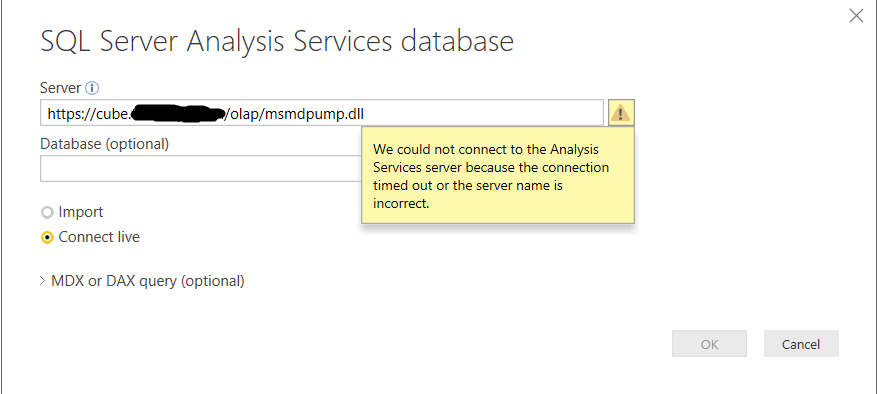
But when selecting 'Import' instead of 'Connect live', the same link works and we get an authentification menu.
When using our login details in the 'Basic' menu, the connection works. In the 'Windows' login it does not work.

Can you confirm if this will ever be fixed, because our (and our clients') adoption of Power BI pro/premium depends on msmdpump.dll live connection support.
- Mark as New
- Bookmark
- Subscribe
- Mute
- Subscribe to RSS Feed
- Permalink
- Report Inappropriate Content
Is there a method to live connect to the SSAS with a connection string in PBI Desktop?
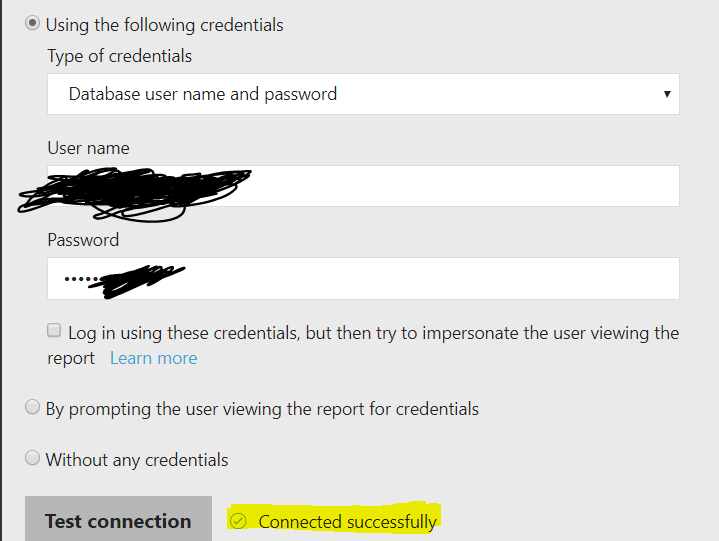
I just tried with Power BI Report Server. The data source connection asks for a connection string and authentification, so I was able to connect successfuly to the SSAS to the pump.

- Mark as New
- Bookmark
- Subscribe
- Mute
- Subscribe to RSS Feed
- Permalink
- Report Inappropriate Content
Hi @tannera,
Based on test, power bi not support live connect to a dynamic SSAS datasource which provided by 'msmdpump.dll'.
Actually, it only support to connect to static data source, every time you change the connection string or data, power bi need to rebuild the report and reload the relationships.
For import mode, power bi will import records from current datasource. If you change the stored config file, it may remove cache and reload from new datasource.
Regards,
Xiaoxin Sheng
If this post helps, please consider accept as solution to help other members find it more quickly.
- Mark as New
- Bookmark
- Subscribe
- Mute
- Subscribe to RSS Feed
- Permalink
- Report Inappropriate Content
Thanks for your response.
Any plans to offer an OOTB feature for us to specify a complete SSAS connection string?

- Mark as New
- Bookmark
- Subscribe
- Mute
- Subscribe to RSS Feed
- Permalink
- Report Inappropriate Content
I am also looking forward for the answer. Tableau and Excel have this capability, this is a must have.
- Mark as New
- Bookmark
- Subscribe
- Mute
- Subscribe to RSS Feed
- Permalink
- Report Inappropriate Content
+1 . Did run in the same issue today. No problem to connect via https to SSAS via Excel,Tableau,XLCubed...BUT NOT with Power BI Desktop? Can't belive that this still is not possible in 2020. Seems to be more a PBI Desktop UI Bug then a real technical limitation (as other client tools work without issue)?!

Helpful resources

Join us at the Microsoft Fabric Community Conference
March 31 - April 2, 2025, in Las Vegas, Nevada. Use code MSCUST for a $150 discount! Prices go up Feb. 11th.

Power BI Monthly Update - January 2025
Check out the January 2025 Power BI update to learn about new features in Reporting, Modeling, and Data Connectivity.

Fabric Community Update - January 2025
Find out what's new and trending in the Fabric community.

| User | Count |
|---|---|
| 147 | |
| 85 | |
| 66 | |
| 52 | |
| 46 |


| User | Count |
|---|---|
| 215 | |
| 90 | |
| 83 | |
| 66 | |
| 58 |


