Join us at FabCon Atlanta from March 16 - 20, 2026, for the ultimate Fabric, Power BI, AI and SQL community-led event. Save $200 with code FABCOMM.
Register now!The Power BI Data Visualization World Championships is back! Get ahead of the game and start preparing now! Learn more
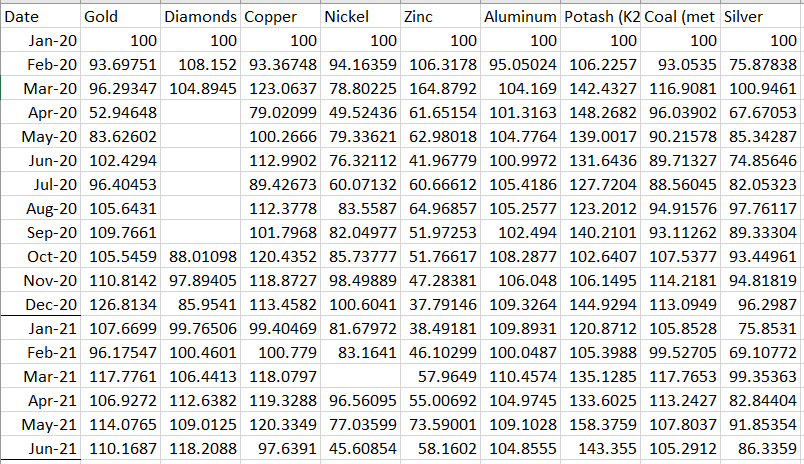
Currently, my data looks like the below. I can plot it fine using a stacked bar or multi-line graph, but the issue arises if I want to make a slicer that allows me to add/remove categories. I'm assuming I need to format my dataset to be Date, Category, Value as the columns? Is there any easy way to do this?
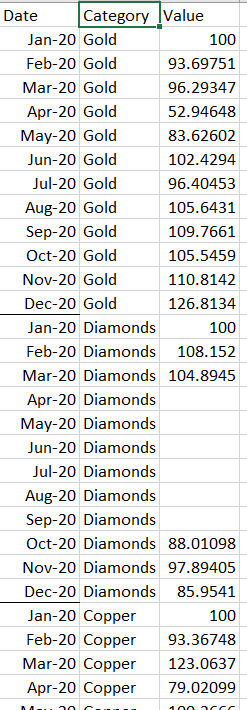
The below is a sample of me chaning my data manually.
Solved! Go to Solution.
HEllo @reagornx ,
this could be acheived throup unpivoting, check this out https://youtu.be/hGj2axffxHo?si=uWEBXL7Hu0C3mhaa
Proud to be a Super User! | |
HEllo @reagornx ,
this could be acheived throup unpivoting, check this out https://youtu.be/hGj2axffxHo?si=uWEBXL7Hu0C3mhaa
Proud to be a Super User! | |
Worked perfectly, thank you
The Power BI Data Visualization World Championships is back! Get ahead of the game and start preparing now!
Check out the November 2025 Power BI update to learn about new features.
| User | Count |
|---|---|
| 59 | |
| 46 | |
| 42 | |
| 23 | |
| 17 |
| User | Count |
|---|---|
| 190 | |
| 122 | |
| 96 | |
| 66 | |
| 47 |