cancel
Showing results for 
Search instead for 
Did you mean: 

The Power BI Data Visualization World Championships is back! Get ahead of the game and start preparing now! Learn more

Reply
Anonymous
Not applicable

An impossibly simple division

Link to PBIX-file: ShopInfo


Hi all!


I could use some help wrapping my head around the following issue:


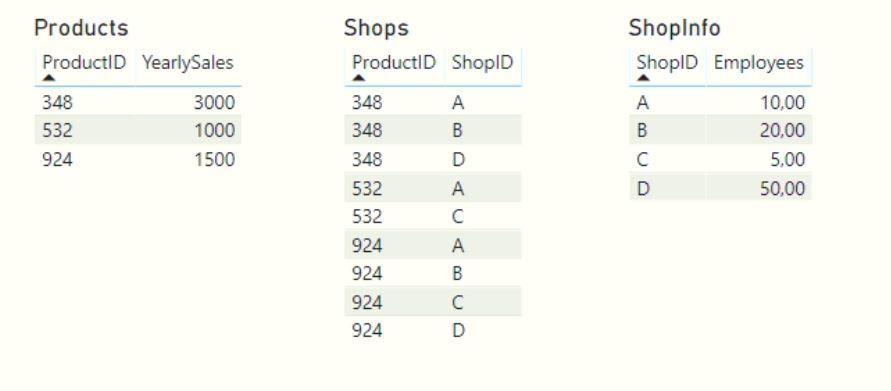
I have three tables in my model:
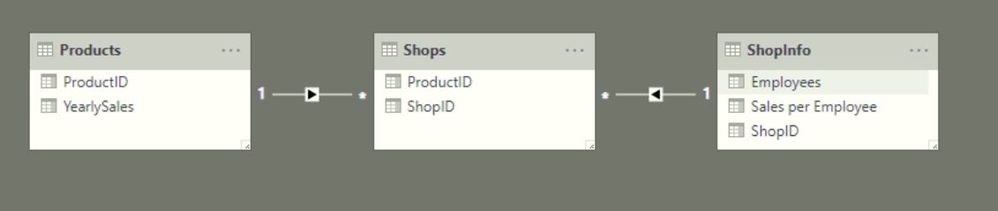
 

model.JPG


They look like:


tables.JPG

Now I've created the following table using these tables:


result.JPG

Now, I want another column in this table that will divide the number of Employees over the YearlySales. So..


ProductIDEmployeesYearlySalesYearlySales per Employee
348103000300
348203000150
34850300060
53251000200
532101000100
92451500300
924101500150
92420150075
92450150030


In the table, I have ticked the 'Don't Summarize' options for the columns 'Employees' and 'YearlySales'.


But as I try to create a measure or calculated column in the ShopInfo-table which just divides both values, the formula editor requires me to enforce some kind of aggregation (max, min, sum, etc...) before being able to include the YearlySales. Which in turn messes up the calculation.. I tried a lot of variations, but no success. 😞


Any ideas on how to solve this? I'm even questioning if I should create a measure or calculated column. Help is very much appreciated. 

1 ACCEPTED SOLUTION
az38
Community Champion
Community Champion

Hi @Anonymous 

in depends on your use case scenario

but in the most common case you can try a measure

YearlySales per Employee = 
DIVIDE(
CALCULATE(MIN(Products[YearlySales])),
CALCULATE(MIN(ShopInfo[Employees]))
)

do not hesitate to give a kudo to useful posts and mark solutions as solution
LinkedIn

View solution in original post

2 REPLIES 2
camargos88
Community Champion
Community Champion

Hi @Anonymous ,


You need to change the direction of relationship to both between Shops and ShopInfo.


Also create this measure:


Measure = DIVIDE(SUM(Products[YearlySales]); SUM(ShopInfo[Employees]))
 
Capture.PNG
 
Ricardo


Did I answer your question? Mark my post as a solution!

Proud to be a Super User!


az38
Community Champion
Community Champion

Hi @Anonymous 

in depends on your use case scenario

but in the most common case you can try a measure

YearlySales per Employee = 
DIVIDE(
CALCULATE(MIN(Products[YearlySales])),
CALCULATE(MIN(ShopInfo[Employees]))
)

do not hesitate to give a kudo to useful posts and mark solutions as solution
LinkedIn

Helpful resources

Announcements
Power BI DataViz World Championships

Power BI Dataviz World Championships

The Power BI Data Visualization World Championships is back! Get ahead of the game and start preparing now!

December 2025 Power BI Update Carousel

Power BI Monthly Update - December 2025

Check out the December 2025 Power BI Holiday Recap!

FabCon Atlanta 2026 carousel

FabCon Atlanta 2026

Join us at FabCon Atlanta, March 16-20, for the ultimate Fabric, Power BI, AI and SQL community-led event. Save $200 with code FABCOMM.