cancel
Showing results for 
Search instead for 
Did you mean: 

We've captured the moments from FabCon & SQLCon that everyone is talking about, and we are bringing them to the community, live and on-demand. Starts on April 14th. Register now

Reply
muggydaniel
New Member

Amending Rows based on Duplicate Count

Hi all 


Looking to amend rows based on duplicate count of such rows 


For each duplicate count of a row, any instance requires to be the "main" row and then the rest are "duplicate rows" It needs to be completed within Power Query and not as a measure 


Before: 

Customer
Adam
Adam
Adam
Chris
Chris
Anthony


After:


CustomerEdit
AdamMain
AdamDuplicate
AdamDuplicate
ChrisMain
ChrisDuplicate
AnthonyMain


Does anyone know how to achieve this? 


Kind regards, 

1 ACCEPTED SOLUTION
danextian
Super User
Super User

Hi @muggydaniel ,


In PQ you can  use Table. Group and then from the resulting group, add an index column. Those with 0 index is the main row else the duplicate. Here's a sample code:


let
    Source = Table.FromRows(Json.Document(Binary.Decompress(Binary.FromText("i45WckxJzFWK1cHGcM4oyixGYznmlWTk51UqxcYCAA==", BinaryEncoding.Base64), Compression.Deflate)), let _t = ((type nullable text) meta [Serialized.Text = true]) in type table [Customer = _t]),
    #"Changed Type" = Table.TransformColumnTypes(Source,{{"Customer", type text}}),
    #"Grouped Rows" = Table.Group(#"Changed Type", {"Customer"}, {{"Group", each _, type table [Customer=nullable text]}}),
    #"Added Custom" = Table.AddColumn(#"Grouped Rows", "Custom", each Table.AddIndexColumn([Group], "Index" ), type table),
    #"Removed Columns" = Table.RemoveColumns(#"Added Custom",{"Group"}),
    #"Expanded Custom" = Table.ExpandTableColumn(#"Removed Columns", "Custom", {"Index"}, {"Index"}),
    #"Added Custom1" = Table.AddColumn(#"Expanded Custom", "Main/Duplicate", each if [Index] = 0 then "Main" else "Duplicate", type text)
in
    #"Added Custom1"
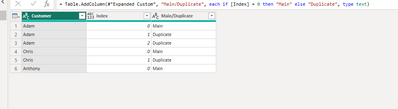
 

danextian_1-1681866139574.png

For small tables, the approach above is fine but on a very large table I would prefer DAX as it is more optimized at scanning a very large table than PQ. After adding an index column and loading the table, I would create this calculated column (not a measure)


Main/Duplicate = 
IF (
    CALCULATE ( MIN ( 'DAX'[Index] ), ALLEXCEPT ( 'DAX', 'DAX'[Customer] ) ) = 'DAX'[Index],
    "Main",
    "Duplicate"
)
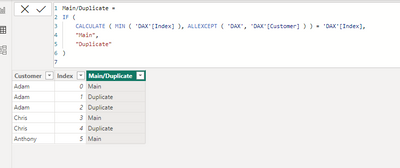
 

danextian_2-1681866169024.png


Please see attached pbix for your reference.


Dane Belarmino | Microsoft MVP | Proud to be a Super User!

Did I answer your question? Mark my post as a solution!


"Tell me and I’ll forget; show me and I may remember; involve me and I’ll understand."
Need Power BI consultation, get in touch with me on LinkedIn or hire me on UpWork.
Learn with me on YouTube @DAXJutsu or follow my page on Facebook @DAXJutsuPBI.

View solution in original post

1 REPLY 1
danextian
Super User
Super User

Hi @muggydaniel ,


In PQ you can  use Table. Group and then from the resulting group, add an index column. Those with 0 index is the main row else the duplicate. Here's a sample code:


let
    Source = Table.FromRows(Json.Document(Binary.Decompress(Binary.FromText("i45WckxJzFWK1cHGcM4oyixGYznmlWTk51UqxcYCAA==", BinaryEncoding.Base64), Compression.Deflate)), let _t = ((type nullable text) meta [Serialized.Text = true]) in type table [Customer = _t]),
    #"Changed Type" = Table.TransformColumnTypes(Source,{{"Customer", type text}}),
    #"Grouped Rows" = Table.Group(#"Changed Type", {"Customer"}, {{"Group", each _, type table [Customer=nullable text]}}),
    #"Added Custom" = Table.AddColumn(#"Grouped Rows", "Custom", each Table.AddIndexColumn([Group], "Index" ), type table),
    #"Removed Columns" = Table.RemoveColumns(#"Added Custom",{"Group"}),
    #"Expanded Custom" = Table.ExpandTableColumn(#"Removed Columns", "Custom", {"Index"}, {"Index"}),
    #"Added Custom1" = Table.AddColumn(#"Expanded Custom", "Main/Duplicate", each if [Index] = 0 then "Main" else "Duplicate", type text)
in
    #"Added Custom1"


danextian_1-1681866139574.png

For small tables, the approach above is fine but on a very large table I would prefer DAX as it is more optimized at scanning a very large table than PQ. After adding an index column and loading the table, I would create this calculated column (not a measure)


Main/Duplicate = 
IF (
    CALCULATE ( MIN ( 'DAX'[Index] ), ALLEXCEPT ( 'DAX', 'DAX'[Customer] ) ) = 'DAX'[Index],
    "Main",
    "Duplicate"
)


danextian_2-1681866169024.png


Please see attached pbix for your reference.


Dane Belarmino | Microsoft MVP | Proud to be a Super User!

Did I answer your question? Mark my post as a solution!


"Tell me and I’ll forget; show me and I may remember; involve me and I’ll understand."
Need Power BI consultation, get in touch with me on LinkedIn or hire me on UpWork.
Learn with me on YouTube @DAXJutsu or follow my page on Facebook @DAXJutsuPBI.

Helpful resources

Announcements
New to Fabric survey Carousel

New to Fabric Survey

If you have recently started exploring Fabric, we'd love to hear how it's going. Your feedback can help with product improvements.

Power BI DataViz World Championships carousel

Power BI DataViz World Championships - June 2026

A new Power BI DataViz World Championship is coming this June! Don't miss out on submitting your entry.

Join our Fabric User Panel

Join our Fabric User Panel

Share feedback directly with Fabric product managers, participate in targeted research studies and influence the Fabric roadmap.

March Power BI Update Carousel

Power BI Community Update - March 2026

Check out the March 2026 Power BI update to learn about new features.