
cancel
Showing results for 
Search instead for 
Did you mean: 

View all the Fabric Data Days sessions on demand. View schedule

Reply
Abhi92
Frequent Visitor

Allot Time range to a particular date/time stamp

Hi,


I have a date/time stamp in this format 

11/21/2016 5:03:18 AM


I want to have a column which says that this time is between 5 and 6 am. How do I do this ? Please help. I am trying to create hour by hour table.

1 ACCEPTED SOLUTION

Hi @Abhi92,


According to your description above, I have made a sample for your reference.


I assume you have a table called "Table1" like below.


t1.PNG


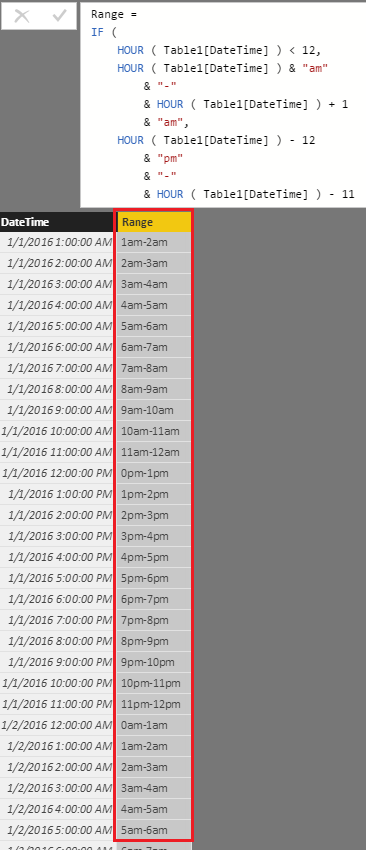
Then you should be able to use the formula below to create a calculate column to get the time range.

Range =
IF (
    HOUR ( Table1[DateTime] ) < 12,
    HOUR ( Table1[DateTime] ) & "am"
        & "-"
        & HOUR ( Table1[DateTime] ) + 1
        & "am",
    HOUR ( Table1[DateTime] ) - 12
        & "pm"
        & "-"
        & HOUR ( Table1[DateTime] ) - 11
        & "pm"
)

c1.PNG


Regards

View solution in original post

2 REPLIES 2
Abhi92
Frequent Visitor

I can convert the date/time to time but still I want to have an hourly range column. For example: 1am to 2am,2am to 3am etc..This way I can see how many parts were made for each time range. Also, I want to show the visual in a table format


Range         Net pieces

1am-2am        50

2am-3am        100


Something like this.

Hi @Abhi92,


According to your description above, I have made a sample for your reference.


I assume you have a table called "Table1" like below.


t1.PNG


Then you should be able to use the formula below to create a calculate column to get the time range.

Range =
IF (
    HOUR ( Table1[DateTime] ) < 12,
    HOUR ( Table1[DateTime] ) & "am"
        & "-"
        & HOUR ( Table1[DateTime] ) + 1
        & "am",
    HOUR ( Table1[DateTime] ) - 12
        & "pm"
        & "-"
        & HOUR ( Table1[DateTime] ) - 11
        & "pm"
)

c1.PNG


Regards

Helpful resources

Announcements
November Power BI Update Carousel

Power BI Monthly Update - November 2025

Check out the November 2025 Power BI update to learn about new features.

Fabric Data Days Carousel

Fabric Data Days

Advance your Data & AI career with 50 days of live learning, contests, hands-on challenges, study groups & certifications and more!

FabCon Atlanta 2026 carousel

FabCon Atlanta 2026

Join us at FabCon Atlanta, March 16-20, for the ultimate Fabric, Power BI, AI and SQL community-led event. Save $200 with code FABCOMM.

Top Solution Authors
Top Kudoed Authors