cancel
Showing results for 
Search instead for 
Did you mean: 

The Power BI Data Visualization World Championships is back! Get ahead of the game and start preparing now! Learn more

Reply
garynorcrossmmc
Advocate IV
Advocate IV

All Selected Minimum Date - Differences in Date vs. Year/Month

Hi all,


I am trying to create a measure that calculates the total count of hires within a specified date range, but does not include hires on the minimum date.  I realize this might be a strange requirement, but it is what the user wants.


Right now, I am using this measure:

## - Hire Count (Regular) =
CALCULATE(
COUNT('HR FACT_WORKFORCEEVENT'[PERSONID]),
or('HR DIM_EMPLOYMENT'[EMPLOYMENTSUBSTATUS]="Active",'HR DIM_EMPLOYMENT'[EMPLOYMENTSUBSTATUS]="Leave With Pay"),
'HR DIM_EMPLOYMENT'[EMPLOYMENTTYPE]="Regular",
'HR FACT_WORKFORCEEVENT'[HIRECOUNT]=1,
'HR FACT_WORKFORCEEVENT'[ACQUISITION]=0,
FILTER(ALL('HR FACT_WORKFORCEEVENT'),'HR FACT_WORKFORCEEVENT'[EFFFROMDATE]<=max('Date'[Date]) &&
'HR FACT_WORKFORCEEVENT'[EFFFROMDATE]>minx('Date','Date'[Date]))
)
 
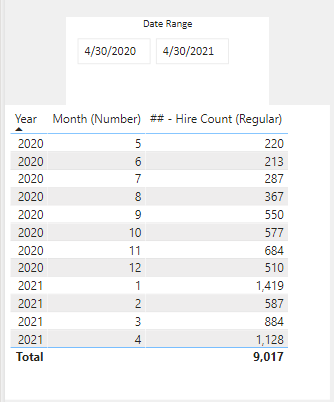
This function provides me with the correct total at the overall level (which is 9,017), however the individual monthly totals are incorrect when trying to display this by year/month:
Capture1.PNG
 
What I believe this is doing is counting the totals by month and excluding the count of PERSONID on the first date of each month, which is not the result I need. 
 
My question is how can I revise this measure so that it ONLY excludes the first date from the Date Range slicer and not the first date of EACH MONTH?  

Thanks in advance.
1 ACCEPTED SOLUTION
amitchandak
Super User
Super User

@garynorcrossmmc , Try with this small change


## - Hire Count (Regular) =
CALCULATE(
COUNT('HR FACT_WORKFORCEEVENT'[PERSONID]),
or('HR DIM_EMPLOYMENT'[EMPLOYMENTSUBSTATUS]="Active",'HR DIM_EMPLOYMENT'[EMPLOYMENTSUBSTATUS]="Leave With Pay"),
'HR DIM_EMPLOYMENT'[EMPLOYMENTTYPE]="Regular",
'HR FACT_WORKFORCEEVENT'[HIRECOUNT]=1,
'HR FACT_WORKFORCEEVENT'[ACQUISITION]=0,
FILTER(ALL('HR FACT_WORKFORCEEVENT'),'HR FACT_WORKFORCEEVENT'[EFFFROMDATE]<=max('Date'[Date]) &&
'HR FACT_WORKFORCEEVENT'[EFFFROMDATE]>Min('Date'[Date]))
)

/// Do you have to date , then try like 
## - Hire Count (Regular) =
CALCULATE(
COUNT('HR FACT_WORKFORCEEVENT'[PERSONID]),
or('HR DIM_EMPLOYMENT'[EMPLOYMENTSUBSTATUS]="Active",'HR DIM_EMPLOYMENT'[EMPLOYMENTSUBSTATUS]="Leave With Pay"),
'HR DIM_EMPLOYMENT'[EMPLOYMENTTYPE]="Regular",
'HR FACT_WORKFORCEEVENT'[HIRECOUNT]=1,
'HR FACT_WORKFORCEEVENT'[ACQUISITION]=0,
FILTER(ALL('HR FACT_WORKFORCEEVENT'),'HR FACT_WORKFORCEEVENT'[EFFFROMDATE]<=max('Date'[Date]) &&
'HR FACT_WORKFORCEEVENT'[EFFToDATE]>max('Date'[Date]))
)
Share with Power BI Enthusiasts: Full Power BI Video (20 Hours) YouTube
Microsoft Fabric Series 60+ Videos YouTube
Microsoft Fabric Hindi End to End YouTube

View solution in original post

2 REPLIES 2
v-robertq-msft
Community Support
Community Support

Hi, @garynorcrossmmc 

Has amitchandak’s reply helped you to successfully solve this problem?

If so, would you like to mark your own reply as a solution so that others can learn from it too?

Another important point you may dismiss is that you should make sure the date table doesn’t have a relationship with the main table, it may cause problems if you used the ‘Date’[Date] as the column in the slicer.


Thanks in advance!


Best Regards,

Community Support Team _Robert Qin

If this post helps, then please consider Accept it as the solution to help the other members find it more quickly.

amitchandak
Super User
Super User

@garynorcrossmmc , Try with this small change


## - Hire Count (Regular) =
CALCULATE(
COUNT('HR FACT_WORKFORCEEVENT'[PERSONID]),
or('HR DIM_EMPLOYMENT'[EMPLOYMENTSUBSTATUS]="Active",'HR DIM_EMPLOYMENT'[EMPLOYMENTSUBSTATUS]="Leave With Pay"),
'HR DIM_EMPLOYMENT'[EMPLOYMENTTYPE]="Regular",
'HR FACT_WORKFORCEEVENT'[HIRECOUNT]=1,
'HR FACT_WORKFORCEEVENT'[ACQUISITION]=0,
FILTER(ALL('HR FACT_WORKFORCEEVENT'),'HR FACT_WORKFORCEEVENT'[EFFFROMDATE]<=max('Date'[Date]) &&
'HR FACT_WORKFORCEEVENT'[EFFFROMDATE]>Min('Date'[Date]))
)

/// Do you have to date , then try like 
## - Hire Count (Regular) =
CALCULATE(
COUNT('HR FACT_WORKFORCEEVENT'[PERSONID]),
or('HR DIM_EMPLOYMENT'[EMPLOYMENTSUBSTATUS]="Active",'HR DIM_EMPLOYMENT'[EMPLOYMENTSUBSTATUS]="Leave With Pay"),
'HR DIM_EMPLOYMENT'[EMPLOYMENTTYPE]="Regular",
'HR FACT_WORKFORCEEVENT'[HIRECOUNT]=1,
'HR FACT_WORKFORCEEVENT'[ACQUISITION]=0,
FILTER(ALL('HR FACT_WORKFORCEEVENT'),'HR FACT_WORKFORCEEVENT'[EFFFROMDATE]<=max('Date'[Date]) &&
'HR FACT_WORKFORCEEVENT'[EFFToDATE]>max('Date'[Date]))
)
Share with Power BI Enthusiasts: Full Power BI Video (20 Hours) YouTube
Microsoft Fabric Series 60+ Videos YouTube
Microsoft Fabric Hindi End to End YouTube

Helpful resources

Announcements
Power BI DataViz World Championships

Power BI Dataviz World Championships

The Power BI Data Visualization World Championships is back! Get ahead of the game and start preparing now!

December 2025 Power BI Update Carousel

Power BI Monthly Update - December 2025

Check out the December 2025 Power BI Holiday Recap!

FabCon Atlanta 2026 carousel

FabCon Atlanta 2026

Join us at FabCon Atlanta, March 16-20, for the ultimate Fabric, Power BI, AI and SQL community-led event. Save $200 with code FABCOMM.