Forum Discussion

Aggregating Duration/Time
- 10 years ago
Sure, I can give a general solution but I have no clue as to what AHT refers to. Average Hours Talked? In any case, simple enough, I've done in a series of steps to make it readable.
Given a number of seconds "[Seconds]", create the following columns/measures or what not:
Hours = ROUNDDOWN([Seconds]/360,0)
Minutes = ROUNDDOWN(([Seconds]-[Hours]*360)/60,0)
Sec = MOD(([Seconds]-[Hours]*360),60)
H = IF(LEN([Hours])=1,CONCATENATE("0",[Hours]),CONCATENATE("",[Hours]))
M = IF(LEN([Minutes])=1,CONCATENATE("0",[Minutes]),CONCATENATE("",[Minutes]))
S = IF(LEN([Sec])=1,CONCATENATE("0",[Sec]),CONCATENATE("",[Sec]))
Text = CONCATENATE([H],CONCATENATE(":",CONCATENATE([M],CONCATENATE(":",[S]))))
Text comes out like 01:03:36 for a value of 576 seconds.


Different type of data but the same topic. I'm completely new to PowerBI so I'm not sure if I should start a new topic or just add on here.
Anyway.. I am pulling data from machines that are running. The data will be recorded every second with a date stamp looking something like this...
_MachineId_TimeStamp_Value
| 6 | 12/5/2016 3:49:17 PM | 3 |
| 7 | 12/5/2016 3:49:17 PM | 0 |
| 10 | 12/5/2016 3:49:17 PM | 1 |
| 3 | 12/5/2016 3:49:17 PM | 3 |
| 5 | 12/5/2016 3:49:17 PM | 0 |
| 6 | 12/5/2016 3:49:18 PM | 3 |
| 7 | 12/5/2016 3:49:18 PM | 0 |
| 10 | 12/5/2016 3:49:18 PM | 1 |
| 3 | 12/5/2016 3:49:18 PM | 3 |
| 5 | 12/5/2016 3:49:18 PM | 0 |
| 6 | 12/5/2016 3:49:18 PM | 3 |
| 7 | 12/5/2016 3:49:18 PM | 0 |
| 10 | 12/5/2016 3:49:18 PM | 1 |
| 3 | 12/5/2016 3:49:18 PM | 3 |
| 5 | 12/5/2016 3:49:18 PM | 0 |
| 6 | 12/5/2016 3:49:19 PM | 4 |
What I have not been able to find or figure out is how to aggreate across a day.
In other words I would like it to end up something like this..
Machine time Len state
3 7am - 7:36 36 Min 1
3 7:36 - 7:38 2 Min 3
3 7:38 - 8:00 22 Min 1
thanks in advance... and if someone could let me know if I did it right by replying to a common thread vs creating new I would appreciate it.
 dshah9 years agoFrequent Visitor
HI smoupre, konstantinos
This helped, although trying to find a easier solution I figured below might help
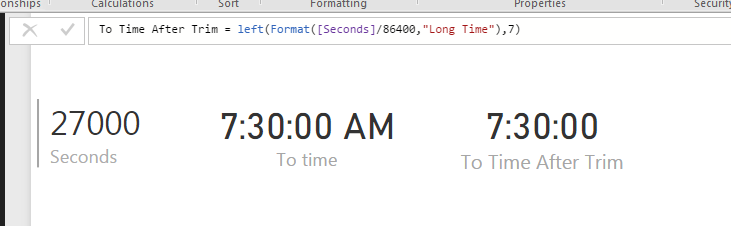
First convert the data into seconds. Then divide the data by 86400 (60 min x 60 secs x 24 hours) to get output that can be converted to time.
Then use below to get time equivalent
FORMAT([seconds]/86400,"Long Time").
This gives time equivalent with AM / PM at end. You can use Left to trim it.
Left(FORMAT([seconds]/86400,"Long Time"),7)
This solves the averaging problem and other time duration related problems.
Additional Date/Time formats in DAX can be find below
https://technet.microsoft.com/en-us/library/ee634813(v=sql.105).aspx
Hope this helps.
Thanks
- Greg_Deckler9 years agoCommunity Champion
This is an interesting problem, I would post this as a new topic as it will get a lot more exposure that way.
 Bwidener8 years agoFrequent Visitor
Can somebody simply paste the exact DAX that will convert seconds to HH:MM:SS, please?
- Greg_Deckler8 years agoCommunity Champion