Forum Discussion

Aggregating Duration/Time
- 10 years ago
Sure, I can give a general solution but I have no clue as to what AHT refers to. Average Hours Talked? In any case, simple enough, I've done in a series of steps to make it readable.
Given a number of seconds "[Seconds]", create the following columns/measures or what not:
Hours = ROUNDDOWN([Seconds]/360,0)
Minutes = ROUNDDOWN(([Seconds]-[Hours]*360)/60,0)
Sec = MOD(([Seconds]-[Hours]*360),60)
H = IF(LEN([Hours])=1,CONCATENATE("0",[Hours]),CONCATENATE("",[Hours]))
M = IF(LEN([Minutes])=1,CONCATENATE("0",[Minutes]),CONCATENATE("",[Minutes]))
S = IF(LEN([Sec])=1,CONCATENATE("0",[Sec]),CONCATENATE("",[Sec]))
Text = CONCATENATE([H],CONCATENATE(":",CONCATENATE([M],CONCATENATE(":",[S]))))
Text comes out like 01:03:36 for a value of 576 seconds.

Pain, but any chance that you could go with a string and CONCATENATE the components together?

Hi
Thank you for the responce.
Could you provide some additional information on your solution? I have found a few solutions designed for Dax in power pivot that work out the hours minutes and seconds and then concentrate them but this is not very flexiable and does not transfer well to Power BI
- Greg_Deckler10 years agoCommunity Champion
Sure, I can give a general solution but I have no clue as to what AHT refers to. Average Hours Talked? In any case, simple enough, I've done in a series of steps to make it readable.
Given a number of seconds "[Seconds]", create the following columns/measures or what not:
Hours = ROUNDDOWN([Seconds]/360,0)
Minutes = ROUNDDOWN(([Seconds]-[Hours]*360)/60,0)
Sec = MOD(([Seconds]-[Hours]*360),60)
H = IF(LEN([Hours])=1,CONCATENATE("0",[Hours]),CONCATENATE("",[Hours]))
M = IF(LEN([Minutes])=1,CONCATENATE("0",[Minutes]),CONCATENATE("",[Minutes]))
S = IF(LEN([Sec])=1,CONCATENATE("0",[Sec]),CONCATENATE("",[Sec]))
Text = CONCATENATE([H],CONCATENATE(":",CONCATENATE([M],CONCATENATE(":",[S]))))
Text comes out like 01:03:36 for a value of 576 seconds.
- konstantinos10 years agoMemorable Member
Greg_Deckler Thanks..Amazing..you saved me a lot of time ( if I even found a solution )..One thing only the Hours are multiply or divided by 3600 & not 360..
I used variables ( not in all versions )on your formulas (filters on same table ) that saved me creating / hiding measures
Test = VAR Duration = AVERAGE ( 'Intranet Activity'[Seconds] ) VAR Hours = ROUNDDOWN ( Duration / 3600; 0 ) VAR Minutes = ROUNDDOWN ( ( Duration - ( Hours * 3600 ) ) / 60; 0 ) VAR Seconds = MOD ( Duration - ( Hours * 3600 ); 60 ) VAR H = IF ( LEN ( Hours ) = 1;
CONCATENATE ( "0"; Hours );
CONCATENATE ( ""; Hours )
) VAR M = IF ( LEN ( Minutes ) = 1; CONCATENATE ( "0"; Minutes ); CONCATENATE ( ""; Minutes ) ) VAR S = IF ( LEN ( Seconds ) = 1; CONCATENATE ( "0"; Seconds ); CONCATENATE ( ""; Seconds ) ) RETURN CONCATENATE ( H; CONCATENATE ( ":"; CONCATENATE ( M; CONCATENATE ( ":"; S ) ) ) )- Greg_Deckler10 years agoCommunity Champion
konstantinos - Dude, you just taught me something amazing, how in the world have I never used VAR statements yet!!
 dshah9 years agoFrequent Visitor
HI smoupre, konstantinos
This helped, although trying to find a easier solution I figured below might help
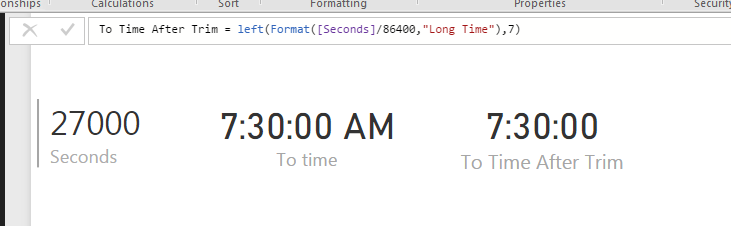
First convert the data into seconds. Then divide the data by 86400 (60 min x 60 secs x 24 hours) to get output that can be converted to time.
Then use below to get time equivalent
FORMAT([seconds]/86400,"Long Time").
This gives time equivalent with AM / PM at end. You can use Left to trim it.
Left(FORMAT([seconds]/86400,"Long Time"),7)
This solves the averaging problem and other time duration related problems.
Additional Date/Time formats in DAX can be find below
https://technet.microsoft.com/en-us/library/ee634813(v=sql.105).aspx
Hope this helps.
Thanks