Forum Discussion

Aggregating Duration/Time
Hi All,
Over the last few months while I've found Power Bi to be a great product that has enabled use to do some truely great things I've really struggled with a few areas of Power Bi namely the aggregation if time.
Example (Time Values in Seconds):
| TalkTime | WrapTime | HoldTime | ||||
| Agent 1 | 60 | 10 | 10 | |||
| Agent 2 | 70 | 10 | 10 | |||
| Agent 1 | 60 | 10 | 0 | |||
| Agent 2 | 80 | 10 | 5 | |||
| Agent 3 | 40 | 10 | 0 | |||
| Agent 1 | 100 | 10 | 0 | |||
| Agent 3 | 60 | 10 | 10 | |||
| Total | 470 | 70 | 35 | Total Seconds | 575 | |
| Calls | 7 | |||||
| AHT (Seconds) | 82.14285714 | |||||
| AHT | 00:01:22 |
I take my raw data in the query editor get any column (example TalkTime) to duration and then create a simple measure (example sum(TalkTime)) to display a total, I can also add the seconds across Talk Wrap and Hold in a new column in query editor change it to duration to get the total time across all three but for the AHT I need to do a dynamic measure outside of the query editor to divide the total by the number of calls, when ever we introduce this the column changes back to a decimal number and displays as a numerical value with no option to display this total as a time formation H:MM:SS etc
Am I missing something, the option to aggregate duration's/times seems to come so naturally in other products but in Power BI I always seem to be having issues.
Sure, I can give a general solution but I have no clue as to what AHT refers to. Average Hours Talked? In any case, simple enough, I've done in a series of steps to make it readable.
Given a number of seconds "[Seconds]", create the following columns/measures or what not:
Hours = ROUNDDOWN([Seconds]/360,0)
Minutes = ROUNDDOWN(([Seconds]-[Hours]*360)/60,0)
Sec = MOD(([Seconds]-[Hours]*360),60)
H = IF(LEN([Hours])=1,CONCATENATE("0",[Hours]),CONCATENATE("",[Hours]))
M = IF(LEN([Minutes])=1,CONCATENATE("0",[Minutes]),CONCATENATE("",[Minutes]))
S = IF(LEN([Sec])=1,CONCATENATE("0",[Sec]),CONCATENATE("",[Sec]))
Text = CONCATENATE([H],CONCATENATE(":",CONCATENATE([M],CONCATENATE(":",[S]))))
Text comes out like 01:03:36 for a value of 576 seconds.

18 Replies
- Greg_DecklerCommunity Champion
Pain, but any chance that you could go with a string and CONCATENATE the components together?
 cmorrisAdvocate II
Hi
Thank you for the responce.
Could you provide some additional information on your solution? I have found a few solutions designed for Dax in power pivot that work out the hours minutes and seconds and then concentrate them but this is not very flexiable and does not transfer well to Power BI
- Greg_DecklerCommunity Champion
Sure, I can give a general solution but I have no clue as to what AHT refers to. Average Hours Talked? In any case, simple enough, I've done in a series of steps to make it readable.
Given a number of seconds "[Seconds]", create the following columns/measures or what not:
Hours = ROUNDDOWN([Seconds]/360,0)
Minutes = ROUNDDOWN(([Seconds]-[Hours]*360)/60,0)
Sec = MOD(([Seconds]-[Hours]*360),60)
H = IF(LEN([Hours])=1,CONCATENATE("0",[Hours]),CONCATENATE("",[Hours]))
M = IF(LEN([Minutes])=1,CONCATENATE("0",[Minutes]),CONCATENATE("",[Minutes]))
S = IF(LEN([Sec])=1,CONCATENATE("0",[Sec]),CONCATENATE("",[Sec]))
Text = CONCATENATE([H],CONCATENATE(":",CONCATENATE([M],CONCATENATE(":",[S]))))
Text comes out like 01:03:36 for a value of 576 seconds.
 nblairRegular Visitor
Different type of data but the same topic. I'm completely new to PowerBI so I'm not sure if I should start a new topic or just add on here.
Anyway.. I am pulling data from machines that are running. The data will be recorded every second with a date stamp looking something like this...
_MachineId_TimeStamp_Value
6 12/5/2016 3:49:17 PM 3 7 12/5/2016 3:49:17 PM 0 10 12/5/2016 3:49:17 PM 1 3 12/5/2016 3:49:17 PM 3 5 12/5/2016 3:49:17 PM 0 6 12/5/2016 3:49:18 PM 3 7 12/5/2016 3:49:18 PM 0 10 12/5/2016 3:49:18 PM 1 3 12/5/2016 3:49:18 PM 3 5 12/5/2016 3:49:18 PM 0 6 12/5/2016 3:49:18 PM 3 7 12/5/2016 3:49:18 PM 0 10 12/5/2016 3:49:18 PM 1 3 12/5/2016 3:49:18 PM 3 5 12/5/2016 3:49:18 PM 0 6 12/5/2016 3:49:19 PM 4 What I have not been able to find or figure out is how to aggreate across a day.
In other words I would like it to end up something like this..
Machine time Len state
3 7am - 7:36 36 Min 1
3 7:36 - 7:38 2 Min 3
3 7:38 - 8:00 22 Min 1
thanks in advance... and if someone could let me know if I did it right by replying to a common thread vs creating new I would appreciate it.
 dshahFrequent Visitor
HI smoupre, konstantinos
This helped, although trying to find a easier solution I figured below might help
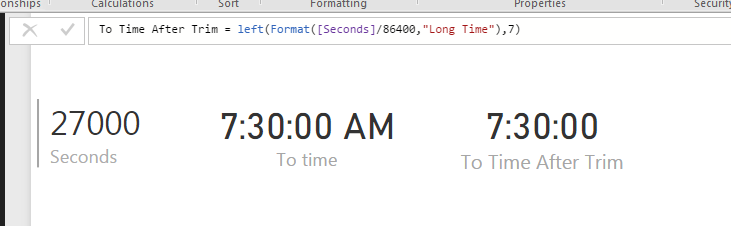
First convert the data into seconds. Then divide the data by 86400 (60 min x 60 secs x 24 hours) to get output that can be converted to time.
Then use below to get time equivalent
FORMAT([seconds]/86400,"Long Time").
This gives time equivalent with AM / PM at end. You can use Left to trim it.
Left(FORMAT([seconds]/86400,"Long Time"),7)
This solves the averaging problem and other time duration related problems.
Additional Date/Time formats in DAX can be find below
https://technet.microsoft.com/en-us/library/ee634813(v=sql.105).aspx
Hope this helps.
Thanks
- Greg_DecklerCommunity Champion
This is an interesting problem, I would post this as a new topic as it will get a lot more exposure that way.
 BwidenerFrequent Visitor
Can somebody simply paste the exact DAX that will convert seconds to HH:MM:SS, please?