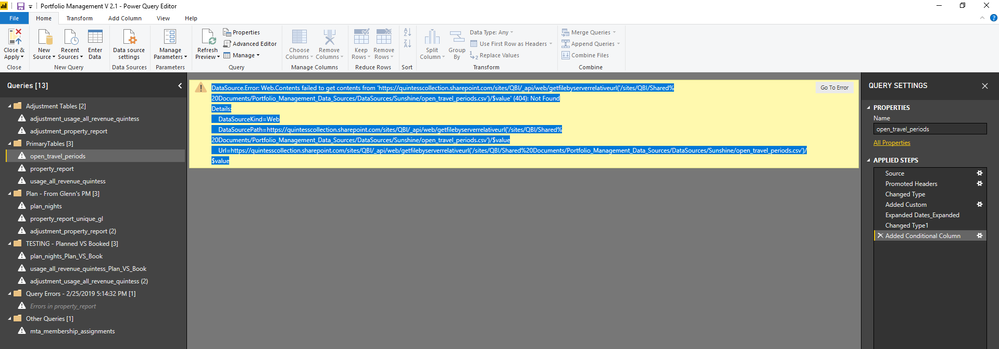
I made some edits in the advanced editor of Power BI's, Power Query Editor. I change the location of a web connected .csv file shared on an office 365 OneDrive folder to a sharepoint location belonging to the BI group. It seemed to be working so I saved the new edition and then everything stopped connecting to the new location. I am now getting the error shown at bottom of post. I don't even know how to begin fixing this... well, i did try to put everything back the way i had it but it still isn't working. If I don't get this fixed I will lose a dozens of hours of work tweaking the transformations to these tables... Any help would be appreciated. Thank you
I changed the document source URL from this:
https://quintesscollection-my.sharepoint.com/personal/mestler_quintess_com/Documents/Business%20Inte...
to this:
https://quintesscollection.sharepoint.com/sites/QBI/Shared%20Documents/Portfolio_Management_Data_Sou...
----- error in Power BI Power Query Editor -----
DataSource.Error: Web.Contents failed to get contents from 'https://quintesscollection.sharepoint.com/sites/QBI/_api/web/getfilebyserverrelativeurl('/sites/QBI/...' (404): Not Found
Details:
DataSourceKind=Web
DataSourcePath=https://quintesscollection.sharepoint.com/sites/QBI/_api/web/getfilebyserverrelativeurl('/sites/QBI/...
Url=https://quintesscollection.sharepoint.com/sites/QBI/_api/web/getfilebyserverrelativeurl('/sites/QBI/...
-----------------Advanced Editor Query -------------
let
Source = Csv.Document(Web.Contents("https://quintesscollection.sharepoint.com/sites/QBI/Shared%20Documents/Portfolio_Management_Data_Sou...",", Columns=10, Encoding=1252, QuoteStyle=QuoteStyle.None]),
#"Promoted Headers" = Table.PromoteHeaders(Source, [PromoteAllScalars=true]),
#"Changed Type" = Table.TransformColumnTypes(#"Promoted Headers",{{"property_uid", Int64.Type}, {"destination_uid", Int64.Type}, {"destination_name", type text}, {"property_name", type text}, {"property_category_ucode", type text}, {"fixed_inventory", type text}, {"begin_date", type date}, {"end_date", type date}, {"nights", Int64.Type}, {"month", type date}}),
#"Added Custom" = Table.AddColumn(#"Changed Type", "Dates_Expanded", each List.Transform({Number.From([begin_date])..Number.From([end_date])-1},each Date.From(_))),
#"Expanded Dates_Expanded" = Table.ExpandListColumn(#"Added Custom", "Dates_Expanded"),
#"Changed Type1" = Table.TransformColumnTypes(#"Expanded Dates_Expanded",{{"Dates_Expanded", type date}}),
#"Added Conditional Column" = Table.AddColumn(#"Changed Type1", "Custom", each if [fixed_inventory] = "Y" then "YES" else "NO")
in
#"Added Conditional Column"
--------------------------------------------------------